
• The move to the new server is done. There are some software and database maintenance updates in process. This has us passing the hat around to help out. We appreciate any donations. Seriously, even a dollar helps. The payment page may be found here - https://www.audiokarma.org/support.html

USB input to AVR worthwhile?

Spitfirejoe

Cheap Audio Aficionado
Looking to update the Audio Video Receiver in my home theater. I kinda know the features I MUST have, but I'm confused as to whether or not the rear panel USB input port found on some AVRs is actually useful.

I have thousands of CDs ripped to FLAC (and mp3 for loading on my phone) and stored on standalone 3tb hard drives connected to my desktop computer. I currently use Plex to listen to my music albums and it works well, but it has issues. It's a web page based system, where each song is pulled up separately. Gapless Playback simply can't be done, there is a momentary pause between each track. That's fine with most of my albums, but there are several that are intended to have no transition between songs (Dark Side Of The Moon, I Robot, and others).

Does anyone actually plug a large hard drive into the USB input and play music directly off it? Or do I need some sort of small music server playing through aux RCA inputs? Or should I just stick with Plex and get over it?

Here's the back panel one of the AVRs I'm considering - Onkyo TX-NR6100.
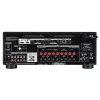
Onkyo-TX-NR6100-Rear-Panel.webp
 
Register to hide this ad
Here's the back panel one of the AVRs I'm considering - Onkyo TX-NR6100.
I suggest you download the manual for the Onkyo TX-NR6100 -
https://assets.onkyo-av.com/product-manuals/txnr6100_en.pdf
Instructions for direct playback from attached USB storage devices is found on pages 96, 97 & 98.

I currently use Plex to listen to my music albums
Plex has a pretty display, but it's largely focused on video playback. There are (much) better server applications for music playback than Plex. IMO Lyrion would be at the top of the list - and it supports gapless playback.
 
As your catalog gets larger, the menu system becomes exponentially more important.

The menus on most hardware "devices" fall WAY short, unless they are capable of displaying 20 plus lines of over 20 characters, and have up/down/left/right input.....and understand folder structure.
 
Last edited:
You can stream music from your PC attached hard drive to this receiver. See the chapter "PLAYBACK - Music Server".

If you have a WiFi router with a USB port, you may be able to share your hard drive music to any device on your network. If supported your router will have instructions on how to set up a network share using a USB attached hard drive.
 
You can stream music from your PC attached hard drive to this receiver. See the chapter "PLAYBACK - Music Server".

If you have a WiFi router with a USB port, you may be able to share your hard drive music to any device on your network. If supported your router will have instructions on how to set up a network share using a USB attached hard drive.
This might be the easiest. Will probably need to upgrade my PC, but that's due for it anyway.

Thanks.
 
I suggest you download the manual for the Onkyo TX-NR6100 -
https://assets.onkyo-av.com/product-manuals/txnr6100_en.pdf
Instructions for direct playback from attached USB storage devices is found on pages 96, 97 & 98.

(Snip)

IMO Lyrion would be at the top of the list - and it supports gapless playback.
I looked at that section of the manual, but really wanted some user input on whether it all works well.

I have looked at Squeezebox in the past, but decided Plex was "good enough" and wanted to avoid having to purchase, set up, and learn a new system - especially one that looked like it was on its way to being abandonded. Now that I see it is still being supported, it just might make sense.

Good observations and advice. Thanks.
 
In my experience, using the "Server" features like Universal Plug'n'Play (UPNP) (aka DLNA) is a great way to interact with my music. I've got an ancient Western Digital MyBook that runs the Twonky DLNA server and I use it with my Marantz Cinema 70s either through the HEOS app as the browser, or through the on-screen menu features on the Marantz receiver. It's an AVR, so it's meant to be hooked up to a TV and has a pretty decent on-screen user interface.

Browsing music can be a little confusing because compilations with multiple artists will break up albums into pieces depending on how you browse, but I've never had trouble with gapless playback using HEOS or the Marantz's onboard player.

If I recall, Plex supports UPnP/DLNA connections.
 
(snip).

Browsing music can be a little confusing because compilations with multiple artists will break up albums into pieces depending on how you browse, but I've never had trouble with gapless playback using HEOS or the Marantz's onboard player.

If I recall, Plex supports UPnP/DLNA connections.
I was careful to remove other artist info from the filenames when I updated the metadata for all my albums. Still have some trouble with artist like Neil Young because he played with so many different bands. So I have Neil and Crazy Horse, Neil and the Stray Gators, Neil and Promise if The Real, etc.

This is going to be another learning experience.
 
If I recall, Plex supports UPnP/DLNA connections.
Yes, as much as I prefer Lyrion, I must say that Plex DLNA streaming to the AVR would be a good and easy solution in Spitfirejoe's particular situation. From the Plex Web App, go to Settings > Server > DLNA, and check the box to Enable the DLNA Server.

Regarding directly-attaching a hard drive to the AVR - I understand this would be controlled from the AVR's remote control, but you would need to turn on your TV for display - for library navigation and status. To my mind that's an unnecessary amount of electricity to consume for such a basic purpose.
 
Yes, as much as I prefer Lyrion, I must say that Plex DLNA streaming to the AVR would be a good and easy solution in Spitfirejoe's particular situation. From the Plex Web App, go to Settings > Server > DLNA, and check the box to Enable the DLNA Server.

Regarding directly-attaching a hard drive to the AVR - I understand this would be controlled from the AVR's remote control, but you would need to turn on your TV for display - for library navigation and status. To my mind that's an unnecessary amount of electricity to consume for such a basic purpose.
Depends on the AVR. The HEOS app (Denon/Marantz) lets you browse any attached storage through your phone or tablet -- though I haven't yet figured out how. Songs show up for me but aren't playable on the FAT32-formatted usb drive I'm experimenting with.

I believe Onkyo AVRs also have an app, so you could use your phone? But I might be wrong.
 
Does anyone actually plug a large hard drive into the USB input and play music directly off it? Or do I need some sort of small music server playing through aux RCA inputs? Or
FWIW, Spitfirejoe, I don`t know about your Onkyo AVR, but I have operated a music filled 1 Terabyte flash drive, and a 2 Terabyte SSD connected to a USB to SATA converter interface plugged into my Integra (Onkyo) A/V/P`s USB port playing,& remote controlled through my living room`s home theater setup.

The only way I would USB connect a regular power hungry spinning disk hard drive would be only if it was externally powered by a converter/interface with a USB plug connecting cable, and have never tried to, as I totally converted to SSDs & high capacity flash drives over 15 yrs. ago.

I have also been for over 10 yrs. successfully operating high capacity SSDs & flash drives nearly filled with my WAV. ripped music plugged into my OPPO Universal BR/DVD/USB player`s USB port powered up 24/7/365 for over 10 yrs. with a 17" HDMI connected monitor sitting on top of it.

In my case, all my house`s all day playing currently, and still growing 15,5 + k track multi-genre music is totally internally sourced, meaning no internet music streaming dependency required nor desired in my chosen lifestyle.
 
Does anyone actually plug a large hard drive into the USB input and play music directly off it? Or do I need some sort of small music server playing through aux RCA inputs?
God damn ongoing corrupt bug laden forum double posted my above post forcing me to delete it !

How long are members going to continue to suffer through this ongoing multi-month site`s glitchy malfunctioning crap ?
 
Back
Top Bottom