
• The move to the new server is done. There are some software and database maintenance updates in process. This has us passing the hat around to help out. We appreciate any donations. Seriously, even a dollar helps. The payment page may be found here - https://www.audiokarma.org/support.html

Using Modern AV Receiver with Vintage Speakers

Ryan Scruggs

New Member
Hi, all!

This one is for my father, who owns a pair of Pioneer CS-D9900 4-way speakers. He bought them from Walmart in the early 80s, I believe, and has been using them ever since. They sound as good as ever, by the way!
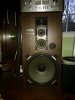
IMG_1588.jpg
The only issue is that my mother and I recently purchased him this Pioneer VSX-824 5.2 channel networked AV receiver with an accompanying Sony active subwoofer.
pioneer_vsx-824_network_av_receiver.jpg

Don't get me wrong, the receiver, speakers, and active subwoofer get the job done. The only downside is that the MASSIVE 15" woofer on the CS-D9900s is not being used! My father wants to experience the same stereo power with his CD player that he experienced years ago, but we can't seem to get the receiver configured properly. Most, if not all of the bass is pushed to the Sony subwoofer.

I have tried playing with the receiver's crossover settings to no avail, along with setting the receiver to "no" subwoofer. I have also set the speaker size to "large" front speakers on the receiver, but this does not push bass to the Pioneer's woofers, either.

Bottom line: we want to be able to use these Pioneer CS-D9900s to their full potential with this new receiver. Even if that means not using the Sony active subwoofer.
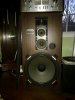
 

Attachments

  • fullsizeoutput_e63.jpeg
    fullsizeoutput_e63.jpeg
    47.2 KB · Views: 7
Register to hide this ad
Welcome to the wonderful world of AV receivers! Let me burst your bubble a bit further...... That AV receiver will never produce the kind of powerful sound with those speakers as an older quality "stereo" receiver or amp would. Or for that matter, even a new and decent "stereo" high-fidelity amp. None of them do as they're not built like a good, real "stereo" amplifier. Notice the emphasis on "Stereo" here.

These receivers are made for multichannel audio to watch movies and to experience the swoosh of that spaceship flowing from back to front, side to side, and to generate that insane and habitual low frequency rumble to the subwoofer they seem to overdo.

Unfortunately, I don't believe you'll ever get the kind of powerful "stereo" performance you're looking for with this.
 
Last edited:
1. Be sure you have the speakers connected properly. That is (+) and (-) on the speakers matched, respectively to (+) and (-) on the receiver.

As well, with an AVR you will almost certainly need to turn the volume knob farther, sometimes a lot farther, than with old stereos. That often gives the impression the unit is real weak to someone coming from old gear. Doesn't mean the unit is weak, they just have a much less agressive gain structure for volume control.

Is the unit set up/configured for a surround system?
 
Yes, whoru99, the unit is set up and has been configured for use with a surround sound system. While using surround sound, we have sound going to all 5 channels and the active subwoofer. However, when we switch the AV receiver to "stereo", it's not true stereo. What we're getting is, what I suppose as 2.1ch sound. I would MUCH rather have 2 channel sound with a full range of frequencies being pushed to the Pioneer speakers, but it looks like that won't happen anytime soon :thumbsdown:
 
First step is to check that the speakers are wired in phase. Please check and report back. If the receiver is set for large front speakers, the bass should be working properly.

That said, that receiver is not a powerhouse unit, and you will probably have to use the subwoofer fairly heavily to supplement the bass, as bass uses most of the power an amplifier has to offer.
 
there is probably a setting in the speaker setup menu, check that the front speakers are set to "large", the av receivers can be set to use small fronts so to compensate they steal the low frequencies from those channels and let the subwoofer take them.....
EDIT: just noticed Faber12 was saying the same thing...
 
I'll throw in my 2 cents. I recently went through similar with a new set up. This turned out to be a process and not a quick fix

I was setting up a system in my vacation home. The room with 18' ceilings had issues. I also could not add wired rears because of a slab construction and no attic crawl space, and I'm not sure that I want to go wireless.
I wanted to simple with in-wall speakers to keep the wife happy with her decorating. This proved to be an expensive mistake.
I went with M-L Edge in walls and I discovered that the speaker cones were bottoming out.
I added some '78 Klipsch Heresy 1 speakers (Completely rebuilt and updated) as the R&L speakers, the M-L speakers were now switched to front effects and an M-L SLM surface mount was the center.
The SLM has now been replaced with a Klipsch RP450C

The System (now):
Vizio 70" UHD 4K LED TV
Yamaha RX-A 860 Receiver
Fisher MT-273 Turntable (1983) with new Ortofon Cartridge
Samsung Blu-Ray (rarely used)
Amazon Firestick (connected through receiver)
Klipsch Heresy 1 - R&L mains
Martin Logan Edge - R&L Effects
Klipsch RP450C - Center
Parts Express Titanic 10" Woofer

The initial set up was done by "pros", silly me. The Edge's were bottoming out and the SLM appeared to be doing the same.
I decided that because of the room size I needed an enclosure type speaker. Enter the Heresy's.

The original "pro set-up" was done with the YPAO auto setup that Yamaha uses. This left the initial poor results which wasn't really apparent until the volume was turned up.
When I added the Heresy's I shifted to MANUAL SETUP.
As the others said, I switched ALL speakers to LARGE.
I then pulled out manuals (or checked specs on-line) and set the receiver X-Over points for all the speakers. It turned out the Edges were set way to low.
I then used an SPL App on my phone to set the volume levels for all speakers.
And adjusted the speaker distances.

The System sounds radically better than when I started, especially when I shift to 7ch stereo to listen to the turntable.

If after adjusting The receiver controls you still have an issue with the Pioneer Speakers check to see if they have fuses or Circuit breakers in them, or less likely the speaker X-overs might be an issue.

Hope this helps.

Hi, all!

This one is for my father, who owns a pair of Pioneer CS-D9900 4-way speakers. He bought them from Walmart in the early 80s, I believe, and has been using them ever since. They sound as good as ever, by the way!
View attachment 1076044
The only issue is that my mother and I recently purchased him this Pioneer VSX-824 5.2 channel networked AV receiver with an accompanying Sony active subwoofer.
pioneer_vsx-824_network_av_receiver.jpg

Don't get me wrong, the receiver, speakers, and active subwoofer get the job done. The only downside is that the MASSIVE 15" woofer on the CS-D9900s is not being used! My father wants to experience the same stereo power with his CD player that he experienced years ago, but we can't seem to get the receiver configured properly. Most, if not all of the bass is pushed to the Sony subwoofer.

I have tried playing with the receiver's crossover settings to no avail, along with setting the receiver to "no" subwoofer. I have also set the speaker size to "large" front speakers on the receiver, but this does not push bass to the Pioneer's woofers, either.

Bottom line: we want to be able to use these Pioneer CS-D9900s to their full potential with this new receiver. Even if that means not using the Sony active subwoofer.
 
fwiw, I've had BW 603 fronts, 602 rears, and CM1s surround using a Yamaha RX-V663 AVR for some time. Since my 2 channel is in the same room and cabinets, where I was using large Rectilinear IIIs, I decided to get a switch for the Rects to use them for fronts on the surround. Initially, I kept the settings in the AVR. Once i manually setup the audio with the "new" old speakers, it was night and day. I now recommend checking audio settings often as when I made the update, the channels were way out of whack.
 
Indeed. Running through an AVR/pre-pro is a "tuned" setup if you will. Change things and you need to re-tune the setup.
 
Back
Top Bottom