• The move to the new server is done. There are some software and database maintenance updates in process. This has us passing the hat around to help out. We appreciate any donations. Seriously, even a dollar helps. The payment page may be found here - https://www.audiokarma.org/support.html

WAV files and playing them.

Oh I totally get that, but I thought that WAV was actually a directly accessible version of the files the files that are on CDs.
 
Steve , Apparently the USB port on your CD player is not compatible with lossless files . If you are using your iPod as a storage device for music , and not sure what quality files are stored on it there is a simple solution . Buy a cheap iPod dock or a suitable length cable with a 3.5 mm headphone plug on one end and rca plugs on the other .Connect the dock or cable to the aux on your stereo and enjoy ! Yes there are audible differences between the assortment of audio files , I wouldn't go crazy converting them .In the future when you download or rip, Apple lossless sounds fine .
 
Oh I totally get that, but I thought that WAV was actually a directly accessible version of the files the files that are on CDs.

Nope. What's on an audio CD is not really a series of files in a computer sense. The "files" on a CD are converted to wav files for storing on a PC. That's why when you do a DIR on an audio CD it lists a bunch of 0 Byte cda files. The PC knows there are a bunch of "files" there but doesn't really recognize them. wav files do not have to be 16/44. They can be several different bit depths, sample rates and even mono.
 
If you're not adverse to using a laptop, you can get a piece of software called VirtualDj. There's a full commercial version or a free version which will do everything you need. It syncs with your itunes playlists and plays just about any audio format going.
 
Virtual DJ is one of the free programs I've tried. Currently I'm using Music Bee. All of the players I've tried have played every file I've thrown at them. Bear in mind I have no DSD files or any file higher than 24/96.

If you're doing the DJ thing via a laptop or PC you owe it to yourself to check out Virtual DJ.
 
I store my library to FLAC for home playback, but also like 256vbr MP3's for the road. jRiver Media Center (and most players) allow me to assign a "five star" rating to my favorite cuts, so I can just point to the "five star" list and convert that to MP3 in bulk, storing those in another directory without deleting the original files. Point to that list again later after adding music to the collection, and it'll skip those that have already been converted, just adding the new stuff.

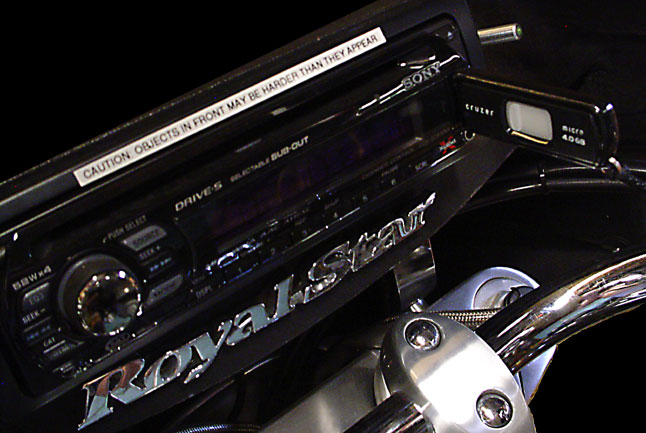
Last step is to fill a thumb drive or two for the road. I have one additional concern that may not bother most ... I add a tether to the drive so it doesn't bounce out and get away from me on a pothole ... <G>

radio-usb.jpg


I use a nice little freeware program called Flash Shuffler for that. Just point to the MP3 folder, tell it how big your target drive is, and it shuffles what's there and writes copies at random to the portable drive. All good music, but nice to change the mix every now and then - although I do notice that the bigger the USB drives get, the less shuffling is needed. ;-}
 
Back
Top Bottom