• The move to the new server is done. There are some software and database maintenance updates in process. This has us passing the hat around to help out. We appreciate any donations. Seriously, even a dollar helps. The payment page may be found here - https://www.audiokarma.org/support.html

What does room correction software correct?

twoengine

Active Member
I have absolutely no experience with room correction software. I took a look at Room EQ Wizard and it went way over my head. There are so many parameters to adjust. Anyways my questions are:

1) What is REW or any room correction software trying to achieve?

2) Is it attempting to achieve a FLAT frequency response given speaker and location and room acoustics?

3) If yes to question 2, then would it require a parametric eq or what to achieve a FLAT frequency response?

Thanks in advance.
 
Register to hide this ad
1) Flat(er) in room response.
2) REW shows you the actual measured in room response at the microphone's position. So yes, it takes into account speaker location and room acoustics.
3) I suppose a 31 band linear equalizer could be used. IME a multi-band parametric is better.
 
I have absolutely no experience with room correction software. I took a look at Room EQ Wizard and it went way over my head. There are so many parameters to adjust. Anyways my questions are:

1) What is REW or any room correction software trying to achieve?
A reasonably flat "room curve"

I2) Is it attempting to achieve a FLAT frequency response given speaker and location and room acoustics?
No. I find flat response at the top too bright sounding. A target room curve is slightly tilted downward at the top and sometimes upwards at the bottom.

I3) If yes to question 2, then would it require a parametric eq or what to achieve a FLAT frequency response?
Using the correction filter does require an external resource - be it parametric EQ or DSP.
 
A reasonably flat "room curve"


No. I find flat response at the top too bright sounding. A target room curve is slightly tilted downward at the top and sometimes upwards at the bottom.


Using the correction filter does require an external resource - be it parametric EQ or DSP.

Back when I was trying to do room eq with a linear equalizer I also found that a completely flat high end was grating and irritating. Consequently since then a gentle roll off has been part of my room eq'ing. That's why I answered question 1 with Flat(er).
 
Back when I was trying to do room eq with a linear equalizer I also found that a completely flat high end was grating and irritating. Consequently since then a gentle roll off has been part of my room eq'ing. That's why I answered question 1 with Flat(er).

Flat doesn't sound very pleasing or natural. The "house curve", of which there are numerous versions, sounds much better and tends to have a slight rise in the low end and slight decrease in the high end. Many DSP type acoustic analyzers/correctors have such curves built into them and some are "selectable" in that you can choose between several different versions of the "house curve".
 
When we used to tune car audio systems for IASCA competitions with a Audio Control SA-3050 spectrum analyzer we would never aim for a flat line response.. A flat line would earn a perfect RTA score but the system would score poorly in the sound quality judging...thin and bright. When dialed in and sounding good the curve would look like a gentle staircase on the 3050 RTA.
 
One of the major reasons I've always liked the Quad 34 preamp is the inclusion of a tilt control.
 
Unfortunately, Quad preamps have always used mediocre op amps for the active devices. In this case late 70s era TL072s. :)

You will note that I've stuck with my ARC preamp. It just sounds better!

I wonder what a 34 would sound like with better IC's?
 
Many automatic room-correction systems just correct the low-frequency response, at least by default. I only use correction up to 400 Hz, and I wouldn't be without it. With some effort, you can achieve good room correction with a parametric EQ, but unless you're pretty lucky, a graphic EQ isn't going cut it.
 
Even with a parametric, it's pretty much a crapshoot that you'll get it right if you're just trying to play it by ear. That's where software like REW becomes an indispensable tool. Once properly set up and calibrated, push the magic button, get a few frequency sweeps, and you know EXACTLY what's going on with your system and room. Push another button, and it automatically builds filters that can be exported to your digital (DSP) equalizer or used as a basis for setting your old school analog controls.

Not all that expensive or complicated either. You need a laptop with decent sound handling and a calibrated microphone. An SPL meter is handy for setting the software levels properly (there's smart phone apps for that now that seem to work quite well) and an ADC if your laptop's sound handling sucks. Here's my simple setup with said sucky laptop ... I also needed the mixer to provide phantom power for the mike, but Dayton now has a USB version of their mike that eliminates that.

rta-eq-setup.jpg


dayton-emm6.jpg


Once done, I exported the REW filters to jRiver Media Center for all my digital sources, and picked the big lumps out of the printout for transfer to the controls on my Technics SH9010 parametric for all my analog sources. Yes, it IS a bit of work, but the results more than make up for any extra effort involved.

As far as REW being complicated, it's only as complicated as you make it. The basics are easy - it's when you get into things like waterfalls that your brain starts to hertz ... <G>
 
Oh. Maybe worth another post.

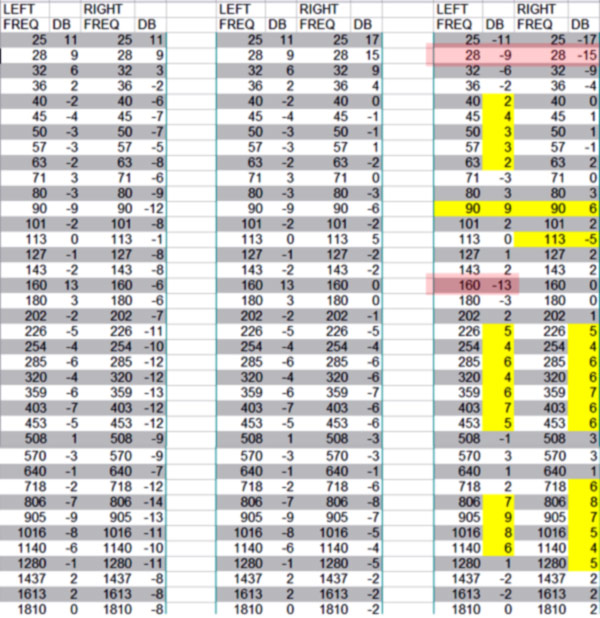
The digital filters REW creates are quite complex with no real limits on exactly what frequencies are treated. Not so with an analog parametric ... my SH9010 is limited to five filters per channel. There, you need to do a bit of head scratching to target the worst offenders. Here's a sample printout from REW with those highlighted, including the center frequencies and bandwidths I wanted the PEQ to address.

Technics-SH9010-REW-FEB13.jpg


... and here's a cheat sheet I built to set the controls on the PEQ ...

Technics-SH9010-Plot-rtaFEB.jpg

That also incorporates a "room curve" to get away from the tasteless flat sound mentioned earlier. You'll notice no correspondence channel to channel as the room shows major inconsistencies side to side. Also, the top filters are reserved for "shelf filters" ... those allow me to adjust the top end on the fly based on whatever the media presents. Sort of a glorified treble or brightness control, only better.

(Hmmmmmmm ... on second thought, maybe it IS a bit complicated.) <G>
 
There seems to be a significant amount of animosity toward using a calibrated microphone and REW (or something else) for flattening in room response. I received a significant amount of vitriol when I suggested that using a meter (any meter) to report listening levels was better than reporting what power amp meters read or what one subjectively experiences. A lot of posters here don't really care about measurements unless they are the standard WPC and harmonic distortion figures. It seems that many selectively use whatever measurements they like. All of them matter, most especially measured in room response.
 
There seems to be a significant amount of animosity toward using a calibrated microphone and REW (or something else) for flattening in room response. ..All of them matter, most especially measured in room response.
Interesting. I find empirical data about frequency response quite useful in this case.

As another suggested, I'm only interested in the bottom three octaves or so. With the main system, all of my "corrections" have been with speaker and bass trap placement and get pretty good results. While the following is only a third octave plot, it sounds darn neutral. I recently upgraded the Squeezebox Touch player with a Sonore uRendu which should restore the better first octave results I used to get with a GamuT CD player. With it, I was getting in room response flat to 25 hz.

u1_response.jpg
 
If you're really interested, check out the response to my post about listening levels (how loud do you listen). When I suggested that anything other than listening levels expressed in dB was essentially meaningless the response was less than positive.
 
Uh ... just turn it up to 11 ... ;-}

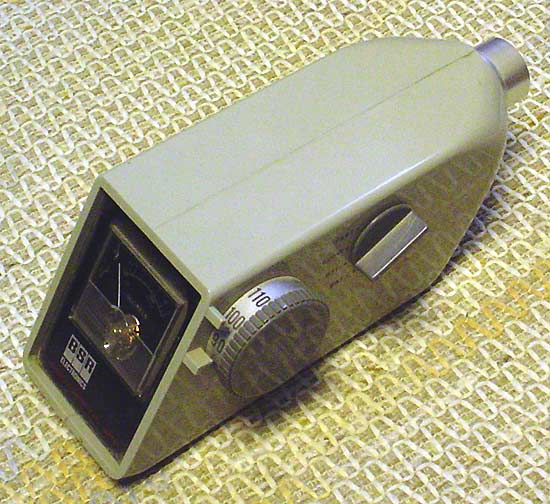
Still got my trusty lil BSR meter on the side table. At least I know why my ears are bleeding.

bsr-spl.jpg
 
To me, this question is like asking: "What does soap wash off?". It kinda depends upon which soap and what is on you.
 
Somebody please explain, what's the point of taking measurements to make a flat frequency response, but then using filters that is not flat or adjusting frequency to what sounds best to your ears? In other words, why do all this when you're just going to do what sounds best to your ears anyways? Because in the end all that matters is what sounds best to your ears.
 
Back
Top Bottom