• The move to the new server is done. There are some software and database maintenance updates in process. This has us passing the hat around to help out. We appreciate any donations. Seriously, even a dollar helps. The payment page may be found here - https://www.audiokarma.org/support.html

What to do next?

Joel Kline

New Member
Hello,

I new to working on electronics. I'm using tutorials, YouTube, and other sources to try to learn. I'm trying to resurrect a Proton D540 Amp and I'm stuck.

Here's what's up:
1. Unit powers on and lights.
2. Relay kicks in
3. No sound.

Here's what I've done:
1. I checked both sides of the board for damaged components and broken soldered joints.
2. I replaced 2 capacitors that leaked from the bottom (capacitor plague?).
3. I've followed most of the power through the circuit.
4. I've tested the resistors and capacitors around the plague.
5. I've measured the transistors. Specs say order is B-C-E. Some seem reversed.Possible or bad?
5. I measure mv amounts coming through both A and B speaker connects when they are selected.
Obviously, as a newbie, I might have done any of these steps incorrectly!

What might I be missing? Thanks so much for any help!

Joel Kline
 
Register to hide this ad
What HalfApt said...If unit has internal PreOut>>Main-In contacts (no external jumpers) the contacts could be dirty. In this case use a patch cord to bypass the internal contacts and retest. Do you have Service Manual? If not download from www.hifiengine.com.
2. I replaced 2 capacitors that leaked from the bottom (capacitor plague?).
Most likely you saw old glue which turns dark brown with age used to hold larger caps to board to avoid vibrations. Not to say caps never leak, just less likely. Some older glues are corrosive to the leads of components they come in contact with over time.
I've measured the transistors. Specs say order is B-C-E. Some seem reversed.Possible or bad?
Are the "specs" from the SM board layout or the individual component data sheet? You can look up the transistor data sheets online and see what their pin outs are. Then compare to board layout. Also look at solder joints of suspect components to see if looks like someone has removed and replaced in the past. If solder joints look like all others they are probably original and correct.

Send Pre-Amp Out to another amp to see if that section is working. And then input a signal into Main-In to see if Amp section is working.
 
Thanks for the pre-amp tips. I'll try that. I do have a service manual from HiFi Engine. I've been using that to identify parts.

Underneath the Caps might have been glue but it deformed the plastic bottom of the caps. One was bad after testing, but putting the two new caps didn't solve the sound problem, so there's something else.
 
Welcome aboard Joel
As stated earlier check your pre-out/main-in jumpers..;)
 
I bridged the pre-out/main-in with RCA cables and the headphones work! But now there's no voltage on either A or B speakers and no sound to the speakers.

Getting there...I think.

Thanks!
 
does this have a speaker A / speaker B switch? I had an amp where the switch was damaged and worked only if one or the other was selected. In A+B mode you got no output.
 
Yes, it has separate push buttons for A and B. I typically try A in/B out, A out/B in, and A in/B in to see if anything works.

FWIW, I'm getting no noise/static/sound whatsoever on any of the speaker outputs. So the signal is definitely not reaching the speaker outputs. I'm checking the solder joints again, today.
 
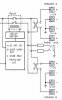
The headphone jack is driven directly from the speaker output lines. So if headphones work but speakers don't, the fault is entirely w/in the speaker select switches and/or wiring to output terminal PCB (or possibly the PCB itself).

Check for continuity thru the switches, then all the way back to the output binding posts.
D-540_output_block.jpg
 
Back
Top Bottom