• The move to the new server is done. There are some software and database maintenance updates in process. This has us passing the hat around to help out. We appreciate any donations. Seriously, even a dollar helps. The payment page may be found here - https://www.audiokarma.org/support.html

Which NAS should I choose?

Preston8452

New Member
Hi guys,

It's just sorta a general wondering, so recently I've been thinking about purchasing a NAS for audio storage and stuff, I used to just simply store music with USB, but I read some articles about NAS, it seems to me that most audiophiles possess one to cooperate with their Hi-Fi gear at home, so maybe it does help further improve the sound quality(?

As you all may know, there are several brands of NAS out there, which one is the best fit for me as a NAS newbie haha? Synology and QNAP are quite popular I suppose, but what about others, what's the difference?

If you can also kindly share what's your system(like what device you use to connect to NAS) with me, that'd certainly be a great reference to me then.

Best,
 
Register to hide this ad
My son built a NAS for me a few years ago.
What's most important is maintaining and securing data integrity.

Software is FreeNas (now TrueNas)-open source and free download.
Hardware uses a PC/Windows MOBO with a fast processor. Much faster than most empty or loaded NAS boxes. MOBO has built in video (only used during software loading).

Interface is Web Browser.

Four NAS rated HD's (WD Red). Currently using 4X8TB. System sees 24TB because each HD has space reserved in case 1 fails.
Operating system is on a USB Flash drive.

RAID 5, if one drive fails, replace it and the data can be restored from the other 3.
If the hardware fails, the operating system can be moved because it's on a USB flashdrive.

OS monitors health of data pool and HD's.

All HD's fail. It's not a question of if...it's when.

I started with 4×4TB I don't know how many years ago and have had 3 HD failures in that time. Never a problem, swapping in a new drive and rebuilding data set takes little time (fast CPU) and system remains fully operational during data rebuild.

My son purchased the 4 HD's from 4 different vendors so we had 4 different production lots. This reduced the likelihood that any two drives would fail at the same time.

It's a little more involved that the NAS boxes but is superior in every way. OS checks HD's and warns you if any drive is developing bad sectors.

I had a commercial, off the shelf NAS and the built in OS failed. Poof! I lost everything.

No worries now. Recently I outgrew 4x4TB, I simply replaced the drives with 4x8TB. Should hold me years. If the hardware fails, the OS is on the USB flash drive.
 
My son built a NAS for me a few years ago.
What's most important is maintaining and securing data integrity.

Software is FreeNas (now TrueNas)-open source and free download.
Hardware uses a PC/Windows MOBO with a fast processor. Much faster than most empty or loaded NAS boxes. MOBO has built in video (only used during software loading).

Interface is Web Browser.

Four NAS rated HD's (WD Red). Currently using 4X8TB. System sees 24TB because each HD has space reserved in case 1 fails.
Operating system is on a USB Flash drive.

RAID 5, if one drive fails, replace it and the data can be restored from the other 3.
If the hardware fails, the operating system can be moved because it's on a USB flashdrive.

OS monitors health of data pool and HD's.

All HD's fail. It's not a question of if...it's when.

I started with 4×4TB I don't know how many years ago and have had 3 HD failures in that time. Never a problem, swapping in a new drive and rebuilding data set takes little time (fast CPU) and system remains fully operational during data rebuild.

My son purchased the 4 HD's from 4 different vendors so we had 4 different production lots. This reduced the likelihood that any two drives would fail at the same time.

It's a little more involved that the NAS boxes but is superior in every way. OS checks HD's and warns you if any drive is developing bad sectors.

I had a commercial, off the shelf NAS and the built in OS failed. Poof! I lost everything.

No worries now. Recently I outgrew 4x4TB, I simply replaced the drives with 4x8TB. Should hold me years. If the hardware fails, the OS is on the USB flash drive.

That's impressive, shout out to your son hahaha!!! He's an engineer or something? anyways, I'm actually a bit concerned about the execution of NAS, like the operation might be tricky to me, for all I know, it's certainly more complex than inserting a USB hahah, I recently bought a Silent Angel M1T, it's a Roon Ready certified streamer, and it got GbE Ethernet interface, so it shall be working smoothly with NAS I suppose...
 
Operation isn't tricky. Like everything else, there's a learning curve. But once you figure it out, it makes sense.
Data security is the thing. All your documents, pictures, movies, songs in a safe place.

I've had a few different off the shelf NAS drives and the drives all failed without notice.
So I bought a dual drive NAS and mirrored the drives thinking that would offer more protection...but the motherboard died. Proprietary... I was screwed. Lost everything on that drive.

My son knows his way around computers and he knew the safest way to store my data.
It's not as difficult as it seems.... It has a learning curve like everything else.

Some people buy multiple off the shelf NAS drives and maintain multiple copies of their data... I think that's a waste.
 
One great thing about FreeNAS/TrueNAS is that the software “scrubs” the volumes - it periodically checks and fixes any corrupted data. You want good quality drives to handle the stress of the scrub. I use enterprise drives in my TrueNAS setup. I have a second TrueNAS setup that I use as a backup for the first.

For me, I just needed to buy the drives and the cases - I used the unused hardware from prior HTPC builds.
 
It all depends on how you want to use it. I've used a Synology NAS for several years as a file server. That is, I store my files on it and my computers retrieve files when I want. My NAS is low speed and has low RAM, so it is not suitable for running music server software like Plex or Logitech Music Server. Any inexpensive NAS is suitable as a file server storing music files. I have a always on computer running my music servers (Plex, LMS, JellyFin) and that computer is connected to the NAS.

Almost all NAS are the same if all you are looking for is a home file server. It is when you want the NAS to perform other functions, such as music server, video server, web hosting, etc., that the differences begin to show. I use a low-end, two drive Synology NAS in my office. It is a file server for 5 computers and has never given me any problems. I have a USB connected HD that I backup my NAS using backup software (FreeFileSync on a Mac). That backup drive is stored at a second location. I also have other backups (on-line and off-line and cloud-based).

That said, I prefer Synology because they target commercial and business users. That means their stuff works. Ideally, once a NAS is installed, you shouldn't need to do anything with it directly. All my file access is through the network. What little administration I do is done via a local web page.

If you want the NAS to host a music server and you do not plan on having the server transcode files, you can get by with a lower performance NAS because the server load will be light. It is basically just streaming music files to end points. If you plan on transcoding or having a video server, you need a higher performance NAS (faster with lots of RAM).

Also, for home use, a single HD in a NAS is fine. BUT you must have a second, equal size hard disk that you use to make a complete backup. With all the floods and fires happening across the country, if you rely upon RAID or store all your backups in one location, you potentially lose it all if you lose anything.
 
Another vote for Synology.

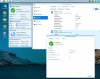
A true NAS is more than drives in a box. And not something PCs are really designed to do. Computing power is not a big factor here even though mine has a quad core Intel processor. It is having multiple dedicated gigabit network connections, scalable support for drive arrays and monitored by its own Linux based operating system which is optimized entirely for data throughput. Mine is a two drive 718+ with the one drive acting as mirror for fault tolerance. The media server software lives here so I configured 8 GB of memory - of which 6 GB is a data cache for both music and video. It doesn't take long before the endpoints are reading from memory.

I use a third drive in a USB enclosure which performs a nightly incremental backup.

Screen Shot 2022-02-14 at 12.25.35 PM.png

synology.jpg
 
In June of 2015 I purchased a Synology D415-S 4-bay NAS & 4 1TB Western Digital 7200 SATA drives. Setup via the Synology website was easy, and the NAS was up and running in no time.

In March of 2020 I replaced the WD 1TB drives with 4 Samsung 1TB SSD units. Data transfer went smoothly and setting up the new drives via Synology's website once again proved to be easy.
 
I have built several different NAS's, all running OpenMediaVault (OMV) on top of Debian Linux. I tried TrueNAS but I don't like the fact it is built on FreeBSD (a version of the Unix operating system). Now, don't get me wrong, I've been in IT and a Unix guy since the late 1980s, but most third party server software packages are built for Linux rather than Unix, and since most of those are not distributed as source code, they can't be recompiled for FreeBSD.

IMO, OMV can do pretty much everything TrueNAS can do, and it's easier to set up, especially for someone who doesn't have Unix/Linux experience. Now, it happens that I have a surplus of older desktop PCs that idle with pretty low power, and I 've used a couple of those, but I also built one on an old Intel-based Buffalo NAS (much better than the native OS), and also on an (almost) ancient Intel SS-4200. Still running beautifully.
 
IMHO (and I say this as someone who has a 35 year career in IT focused on data storage and backup)), you'd be better off just slapping a big drive or two in a PC and sharing them out on your network AND using a cloud-based backup service to have off-site copies of your music. All drives die and unfortunately the NAS itself can as well. One bad cap or solder joint on that motherboard and the party is over. I've been through cheap NAS devices as well as PC-based RAID cards and anything can die (not just the drives). It's the offsite backup that is important here more than the RAID inside the NAS.

Any PC built in the last 10 (or 20) years can easily handle the trivial load of sharing/streaming some content on your home network.

jblnut
 
Back
Top Bottom