• The move to the new server is done. There are some software and database maintenance updates in process. This has us passing the hat around to help out. We appreciate any donations. Seriously, even a dollar helps. The payment page may be found here - https://www.audiokarma.org/support.html

Yamaha CA-1000 Issue - Right Channel Slowly Fading Away?

Parabellum27

Active Member
Hey AKers,

It's been a while since I last posted; nothing new as I am still using my CA-1000 for listening music and watching movies. Well, not the unit in question, but my second CA-1000.

I recently started to experience some issues with my fully restored CA-1000 (restored in late 2018). You can find all the informations about this unit here:

My Yamaha CA-1000 Restoration / Modifications Thread | Audiokarma Home Audio Stereo Discussion Forums

The problem I am experiencing is that the right channel is significantly weaker than the left one. I did nothing unusual, never driven too loudly. If I turn the balance knob from left to right, I can replicate the issue where the left channel is stonger than the right one. I suspected a blown fuse but I tried them all in my second CA-1000 and it works just fine.

When I purchased this unit, I had the right channel that was dead but it had been fixed along the full recap. What could cause the right channel to be only weaker and not just dead flat? Is it just a matter of adjustments or something more serious is going on?

Thanks!
 
Register to hide this ad
Also wiggle the mute switch and bass turnover
EDIT: Should wiggle all switches a few times.
 
Thanks guys! Will do.

By the way, because I had issues with this restored CA-1000, I decided to use my second one (which is absolutely mint and never restored, all original). Since I had changed all fuses inside my first unit for Synergistic Blue fuses, I decided to remove them and install them in the second non-restored/original unit. Honestly, I was in complete shock to hear how good this unit sounds compared to the restored unit. The only thing I had done to the second unit was the same upgraded speaker binding posts and power socket as I had done on my first unit found in my original thread.

My tech told me in January that the unit was in good enough condition to play without really needing a complete recap. For recall, this CA-1000 has been stored in a box for more than 20 years and it belonged to the deceased father of an audiophile friend. The tech did a bit of cleaning and made sure everything was functionnal. It shows that the Japanese back then knew what they were doing. In its original glory, it sounds significantly better than my restored unit. I believe I will have my first unit fixed only to sell it and keep the second one. I am currently looking to buy a Yamaha A-S2200 so that the CA-1000 will be relegated in a secondary system to see a bit less use to extend its life.
 
Okay guys, after much frustrations and hairs pulled I think I have been able to pin point the source of the problem.
To make a long story short, it was a cable issue; the interconnect between my DAC and the amplifier.
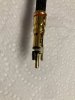
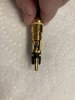
See pictures attached.
The connectors (red and white) plugged into the DAC were in cause. Both had traces of oxidation and the pin on one of them was bent.
So, I cafefully cleaned all four connectors with DeoxIT and bent the pin in problem back in shape.
Plugged everything back and all is working just fine now.

What lead me to this is this :
Tried the second amplifier, same problem.
Swapped all my blue fuses from the first amplifier to the second, same problem.
Swapped the two blue fuses on the right side for another set of fuses, same problem. Scratch head.
Swapped the speaker cables, same problem.
Swapped the speakers from left to right and right to left, same problem on the right side. At least, it was not a speaker issue.
Still there, I was totally confused and deducted the problem was upstream. Either the DAC or set of cables.
So, swapped the red/white connectors on my DAC yesterday night, oh surprise, it worked!
Then this morning, thourough cleaning and fixes. All is working now. I will continue monitoring to see if it recoccurs.
 

Attachments

  • IMG_4130.JPG
    IMG_4130.JPG
    102.6 KB · Views: 17
  • IMG_4131.JPG
    IMG_4131.JPG
    97.3 KB · Views: 16
  • Like
Reactions: mbz
Well, I went back this afternoon to listen to music and that dreaded right channel was out again. F***!
Though, I now know what the issue was and I am confident that I fixed it for good this time.
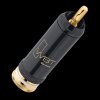
The RCA connector on my Kimber Kable Select KS1016 is the WBT0102Cu as shown in the picture attached. The pin of the connector is hollow and if one is not careful with it, it can be squished to become loose in its female socket. This is what I believe it happened because everytime I was inserting the RCA connectors in the RCA sockets of my DAC, I always felt they were not really snug enough. To confirm this, I reversed the cable and it was a snug fit in my CA1000. Not every socket is of the same tolerance it seems.

So, after careful inspection, the slot in the pin of the connector, which acts as a spring, was too compressed. So I decided to force a needle in the slots (2 mirroring) to decompress and flare the pin a bit. There is now a gap that is about 0.010/0.012" (I have good eyes, been working as QC in machine shops for 25 years). So I went back downstairs and when I inserted the connectors in my DAC I felt some resistance and the fit was satisfyingly snug so that there is good and constant contact. I quickly started my reference tunes and all was good this time.

I hope I went to the bottom of it this time and all is good if it can be of any help to others.
 

Attachments

  • 0102cu.jpg
    0102cu.jpg
    24 KB · Views: 4
Damn... Same problem reoccured. It's strange because it works at first and for a little while, then it craps out. Scratch head.
As I was doing when trouble shooting computer issues, I decided to strip my sound system bare of all the unnecessary stuff like chromecast, TV box and all the cable nest that goes with it. So far, no problem. We will see.
I am wondering if it's not an issue of unshielded cables tangling togheter that could create all this. Or worst, if it's not my DAC that is in problem. Ughh.. I am tired of this.
 
Dirty switch or control most likely.. Or possibly relay contacts.. Wiggle or toggle the coupler switch on the rear panel..

Well Sir I think you nailed it once again... I should have done what you told me to do in the first place.
I decided to do what you said by activating all the controls and the music came back right away in the right speaker, where it stopped playing once the album I was listening to was finished.
It seems the problem comes more specifically from the "auto muting" lever switch. Because whenever I wiggle this one I can hear some scratch noise in the right speaker only.
Looks like both my CA1000 have the same issue. I think I will bring my actual unit for a thorough cleaning to my tech.

Thanks!
 
Back
Top Bottom