• The move to the new server is done. There are some software and database maintenance updates in process. This has us passing the hat around to help out. We appreciate any donations. Seriously, even a dollar helps. The payment page may be found here - https://www.audiokarma.org/support.html

Yamaha CDC-635 won't play burned CDs

abhi2143

New Member
I recently got a used Yamaha CDC-635 5 CD changer. It was in great cosmetic condition but mechanically not. The tray won't come out, the spindle was jammed and the lens gear was cracked (basically nothing left)
Managed to repair it though.
The problem is that it will only read an original audio CD. That audio CD is in fact heavily scratched and even has a little crack at the edge, but it plays perfectly and the audio quality is excellent.
I burned an audio CD at 16x and tried playing it, but it has problems reading it. It will just reject it and won't even try to read it. After several tries it did read the CD, but it was skipping tracks.
Please help.
 
Register to hide this ad
It could be something else, but it sounds like a problem I used to encounter back in the 90s. It was result of the CD-R media being used. The only media that would consistently play in a CD player or read in a CD-ROM drive were those based on the yellow dye type. Those based on the blue-green type seldom worked in CD audio players or at least the CD players I owned.
I don't know much about current CD-R media as far as what dye types are being used or what media you are using, but you might try another brand or type. Just a thought.
 
When was it manufactured? What file type are you burning (MP3, .flac, etc.)? A lot of pre-90's players won't play CD-R's. Some do. My 1986 Kyocera will, but I had a NAD and a Proton from that era that wouldn't. WobblySam makes a good point about variations in CD-R's. Memorex CD-R's are notoriously problematic. I've found Verbatim CD-R's seem to be the least glitchy.
 
Last edited:
I’m not sure it was completely about the dye color. All my CD players are from the 80s and 90s, and most of them struggle to some extent with CDR. A weakened laser, a transport with a sloppy belt that flutters or doesn’t position the laser perfectly—anything can make them screw up on CDRs without harming commercial audio CD playback. My Magnavox CDB-650 struggles with CDRs, but I think it’s because the drawer belt isn’t lifting the laser array with authority.

A fresh belt was all a Cambridge player needed to read everything, and my 90’s TASCAM players are fine with most CDRs.

For making CDRs now, I’m using JVC media that was made in Japan. These are only available old stock, and I bought a hundred of them. They are the best I’ve used. They track in all my players, as long as they are spotless, and they use blue-green dye.

Rick “modern players use computer drives optimized for different objectives” Denney
 
It could be something else, but it sounds like a problem I used to encounter back in the 90s. It was result of the CD-R media being used. The only media that would consistently play in a CD player or read in a CD-ROM drive were those based on the yellow dye type. Those based on the blue-green type seldom worked in CD audio players or at least the CD players I owned.
I don't know much about current CD-R media as far as what dye types are being used or what media you are using, but you might try another brand or type. Just a thought.

Thanks
 
When was it manufactured? What file type are you burning (MP3, .flac, etc.)? A lot of pre-90's players won't play CD-R's. Some do. My 1986 Kyocera will, but I had a NAD and a Proton from that era that wouldn't. WobblySam makes a good point about variations in CD-R's. Memorex CD-R's are notoriously problematic. I've found Verbatim CD-R's seem to be the least glitchy.

January 1993. I have burned the audio cd from flac., using nero. I have used BENQ media, not very good but they work on all my players. I too am planning to use Verbatim CDs. I am already using Verbatim blu-rays for data storage, and they seem good.
 
Just watched this repair video of a Yamaha CDC 745
He is playing Fujifilm media. Maybe the 745 is a better model.

Could it be possible that the lens is out of alignment? I had to remove the spindle platter and reseat it a wee bit higher as it was rubbing against the plastic collar surrounding the platter.
 
It could be something else, but it sounds like a problem I used to encounter back in the 90s. It was result of the CD-R media being used. The only media that would consistently play in a CD player or read in a CD-ROM drive were those based on the yellow dye type. Those based on the blue-green type seldom worked in CD audio players or at least the CD players I owned.
I don't know much about current CD-R media as far as what dye types are being used or what media you are using, but you might try another brand or type. Just a thought.

thanks
 
Have you tried burning at a slower speed?

Force it down to 2x or 4x or something "slow" and try that.

You might also try converting the files first to WAV then burning to see if that makes any difference.
 
You would have to look at the specs. Some will read written material while some will only work with original CDs. I had that problem with computers too in the early days of burning CDs. Older transports made before the age of burning can not be expected to have the necessary technology to reliably read them.
 
Have you tried burning at a slower speed?

Force it down to 2x or 4x or something "slow" and try that.

You might also try converting the files first to WAV then burning to see if that makes any difference.

Burned it at 16x as that was the slowest possible with Nero. Please advise how to force the speed to 2x or 4x?

I will try the WAV trick.
 
You would have to look at the specs. Some will read written material while some will only work with original CDs. I had that problem with computers too in the early days of burning CDs. Older transports made before the age of burning can not be expected to have the necessary technology to reliably read them.

I agree with you on that.
Will have to proceed by trial and error.
 
Burned it at 16x as that was the slowest possible with Nero. Please advise how to force the speed to 2x or 4x?

I seem to recall doing that in the past to get some burns to work but maybe it's not possible these days to slow down the write below some minimum speed. :dunno:

It's been quite a while since I actually burned a music CD.
 
January 1993. I have burned the audio cd from flac., using nero. I have used BENQ media, not very good but they work on all my players. I too am planning to use Verbatim CDs. I am already using Verbatim blu-rays for data storage, and they seem good.
Hope that works for you.
 
I had a Sony shelf stereo / surround sound system from around 2002. It was not exactly a cheapie model either. It pretty much refused to play anything but store bought CDs, which made it almost useless to me, especially after my CD collection was stolen. I assume they were doing that on purpose to try and punish people that were copying or downloading music.:rolleyes: I should have taken the damn thing back for a refund.
 
Just watched this repair video of a Yamaha CDC 745
He is playing Fujifilm media. Maybe the 745 is a better model.

Could it be possible that the lens is out of alignment? I had to remove the spindle platter and reseat it a wee bit higher as it was rubbing against the plastic collar surrounding the platter.

This guy has some pretty cool videos. I started watching some and learning...
 
This guy has some pretty cool videos. I started watching some and learning...

Learned a lot from his videos. He is repairing stuff and troubleshooting problems which we face regularly.
Also, Mr. Carlson's lab has the best information regarding component level repairing.
 
f065d94f-6fb4-4b43-bdac-f5eb0f737990.jpg

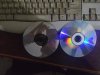
On the left is the original audio CD (1992) that is playing, and on the right is a blank HP CDR (2007). The difference in reflective surface is clearly evident.
The original CD has a mirror like surface.
 
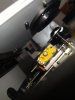
Finally it's playing CDRs. The platter height was too low. Raised it to about 5 mm from the lens box (image atached) (the top of the platter hole and the tip of the motor
shaft at same level) and now it is playing CDRs without any problems. Not playing CDRW though.
The tray is still not fixed. Tried different sizes and tensions, but no success.
If the belt is tight or thick, the motor is bogged down and doesn't run, and if it is thin and firm, not loose, then the tray is sluggish and doesn't close properly.
If there is no belt, then the tray mechanism moves freely, but when the belt is installed then there is a lot of resistance in the tray movement, which becomes worse with increase in belt tension.
Maybe the motor is not getting full power.
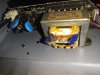
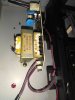
I forgot to mention - the transformer was repaired by the previous owner (image attached). It's a 110v system and had been accidently plugged into 220v.
Could that be the reason??

IMG_20201220_190101.jpg
 

Attachments

  • IMG_20201220_230407.jpg
    IMG_20201220_230407.jpg
    77 KB · Views: 1
  • IMG_20201220_230416.jpg
    IMG_20201220_230416.jpg
    91.4 KB · Views: 2
Back
Top Bottom