• Please note that Audiokarma will be offline briefly for updates early on Monday morning, September 28th.

Yamaha CDR-HD1300 HDD/CD Recorder Laser?

altecman

Active Member
My Yamaha CDR-HD1300 is starting to play up, it won't read CD's anymore, comes up with the "Check Disc " error. The CD's are clean as a whistle, so I suppose it must be a dead laser. Problem now is that Yamaha doesn't stock the laser or the CDR Mechanical Unit part number V9397900 anymore.

I've seen people mention on some forum sites that they have replaced the laser but as this was some time ago I can't find any info regarding what make or model the laser was. Could anyone help me here as I would to get the old girl going again. Thanks:(:(
 
Register to hide this ad
I can't answer your question, but I hope you find an answer.
I've got one too, and think it's a great machine.

There's a guy here who knows a lot about repairing disc players, @dr*audio . Maybe shoot him a PM.
And if you get any info, post it here.:thumbsup:
 
That laser assembly does not seem to be readily available unfortunately. You may have to dig deep to find one. I did find one site saying this is a the new oart number for a compatible laser.
Substitute Part
Yamaha WA874700
 
A thought. Have you opened it up to see what drive it uses?
Perhaps it's just a common computer drive and you can replace the whole thing? I no expert at this stuff, FWIW.
I do know when I blew the hard drive in mine years ago the replacement was a simple computer drive. Fixed it just fine, and upped the storage too.
 
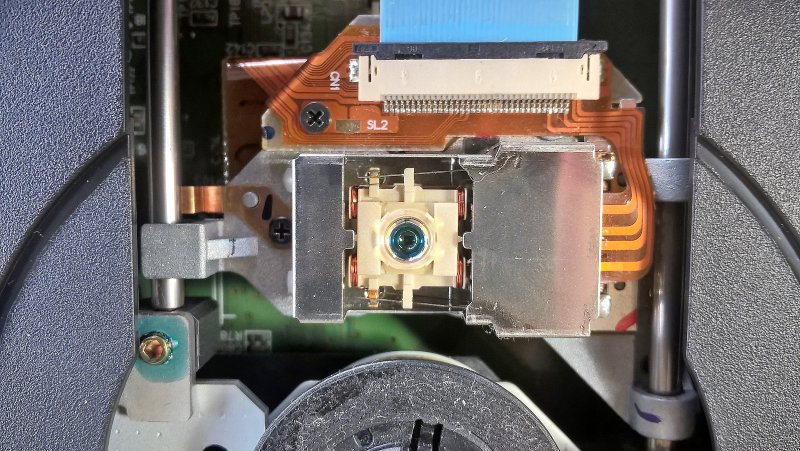
Next step will be to remove the CDR Mechanical Unit and do the Laserology thing to it, take some pics and hopefully have a good outcome. I read the Laserology article and was amazed that 99% of the time it's not the laser, unbelievable..:cool:
 
It apparently used the same laser assembly as one of the PC mount Yamaha branded AMQR CDRWs made around the same time.

Yamaha marketed and sold AMQR (audio master quality recording) drives for PCs- the unit in your 1300 is not the same, but the laser is. I have one of the 1300s too- but it is fine.
 
Just cleaned the laser, same problem with the Check Disc error. One thing I did notice was that the CDRW motor spun up about 3 times trying to read cd, is that a good thing.
 
I would try to fix it, but that's me. I have a soft spot for those recorders- even though they are a nightmare on the UI side (stupid menu/display).
 
I would try to fix it, but that's me. I have a soft spot for those recorders- even though they are a nightmare on the UI side (stupid menu/display).
I think I'm the same. I only use mine for recording concert stuff on FM and the odd vinyl needle-drop, though.
The UI is bad in a funny 90s way, but I get by with the remote. Being able to chop up and cut live tracks down to 1/70th(I think?) of second on that thing so works for me. I know there are computer programs that do this better, but I like doing it on the Yamaha.
 
Now all you guru's out there check what has just happened now.
I was reading the service manual and it was talking about the laser beam readjusting itself when copying. I thought gee, this might auto correct something, so I tried it, low and behold the cd was being copied. I then stopped it and then pressed play and bingo, music was being played. I tried another cd, this time it worked without trying to copy it first. When I tried it again it wouldn't read, so I tried to copy it and yes it worked but the sound was jittery when played. This happened once again and I had 2 that wouldn't read. In all 10 cd's worked. I bought this thing secondhand from Cash Converters, so who knows the history.
What would cause this, would it just be a case of the cd drive not being played for awhile? Laser might need adjustment?
Might have to get it serviced for a full assessment but gee I'm happy, thought I got a dud. :banana:
 
Yay!
I could be that it just need to be worked a bit?

Can I give you another tip, based on my experience?
There's a fan that cools the hard drive. Something went funky in my unit and the fan stopped working. I ended up having the hard drive burn out. It actually got went to a local repair depot(who couldn't figure it out), and then to Yamaha(who couldn't figure it out). I ended up wiring up a simple wall-wart power supply to run the fan. The fan is fine, it's just whatever the heck powers/controls it.
Anyway, make sure the fan kicks in after you've been running it for a bit.
 
Adjustment (APC laser power) is performed based on the media and happens at the start of the CDR recording. I don't think this is the issue, but gives us a clue.

Copying a CD, the machine really spins up the disc. Playing a CD, it spins much slower. I think you should try a tiny drop of lubricating oil right on the upper spindle motor sleeve bearing under the disc table- you may have bearing run-out on a dry sleeve bearing. Might be tricky to get to. While you are in there, lubricate the sled rails very sparingly.
 
Might have to try this when I'm keen to pull it out of the rack, what's the best oil top use for the bearing. Haven't played it for a week and a bit
and now it's gone back to not reading or copying any cd's at all. Talk about frustrating:idea:
 
Back
Top Bottom