• The move to the new server is done. There are some software and database maintenance updates in process. This has us passing the hat around to help out. We appreciate any donations. Seriously, even a dollar helps. The payment page may be found here - https://www.audiokarma.org/support.html

Yamaha Px-2 Speed control issues

Ceez06

New Member
I replaced all of the micro switches. when you switch the speed from 33 to 45 the speed remains constant at 33. The indicator lights will switch back and forth from 33 to 45 but no change to speed. Where should I be testing to find the culprit?

Beyond the speed control everything operates as normal.
 
Register to hide this ad
Hi @Ceez06 and welcome to AudioKarma! Was the 45rpm position not working before you replaced the micro switches or was it working? Is that the reason you replaced the switches? It sounds like the switch it is not sending the signal to the circuit that would then activate the speed change in the motor, but I'm just working off of fumes as it's been a while since I was looking at my PX-3. Others will chime in shortly......carry on, amigo
 
Hi @Ceez06 and welcome to AudioKarma! Was the 45rpm position not working before you replaced the micro switches or was it working? Is that the reason you replaced the switches? It sounds like the switch it is not sending the signal to the circuit that would then activate the speed change in the motor, but I'm just working off of fumes as it's been a while since I was looking at my PX-3. Others will chime in shortly......carry on, amigo
The speed was not working before the microswitch swap. I tested continuity before the swap and the original switches failed testing. The light would swap between 45 and 33 but the actual speed never changed.


Orientation of replaced switches are okay.
 
That's just plain weird.....so the signal from the switch that tells the motor at which speed it should run is (1) being sent but not received at the motor so the motor does not respond, or (2) is not being sent properly. Do you have a schematic for the turntable? If so, have you examined the connections? Only thing I can think of is that somehow a connection is not being made, so even though the switch is getting power (because the light changes from the 45 position to the 33 position) that power is either not going out properly or if it is, it's not going to the right place. Maybe follow that trace from the switch to the motor and see what other components it interacts with. There has to be a disruption in the signal somewhere that keeps the motor from responding. Sorry I can't be of more help, my knowledge in such stuff is limited even though when I have it sitting in front of me I can usually "connect the dots" and come up with a solution. Carry on, amigo.....
 
The indicator lights will switch back and forth from 33 to 45 but no change to speed.
Your problem is not with the switches themselves because if the 33 and 45 lights changed when you press the corresponding switch, the switch is working.
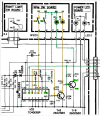
  • Referring to the Control C Board
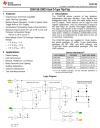
  • Pressing the 45 switch sets the flip-flop IC2 using the preset (PR) input.
  • When you press the 33 switch the FF is cleared using the clear input (CL).
  • The Q and Q* FF outputs drive the two transistors TR8 & TR9 which turns on the corresponding LED.
  • You can check to see if the FF is working using your DMM and measuring the DCV on IC2 pin 13 (Q=output) and also at the connector pin 3.
  • It should toggle from about 0v to 5v as you press either 33 or 45.
1788977246690.png
1788978897039.png
 
Last edited:
OK, here is some more information.
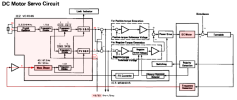
  • The 45/33 output from the Control C Board (pin 3) goes into IC2 pin 13 (pin 3). (see block diagram below)
  • That control signal selects between two sets of frequency divider values that are used to control the motor speed going out of the chip on pins 7 & 10.
  • The 45/33 signal goes to IC2 pin 13. (see board layout red line)
  • If you attach your DMM set to DCV (black on chassis ground), red on IC2 pin 13, you should see this signal go high or low depending on the speed that you select.
  • Careful not to short out the pins on the IC2.
  • Actually, it might be safer to attach your DMM to R37, they are connected with a board trace.

1788990952354.png
1788991988961.png
 
Back
Top Bottom