• The move to the new server is done. There are some software and database maintenance updates in process. This has us passing the hat around to help out. We appreciate any donations. Seriously, even a dollar helps. The payment page may be found here - https://www.audiokarma.org/support.html

9090 repair advice needed

RobertCO

Active Member
Just picked up this 9090 for a reasonable price. Right channel was out, turned out the fuse in the plastic cover on the driver board was blown. Replaced it with a 125V 6A fast blow and wow, this thing sounds incredible.

I was able to adjust the DC offset to zero (was at 0.012) pretty easily, but the bias is another story altogether. I removed the fuse on the amp board at F08 and powered the unit back on and it wont come out of protection (flashing red). Tried the same for the other use with same result. I tried measuring the bias amperage anyway and got no reading. What am I doing wrong?

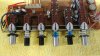
Also, I think I know the answer to this next question but here goes. Is there an easy way to fix these broken push switches? Replacement?
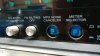
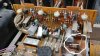
0119192339.jpg
 
Register to hide this ad
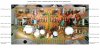
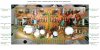
yup, a blown meter fuse tends to do that. Just in case you get fooled by the funky erroneous service manual, here's some pic of how it's done

MGJTawo.jpg


cPtIfrj.jpg


If that still doesn't help, try replacing the VD1212 diodes. each with a pair of 1N4148 standard rectifiers in series.
It's a mystery why you had a blown fuse on the driver amp. You may want to replace the fusible resistors and if you
want to replace other semi-conductors, check this thread out.

The push switches are Alps. It would be a major PITA to open them up and replace the plastic stubs, so a little improvisation would be handy.
You could drill the stubs, jbweld some caps leads in the hole and attach a new extension to it.
 
Some of those switches are easy to repair without removing them. The plunger can be replaced by removing the clip that latches it. Pull it out carefully and install new one.
The clip can be a pain to reinstall.

You could also look for a replacement board with good switches and change the board.

Or, pull them and replace.

Rob
 
Thanks for the replies gents. Good info. On that fuse, I expected it to immediately blow on power on but I've had it playing low and medium volume overnight and it still sounds incredible. Not running hot at all, I'm tempted to leave it as is. I'm going to search on how to measure the resistor fuses and check them. Also, can't find a B&M source for the meter fuse, gonna have to wait on adjusting the bias until I can get one shipped. I have a Fluke 23 and an Snap-On EEDM504D and both have blown fuses. :-D
 
Well, I hope to have the fuse tomorrow to adjust the bias but... Tonight I took it inside to give it a good listen on my NHTs (rather than my $40 KLHs in the garage).

In any case, this thing has an irritating distortion on the left channel. Can really hear it in the mids/highs at low volume, sounds a bit like static distortion. I tried a few things and it's definitely the left channel and the amp section, not the preamp (I did the rca cable trick from preout to main in and swapped L/R and the problem stayed with the left channel).

What is most curious is that the mysterious blown driver board fuse was on the right channel of the driver board (if I can assume the side with VR02 is the right channel) and the left channel is the one with the slight distortion. Is is remotely possible the bias adjustment and then DC offset adjustment again might clear this up?

I've never replaced a resistor or capacitor in my life but I may have to refurb this board based on your suggestions.

Pic of the fuse replacement (it's just the camera angle, it's not touching anything and I put the plastic cover back on before use):
PicsArt_01-19-08.59.23.jpg
 
Is the distortion only at low volume? If so, low bias could cause this, so setting bias may cure it.

Could also be dirty relay contacts. Wiggle the relay around while it's playing.

Rob
 
Thanks Rob. Yes, the static is pretty much constant.

Got the fuse for my meter today. Followed the pics posted here (thanks tnsilver).

Right channel (which plays perfect) was 37.5 and adjusted easily to 49.9.

The left channel (with distortion) measures 12.65ma. Worse, turning pot VR04 only moves it a few milliamps (roughly 11ma to 17ma range). Off to search for the "can't adjust bias on the 9090" threads here.
 
All fuse resistors check out except R39 (10ohm) which is open, tested from both sides. Going to replace that and hope I can get the bias adjusted.

I'm not being cheap by the way, I just have no confidence in my soldering skills.
 
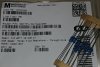
Made this for my own edification, thought someone might find it useful.

F-2436-1.jpg

And here it is with my readings on my board:

F-2436-1-my-readings.jpg
 
Replaced R39 (which was open) with one of the resistors above. Am now able to adjust bias (which was reading 69mv!) down to 50mv and static is gone! Thanks for the help gentlemen. Much appreciated.
 
Thought I'd update this thread as I just fixed my broken switches. Ordered a 9090DB board from the auction site that had 3 of the switches I would need (only needed 2).

1.jpg

0.jpg

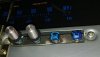
The problem, two switches on the right had been broken off. Just had to remove the bottom plate and the two screws above and was able to pull this gently from the bottom to work on it.

3.jpg
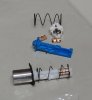
The blue shaft is the broken one, the white shaft is ready to go back in.

Just had to bend those 4 metal tabs holding the plastic switch shaft in and gently pull off the white plastic piece on top. Trick is to flip it over before you pull out the shaft so the tiny copper pickups don't fall out.

Gently slide the new shaft in the opening (again upside down) and push it all the way in. Now ready to position the triangluar stop piece, let the shaft come out just a bit until you see the opening in the shaft for the locator then pop the triangular piece back into place (it helps to hold the spring back away from the assembly. Now just rebend the metal tabs to lock it in and done.

4.jpg

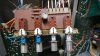
Shafts replaced, before putting back into place.

0311191831b_2.jpg

Back into place. Only took me about an hour. Hope someone someday finds this useful. :-)
 
Back
Top Bottom