• The move to the new server is done. There are some software and database maintenance updates in process. This has us passing the hat around to help out. We appreciate any donations. Seriously, even a dollar helps. The payment page may be found here - https://www.audiokarma.org/support.html

Accuphase E-202 Help!

isRelative

Show Me What You Got
Hello All,

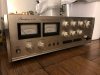
I recently jumped on a good deal for a semi-working Accuphase E-202. Just wanted some help diagnosing and repairing it (if it's something that's simple and in my wheelhouse). I've set the DC offset and bias voltage to specification, but there are a few issues that still need remedying.

The first is that the volume potentiometer is very scratchy, even after a nice Deoxit soak, but only scratchy on the left channel. To get any volume out of the speakers, I have to crank the volume pot pretty high (like around the noon position). The sound only occasionally comes out of the left channel, and I can get the right channel to sound nice and clear if I jimmy/hold the "filter amp assembly" and sometimes the "tone amp assembly" (language taken from the service manual, they're the two boards immediately behind the volume pot).

I'm looking at the layout of the boards and it seems like it may have something to do with how the boards are mated to the chassis, or whatever they're attached to. Is there a proper way to re-seat them where they need to be? Any help would be greatly appreciated. If this is something that needs to be handled by a local tech, any suggestions would be helpful as well.

Thank you!

Best,
Brian
 
Register to hide this ad
The boards all unplug and you can clean the edge connectors. It is however ancient and will likely need some major work if it is to be a reliable workhorse.
 
Signal runs everywhere. Be sure to clean all switches and buttons including the Damping Factor switch on the back panel. Use residue free contact cleaner.
 
You've got the black front cover off I presume, the boards plug in with nylon clips with small latching teeth IIRC. The power amp boards are held down with a metal clip/screw arrrangement and they have edge card connectors.

It's a veritable rat's nest of signals and there's lots to clean.

Take your time and do it methodically.
 
Last edited:
I'm going to pull out as many boards as I can one by one and clean the contacts. Wish me luck! I'll be back with pictures and a situation report. Thanks all!
 
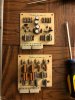
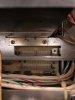
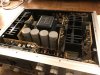
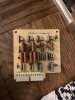
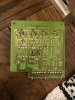
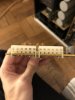
So I pulled out all the boards, cleaned the contacts, and deduced that the problem boards were the two that I mentioned earlier (filter and tone amp assembly). When I push them down with a little force, I hear some beautiful music, so I'm not sure if it's insufficient contact with the pins/receivers or if it's cold solder joints in the actual boards. I'll try and bend the metal pressure prongs on the boards tomorrow to maybe get better contact (already tried cleaning the pins with Deoxit to no avail). If that doesn't solve the problem, I'll go looking for cold solder joints. Here are some pictures for all your help :)

IMG-0784.JPG
IMG-0786.JPG
IMG-0790.JPG
IMG-0791.JPG
 
So I cleaned the pins and contacts on the two boards, but when I rock the boards back and forth, I still get the channels cutting in and out. Going to work now but I suspect cold solder joints in the board attached to the chassis. I visually inspected the two small boards and the the joints look fine. I may end up re-flowing the solder anyway just to make sure everything is good.

In terms of recapping this beast, it looks much easier now that I know that the boards come out. I've heard that the signal in this integrated amp doesn't go through any electrolytics. Is that true? If so, would recapping it make any difference in sound quality?
 
I just picked up the same E-202. I've got a scratchy volume control as well. I haven't got to the point of taking apart the front panel yet to clean the volume pot. I can keep you updated on my progress. Maybe my E-202 has the exact same problem.
 
I just picked up the same E-202. I've got a scratchy volume control as well. I haven't got to the point of taking apart the front panel yet to clean the volume pot. I can keep you updated on my progress. Maybe my E-202 has the exact same problem.

You don't need to take apart the front panel, just the top cover. If you're having the same problems, take a look at the connections on the two boards immediately behind the volume pot :) Good luck!
 
Nice amp! If I were going to run a vintage piece, this one is on the short list for sure. Hope you get it sorted out.
 
Accuphase used a different soldering technique that results in joints not looking completely soldered, whether that leads to more issues or not, Im not sure. I sure had a few joints in my P300 and C200 that I reflowed just to be sure.

If you are reflowing joints, you don't want to do just half a job - you should also reflow the male pins sticking up as shown in your 3rd posted photo above.
 
  • Like
Reactions: mbz
Sometimes gold connectors are a PITA to solder correctly. Maybe research to see what is the best solder for gold connections, 2% silver?

Also while you have it apart there check the amplifier driver cards, there's usually one resistor that's runs rather warm.

Craig
 
So I reflowed the solder on the male pins and female receivers on the two smaller boards and while the rear board is perfect (right channel is flawless), I’m having a hard time getting any sound out of the left speaker at all (an issue with the front board). I did continuity checks all over the small board and it looks good. I’m kind of lost as to what I should do.

1EF1780C-3FAD-4F05-B652-C659C08DACF0.jpeg
70FCCE2F-B8E1-4A8D-8587-BB3E6DA4CEBA.jpeg
4D34C3AE-FA0C-4CB2-AFE4-346448FC5CC6.jpeg
 
  • Like
Reactions: mbz
All controls cleaned OK?

Do you have relays in that unit? Im not sure if service data is available for this one or not....
 
Use a pencil with a round eraser on the end. Push it down onto the male pins to make a hole in the centre. Do one at time and spin it around several times. That will be your new pin cleaning tool. Deoxit can be added too.
 
Use a pencil with a round eraser on the end. Push it down onto the male pins to make a hole in the centre. Do one at time and spin it around several times. That will be your new pin cleaning tool. Deoxit can be added too.

The pins are relatively long, so I've been using a Q-tip soaked in contact cleaner. I'll try to find an eraser long enough for your solution :)
 
So after reflowing the solder on the boards and cleaning the pins with Deoxit and an eraser, I still only get sound out of the left speaker like 10% of the time if, and only if, I hold the board a very specific way. If it wouldn't be too much trouble, and if I wouldn't be overstepping my bounds, would anyone be willing to send me their board so I can just pop it in and see if it's my board that's faulty or if it's the receiving board/connections? I don't think my expertise extends any further than what I've already done :(
 
Back
Top Bottom