• The move to the new server is done. There are some software and database maintenance updates in process. This has us passing the hat around to help out. We appreciate any donations. Seriously, even a dollar helps. The payment page may be found here - https://www.audiokarma.org/support.html

AKAI 1015 Receiver loud crack(le/pop) on power on

MacShrike

New Member
Ls,

My mom's Receiver makes a loud bang when turning power knob from off to speakers A.
It scares her so much (she's 88) that she doesn't turn it on anymore which saddens me deeply.

Type: AKAI 1050 Receiver

I've got an old scope and multimeter trying to teach myself electronics and at the same time fix it for her.
I can solder and have some knowledge already but a heads up would really be helpful.

I read somewhere that it could be a failing cap on the power circuit and that it doesn't power up equally on both channels... or something:blah: (yeah I know nothing :()
I did find the service manual.

Would somebody give me some components/places I could check first to find the fault.
It feels straight forward if I had known what I was doing.

So: power on -> loud crack/bang.
Any hints?:beerchug:

Thanks and highest regards,
Mac
 
Register to hide this ad
I'm NO TECH. But nobody replied yet so here it is. Most obvious causes.
1) Deoxit clean every pot and (power) switch. Vintage Akai gear has notorious goo'd up sticky filthy (corroded) pots and switches often. If pop cracle etc don't go away:
2) Look for any visable solder joint crack! And if it looks cracked or fishy, re-solder! If that doesn't solve it or solves it completely:
3) Look for any obvious 'burnded' or blackened transistor, capitor etc. If so, replace it! And if that doesnt work:
4) Remove and or just open speaker protection relay And clean contact points. They should look like shiny steel, gold or silver; but NOT dark blackened! If that doesn't work go trace the voltages. But better, it's your mothers. The problem you describe is minor! A real tech will find and solve it fast and cheap'.

One thing you can try first! Is tap lightly but firmly with a plastic hammer or heavy srewdrivers etc, every individual output transistor while the receiver is iddling. Turn it off, turn it on, and it's possible it was just a 'stuck' output transistor(s)! If you receiver is indeed the Akai AA-1050, it has dicrete TO3 packed output transistors you see. But later Akai receivers ending with 50 have often non discrete output powerpacks, so tapping on it won't solve anything!
 
Last edited:
I'm NO TECH. But nobody replied yet so here it is. Most obvious causes.
1) Deoxit clean every pot and (power) switch. Vintage Akai gear has notorious goo'd up sticky filthy (corroded) pots and switches often. If pop cracle etc don't go away:
2) Look for any visable solder joint crack! And if it looks cracked or fishy, re-solder! If that doesn't solve it or solves it completely:
3) Look for any obvious 'burnded' or blackened transistor, capitor etc. If so, replace it! And if that doesnt work:
4) Remove and or just open speaker protection relay And clean contact points. They should look like shiny steel, gold or silver; but NOT dark blackened! If that doesn't work go trace the voltages. But better, it's your mothers. The problem you describe is minor! A real tech will find and solve it fast and cheap'.

One thing you can try first! Is tap lightly but firmly with a plastic hammer or heavy srewdrivers etc, every individual output transistor while the receiver is iddling. Turn it off, turn it on, and it's possible it was just a 'stuck' output transistor(s)! If you receiver is indeed the Akai AA-1050, it has dicrete TO3 packed output transistors you see. But later Akai receivers ending with 50 have often non discrete output powerpacks, so tapping on it won't solve anything!

Sir! :angel:Thank you.
I will be on it the first thing tomorrow. Clock just hit 00:00 here and I'm tired.
Your advice sounds sound. =))
I will keep you posted.
:trebon:
 
Going to move this over to the Solid State forum where it will get more attention. This is not a "Tuner" (Radio) issue.
 
Going to move this over to the Solid State forum where it will get more attention. This is not a "Tuner" (Radio) issue.

Thank you for moving this and apologies.

UPDATE:

Some new things I noticed now that its open. They provide invaluable clues had I know what they where :dunno:

It's not som much a bang on power on but a loud hiss that sometimes sound like a bang.
I put 1 speaker on it. It happens on both speaker A and speaker B and A+B.
Turning the volume or bass, trebble, balance, creates a nasty static hiss/scratch now and then.
The Receiver lights all flikker in the beginning and there is no real FM reception but a vague hiss.
After a short while, the lights suddenly stabalize and reception is good.
Turning it on and off again restarts this problem like it has trouble stabalizing the voltage.

There appears to be no, obvious, visual breaking or blackening or leakage.

1 light is broken, I'm replacing that now for that is all I can do basically.:crazy:

If, based on these symptoms, anybody has some more information as to the likely cause I would be gratefull for it.

:thumbsup:
 
The Receiver lights all flikker in the beginning and there is no real FM reception but a vague hiss.
This is the important clue.
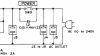
The power switch is arcing and needs to be replaced, along with the anti-arcing capacitor across the switch.
Further, you are not supposed to turn it off and on with the speaker switch, the speaker switch should stay on A and you use the power switch to turn it on and off.
You need a SPST or SPDT push switch and a .01uF capacitor as shown below:(needs to be rated 600V or above)
upload_2022-4-24_9-24-20.png
This switch is DPST (Double Pole Single Throw) but it will work and you can jumper the 2 poles together so it will handle even more current and last longer.
https://www.amazon.com/Locking-Push...ision+key+switches+kdc-a04-2s+,aps,532&sr=8-1
Here's a cap:
https://www.digikey.com/en/products/detail/kemet/R474F210000A1M/8565810
 
:cool: thank you.

A few things:
It's the CEE 220v power thingy.
The power knob rotates from off to A none B and A+B.

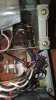
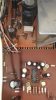
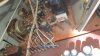
Also the two giant 25v 2200uf caps... the left one seems dodgy. Perhaps leaked long ago. The stuff at the base is glue I think. (See pics)
20220424_163106.jpg 20220424_162630.jpg 20220424_162655.jpg 20220424_162646.jpg
 
I'm NO TECH. But nobody replied yet so here it is. Most obvious causes.
1) Deoxit clean every pot and (power) switch. Vintage Akai gear has notorious goo'd up sticky filthy (corroded) pots and switches often. If pop cracle etc don't go away:
2) Look for any visable solder joint crack! And if it looks cracked or fishy, re-solder! If that doesn't solve it or solves it completely:
3) Look for any obvious 'burnded' or blackened transistor, capitor etc. If so, replace it! And if that doesnt work:
4) Remove and or just open speaker protection relay And clean contact points. They should look like shiny steel, gold or silver; but NOT dark blackened! If that doesn't work go trace the voltages. But better, it's your mothers. The problem you describe is minor! A real tech will find and solve it fast and cheap'.

One thing you can try first! Is tap lightly but firmly with a plastic hammer or heavy srewdrivers etc, every individual output transistor while the receiver is iddling. Turn it off, turn it on, and it's possible it was just a 'stuck' output transistor(s)! If you receiver is indeed the Akai AA-1050, it has dicrete TO3 packed output transistors you see. But later Akai receivers ending with 50 have often non discrete output powerpacks, so tapping on it won't solve anything!
What is a "Stuck" transistor????????
 
1) Deoxit clean every pot and (power) switch. Vintage Akai gear has notorious goo'd up sticky filthy (corroded) pots and switches often. If pop cracle etc don't go away:
Never use deoxit in a power switch. Spraying anything in there that leaves a residue will contribute to arcing. You can use a zero residue spray but that seldom does any real good.
 
The power switches that are built into the speaker selector are notorious for failing.
My fix is to open them up and polish/sand the contacts (this takes some care) then do the mod in this thread to give the switch a much easier life going forward.
https://www.audiokarma.org/forums/i...orth-5-and-an-hour-or-so-of-your-time.504673/

And if I get a unit in with one of these switches that isn't causing issues yet I do the mod as a preventative to save me opening up the switch in the future.
 
Never use deoxit in a power switch. Spraying anything in there that leaves a residue will contribute to arcing. You can use a zero residue spray but that seldom does any real good.

The power switches that are built into the speaker selector are notorious for failing.
My fix is to open them up and polish/sand the contacts (this takes some care) then do the mod in this thread to give the switch a much easier life going forward.
https://www.audiokarma.org/forums/i...orth-5-and-an-hour-or-so-of-your-time.504673/

And if I get a unit in with one of these switches that isn't causing issues yet I do the mod as a preventative to save me opening up the switch in the future.

Thank you very much.
I haven't taken it apart yet. I will do so and clean the power switch and do the mod.

As for the caps. Could you please take a look at the photos and tell me if this is a leak?
Also, I noticed that the analog tuner vu meter doesn't move. The fm tuning led does light up.
I multimetered the incoming wires to that but there's no voltage on it (perhaps it doesn't work that way. I'm certain... very noob)

Highest regards,
Mac
 
That's not cap leakage just assembly glue. Though it can be good to clean it off because it can corrode the leads of any components it touches.

Sometimes the meters can stick. I'll connect the meter to them on diode check just for a moment, this normally jolts them back into action. The voltage from the meter will make the needle move. Don't leave the meter connected for any length of time, it only needs to touch.
 
That's not cap leakage just assembly glue. Though it can be good to clean it off because it can corrode the leads of any components it touches.

Sometimes the meters can stick. I'll connect the meter to them on diode check just for a moment, this normally jolts them back into action. The voltage from the meter will make the needle move. Don't leave the meter connected for any length of time, it only needs to touch.

:beerchug:epic help. I didn't think so but I've been known to be over optimistic and lazy(bad combo:whip:)
OK so last one till I get to work on it tomorrow:
I disconnected the speaker part and ran it idle.
There's this yellow cap near one of the IC's that, when I touch the top of the cap, creates a humming tone through the speaker still.
(Saw an Indian YouTuber do that) is that a fail?

o_O
 
He Mac,

That is a sweet looking little receiver if you ask me. A few quick notes I hope might help you.

First off, there appears to be a bit of confusion as to which model you got there. From the pictures I presume it is either the AA1015 or the AA1010. Those are basically the same. It's the smallest receiver of that line. You also mentioned the AA1050. That is the biggest receiver of that line, and quite different in the relevant parts.

Assuming it's either the 1010 or 1015 from here on. That is a capacitor coupled design. One consequence of that is that there will Always be a "pop" thru the speakers when you switch it on. It's a small amp with 2200uf capacitors, so that might be a somewhat bigger "pop" as I indeed recall from those I worked on. Always switch the volume all the way down when you turn it on.

Okay, I'm going to stop here for now, because I see you are in active conversation with Raccoon now. I'll call back later;)
 
He Mac,

That is a sweet looking little receiver if you ask me. A few quick notes I hope might help you.

First off, there appears to be a bit of confusion as to which model you got there. From the pictures I presume it is either the AA1015 or the AA1010. Those are basically the same. It's the smallest receiver of that line. You also mentioned the AA1050. That is the biggest receiver of that line, and quite different in the relevant parts.

Assuming it's either the 1010 or 1015 from here on. That is a capacitor coupled design. One consequence of that is that there will Always be a "pop" thru the speakers when you switch it on. It's a small amp with 2200uf capacitors, so that might be a somewhat bigger "pop" as I indeed recall from those I worked on. Always switch the volume all the way down when you turn it on.

Okay, I'm going to stop here for now, because I see you are in active conversation with Raccoon now. I'll call back later;)

Hi Okke.

No that's OK okké:)

It is the aa1015. Typo sorry.
This crack is really sharp even with volume down.
I will clean up the switch and stuff first before bothering you lot any further.

You guys(?) are very helpful. I'm very pleasantly surprised :beatnik: your karma is probably off the scale :bowdown:
 
Ah, alright hen! Yes, Audio Karma is an oasis on the internet, where it is common for strangers to really help each other out. I said about the same thing as you ten years ago, when I had no idea where to start. Ironically, on an Akai AA1010.

Back to the receiver then. One issue with this model, is that it has a tiny little transformer. Now also running on 230V instead of 220V (if you live in the EU) and getting old.. Did you ever notice, when you switch the receiver on, the scale light sort of flickering a bit and then 'zap' in to proper working order?

As Raccoon mentioned, the stuff underneath the capacitors is just glue. However, the capacitors might still be bad. Without a component tester, I would just replace the two large coupling capacitors and see what it does. As you should be able to read from the side, these are 2200uf (micro farad) and 25V (volt). A preplacement here should be exact 2200uf and at least 25V, but 35V or 50V is even better.

@dr*audio, see one post above
 
You'll want to sort out the power switch before trying to figure out if there are other issues.
The flickering lights confirms this is an issue.
 
Dear dokter, it was a typo. It's an AA1015

Yes Okke, the lights do flicker.

Racoon. I'm taking it apart later this afternoon.. soon.

I'll keep you all posted.
:needpics:
 
Back
Top Bottom