• The move to the new server is done. There are some software and database maintenance updates in process. This has us passing the hat around to help out. We appreciate any donations. Seriously, even a dollar helps. The payment page may be found here - https://www.audiokarma.org/support.html

All Mixer channels have .6v DC

agooodname

New Member
My mackie vlz 1604 recently developed a strange problem:

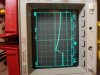
The problem: When I turn it on, all the channels develop a constant .6v dc in the signal path somewhere in the preamp stage. Stranger still, when I turn on the phantom power switch all the channels bump up to 1.37v before decaying back down to .6v (picture attached)
vbn n.JPG

2465682-ef9d573b04774227842ffe3d4f270357.jpg
My thoughts: I cant really think of a reason this would be happening across all channels. But, because it is happening across all channels, each individual channel circuitry must be fine. The only thing shared by all channels are the power rails and the ground. All the voltages leaving the power part of the circuitry seem to be correct. I do not have enough experience to troubleshoot this kind of thing and I am hoping for some suggestions about what to test/where a problem like this might be found

Manual: www.manualslib.com/download/1188123/Mackie-1604-Vlz.html?print=1
 

Attachments

  • vbn n.jpg
    vbn n.jpg
    83.1 KB · Views: 2
Register to hide this ad
Welcome aboard agood
Do all sixteen channels share the same power supply ?
 
Last edited:
I've found problems in these kind of mixers at the double sided PCBs, sometimes one part of the PCB doesn't have continuity with the rest.

1st thing I do with these mixers is to check continuity from one OPamp +V and -V pins to all the rest. All of them share the same power supply so your DMM should "beep" when touching any of them. Use just one OPamp as a reference (or the power supply rails) and check every other opamp is connected to that one.

Also, check if some IC is overheating. One short could be dropping or "shifting" the PS. Shorted OPamps usually show high voltages at the output (pins 1 and 7)
 
My mackie vlz 1604 recently developed a strange problem:

The problem: When I turn it on, all the channels develop a constant .6v dc in the signal path somewhere in the preamp stage. Stranger still, when I turn on the phantom power switch all the channels bump up to 1.37v before decaying back down to .6v (picture attached)
View attachment 2591603

View attachment 2591602
My thoughts: I cant really think of a reason this would be happening across all channels. But, because it is happening across all channels, each individual channel circuitry must be fine. The only thing shared by all channels are the power rails and the ground. All the voltages leaving the power part of the circuitry seem to be correct. I do not have enough experience to troubleshoot this kind of thing and I am hoping for some suggestions about what to test/where a problem like this might be found

Manual: www.manualslib.com/download/1188123/Mackie-1604-Vlz.html?print=1
Why do you think the point you tested should be at zero volt potential?

I'd check the output of U101, pin 1. I'd expect near zero at that pin.
 
Why do you think the point you tested should be at zero volt potential?
.
thank you so much for your suggestions!!!!!!!! I tested between that point and the outer metal shell. I just assumed that any audio the signal path should not have a dc component to the signal (maybe this is not the case?). Also, when I solo the channels, even with the trim all the way down, the UV LEDs are half way lit up, which I assume is a result of the DC boosting the signal. Also the channel outputs are weird, untill the trim is halfway, there is no audio but at a certian point it passes signal and its very clipped.

I had this problem once before without really knowing what was happening and it resolved itself on its own after an hour of messing with it, but then it quickly came back.
Also, when I first took it apart, the preamp pcb was not properly grounded and all the channels had like 14volts where I probed. After realizing my mistake and grounding it with an alligator clip the voltage went down to the .6v value. Grounding seems to be the issue but I cant figure out what to do next.

I will try all your suggestions and report back withing a few days.

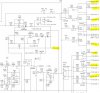
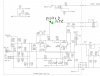
A question I have is that there appears to be different grounds labeled in the diagram. do these all have the same voltage potential, if so then why are they not all labeled the same? for example: CHAN1-GND and GND from the first diagram
dghjkol.JPG


Welcome aboard agood
Do all six channels share the same power supply ?
Thank you! hopefully I will be here quite a while. yes they do, there are 16 channels though.
 
thank you so much for your suggestions!!!!!!!! I tested between that point and the outer metal shell. I just assumed that any audio the signal path should not have a dc component to the signal (maybe this is not the case?). Also, when I solo the channels, even with the trim all the way down, the UV LEDs are half way lit up, which I assume is a result of the DC boosting the signal. Also the channel outputs are weird, untill the trim is halfway, there is no audio but at a certian point it passes signal and its very clipped.

I had this problem once before without really knowing what was happening and it resolved itself on its own after an hour of messing with it, but then it quickly came back.
Also, when I first took it apart, the preamp pcb was not properly grounded and all the channels had like 14volts where I probed. After realizing my mistake and grounding it with an alligator clip the voltage went down to the .6v value. Grounding seems to be the issue but I cant figure out what to do next.

I will try all your suggestions and report back withing a few days.

A question I have is that there appears to be different grounds labeled in the diagram. do these all have the same voltage potential, if so then why are they not all labeled the same? for example: CHAN1-GND and GND from the first diagram
View attachment 2593123


Thank you! hopefully I will be here quite a while. yes they do, there are 16 channels though.

The point you are measuring is at a feedback network, not exactly a "volume potentiometer" but a gain setting. It could have some voltage.

Looking at the schematic, without being an engineer, I see you have +16V feeding R106 and R107, and the signal input at the base of Q103 and Q104. If that signal is at 0 Volt at those transistors bases, I'd expect +0.6V at the point you are measuring (one transistor junction), from the transistor base. If the points you are measuring were at zero V, the base of the transistors (signal input) should be at -0.6V. There is usually 0.6V between base and emitter in a working transistor.

I'd check U101 output, and what is said, interconnection along the PCB. Based on your previous experience, I'd check ground connections too. Take one reference point, and check all the channels grounds are connected to that point.

Another check is to measure the voltages at the OPamps output. It must be near zero . A few mV is fine, a few VOLTS is not OK.

Regarding the different grounds in the schematic, it's probably because the mixer is built in "modules", each channel as a unit. But all the grounding should end at one point in the power supply.

Distorted audio , and not passing until a certain threshold could mean simply dirty switches or potentiometers, broken solder connections, or really a malfunction. Check proper supply to all the OPamps, and just then trace other fails. Actuate and clean all the switches, specially muting switches. They cause trouble all the time. But checking all the OPAmps are receving +V and -V is the first thing to check.
 
agreed, the spot highlighted in the original post would have some voltage. Its connected to the collector of Q103, which is fed from the +16v supply through a resistor. Exactly what voltage should be read I don't know but greater than zero would be my expectation.

The spike when you turn on phantom power is probably just the DC blocking cap charging up.
 
I want to thank everybody in this thread. I learned a lot and was able to resolve the problems I was having. I would say it seems like op amps are very often the problem when a mixer goes bad.
 
Back
Top Bottom