

You are using an out of date browser. It may not display this or other websites correctly.
You should upgrade or use an alternative browser.
You should upgrade or use an alternative browser.
Another Super High End Phono Stage! No expense spared...
- Thread starter Fasterdamnit
- Start date
Hi all,
Just complete everything and I am not getting any sound
Regards,
Sachin
Are the batteries hooked up with the polarities as per
the pic posted earlier?
Did you wire the switch correctly?
Check the voltage on the board using a multimeter.
Check the orientation of the op-amp. Pin 1 is marked with
a small dot on the package.
Make sure all pins are actually going into the socket. It's easy for
one of the pins to get bent either under the opamp, or over the socket.
You need to press the op-amps in fully into the socket - you'll feel the pins
gripping as you fit it in.
It may help if you post the pics of the component side board and
the underside too.
Last edited:

sachu888
Spare the tigers, kill me
I have checked everything,Opamps are also correctly and tightly fit. I am doubtful about power socket connection and I have not used LED in that.Will post a picAre the batteries hooked up with the polarities as per
the pic posted earlier?
Did you wire the switch correctly?
Check the voltage on the board using a multimeter.
Check the orientation of the op-amp. Pin 1 is marked with
a small dot on the package.
Make sure all pins are actually going into the socket. It's easy for
one of the pins to get bent either under the opamp, or over the socket.
You need to press the op-amps in fully into the socket - you'll feel the pins
gripping as you fit it in.
It may help if you post the pics of the component side board and
the underside too.


Here is the pic, Red wire is +Ve battery wire.I have not added ground wire for TT but I have grounded Batteries as shown in the pic.
rEGARDS,
sACHIN
Show a pic of the underside of the board.
One thing I do notice from that pic is that you have not selected an input impedance, set both dip switches to 47k for a start. In other words push number three over to the other side of each switch.
Last edited:


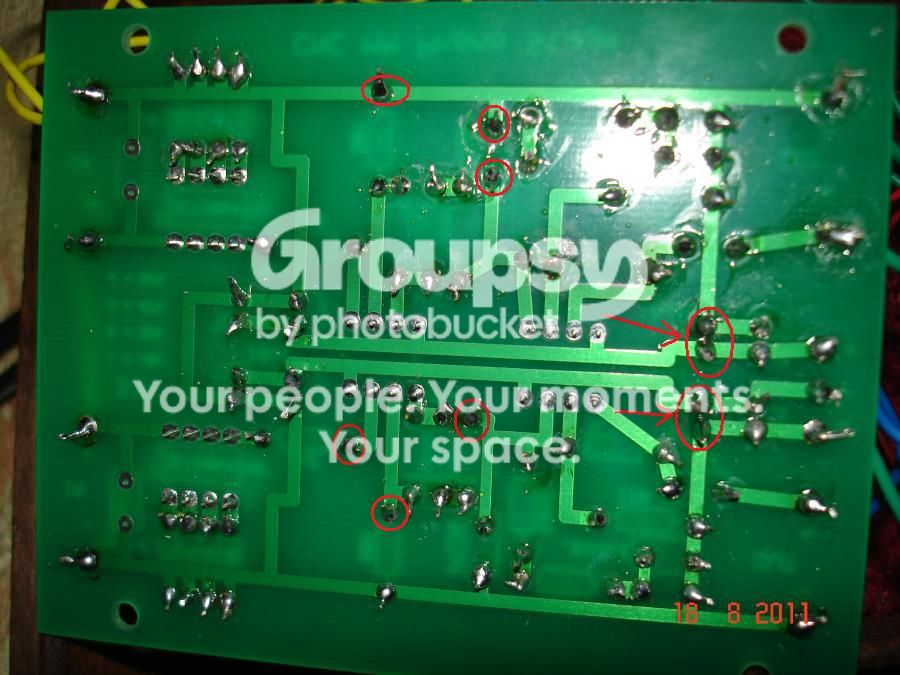
Here are the pics of underside and RCA connection.
Regards,
Sachin
I would check very closely the joints with the arrows pointing to them as I can't tell if you have solder bridges there, make sure the joints are not touching one another.
I am a bit concerned about the other joints I have circled maybe it's the photo, but check the ones with the arrows pointing to them first, you can use a DMM to see if there is a short even if you can't see one visually.
And do set those dip switches so that number three on both is ON.
Last edited:

bsabel
Well-Known Member
Remember when this project was just a wee baby? You guys brought this a long way in a very short time!

sachu888
Spare the tigers, kill me
I would check very closely the joints with the arrows pointing to them as I can't tell if you have solder bridges there, make sure they joints are not touching one another.
I am a bit concerned about the other joints I have circled maybe it's the photo, but check the ones with the arrows pointing to them first, you can use a DMM to see if there is a short even if you can't see one visually.
And do set those dip switches so that number three on both is ON.
Thanks Phillp,
I will check tomorrow as it is 2.30 night in India.I have checked for bridges.I just got a very little sound while pushing out RCA cable in and out there was a sharp hum also.I think my Battery connections may be fine as I just got a very little sound and I have connect the terminals as per pic.I was not comfortable while soldering RCA so THey might get short.What do u suggest?May be I will try new RCA tomorrow.I have set dp switches to 47k.
Regards,
Sachin
Last edited:

 I customized the input text on my receiver to accept the CNC so I knew what I was listening to. Do I need to make a "CNC - MC input now?? :scratch2: So far it sounds great, but I only have one hour on it so far...

bobrown14
Super Member
Here is the pic, Red wire is +Ve battery wire.I have not added ground wire for TT but I have grounded Batteries as shown in the pic.
rEGARDS,
sACHIN
I didn't finish reading the entire posts after I saw this pic. You haven't selected any option on the dip switch. The blue boxes - you need to select one of the settings on both boxes to get any output. Suggest selecting 47 first. Oh and check your solder on the pins on the bottom side of those dip switch boxes, they look like they dont have any solder on at least a few of the pins. Easy to miss, I forgot to solder mine and only noticed when I plugged in the OP-AMPs and the box was rocking ... ooops forgot to solder.
Edit: solder iron doesn't look like its hot enough, after plugging in wait a while like 5 minutes if it's a iron that doesn't have a temp setting. Some of you solder joints look like they got too hot and some look like not enough heat.
Cheers,
Bob
Last edited:
sachu888
Spare the tigers, kill me
I didn't finish reading the entire posts after I saw this pic. You haven't selected any option on the dip switch. The blue boxes - you need to select one of the settings on both boxes to get any output. Suggest selecting 47 first. Oh and check your solder on the pins on the bottom side of those dip switch boxes, they look like they dont have any solder on at least a few of the pins. Easy to miss, I forgot to solder mine and only noticed when I plugged in the OP-AMPs and the box was rocking ... ooops forgot to solder.
Edit: solder iron doesn't look like its hot enough, after plugging in wait a while like 5 minutes if it's a iron that doesn't have a temp setting. Some of you solder joints look like they got too hot and some look like not enough heat.
Cheers,
Bob
Hi,
I did did not solder dp switch sockets and op amp sockets.DO I need to solder them as well?I have selected 47k setting on dp switch.
Regards,
Sachin
Last edited:
I did not solder dp switch sockets and op amp sockets.DO I need to solder them as well?I have selected 47k setting on dp switch.
Huh? Not sure what you mean.
They need to be soldered only on the pcb copper side, and
looks like you did that.
If any of the solder joints look dodgy, redo it with a nice hot iron.
A good joint will be nice and shiny, with just enough solder (in a
kinda concave shape).
Check the RCA jacks that the center pin is not shorting to the
metal body (ground). Check here too for a bad/cold solder joint.
If you had a solder bridge at one of the points highlighted by Hpnotoad, your
battery could be dead too. See if it shows a good 9V or so.
Last edited:
sachu888
Spare the tigers, kill me
Huh? Not sure what you mean.
They need to be soldered only on the pcb copper side, and
looks like you did that.
If any of the solder joints look dodgy, redo it with a nice hot iron.
A good joint will be nice and shiny, with just enough solder (in a
kinda concave shape).
Check the RCA jacks that the center pin is not shorting to the
metal body (ground). Check here too for a bad/cold solder joint.
No,I have not soldered them just pushed inside of PCB.DO I need to solder dip switches and opamp sockets to pcb?
Regards,
Sachin

ghazzer
Senior Member
The soldering on the pins for the DIP switch pins and the IC socket pins look good. I would not do anything to them yet. Follow HypnoToad's suggestion and use a meter to check the solder joints that he has indicated. Look for continuity between two adjacent joints where the pads should not be touching. Use the pics in post #174 and the layout in post #106 for a reference.
You can use an eye loupe or a good magnifying glass to look for small whiskers of solder that may have formed between solder joints if you didn't get a clean lift off when you finished a joint.
Some of your joints may not be making good connections. This is difficult to determine, so my suggestion is to re-flow them with your soldering iron. As Bobrown14 suggested, your iron may not be hot enough so make sure you wait 30 to 40 seconds between each "touch".
.
You can use an eye loupe or a good magnifying glass to look for small whiskers of solder that may have formed between solder joints if you didn't get a clean lift off when you finished a joint.
Some of your joints may not be making good connections. This is difficult to determine, so my suggestion is to re-flow them with your soldering iron. As Bobrown14 suggested, your iron may not be hot enough so make sure you wait 30 to 40 seconds between each "touch".
.

Hi Guys,
I have soldered op amp sockets and dip switches to pcb and it started to sing.Thanks guys for help me out.I am getting little hum.Do I need to add a wire for ground the TT also.Thanks guys.AK rocks.
Regards,
Sachin
Great job. Congrats!
A battery powered pre should be dead quiet. So try connecting
the TT ground wire too. Look for other loose contacts in the path.
For the wires from the RCAs to the CNC board, use a
shielded cable, or alternatively, try using a twisted pair of wire from
an ethernet cable (CAT5 or CAT6). Keep the wire length short.