

You are using an out of date browser. It may not display this or other websites correctly.
You should upgrade or use an alternative browser.
You should upgrade or use an alternative browser.
Brand new AT-LP120X seems affected by Anti Skating issue
- Thread starter chriz74
- Start date
What you're seeing is that it actually has too much anti-skating applied, maybe because it is brand new and the anti-skating spring is still rather stiff. Try reducing the anti-skating dial setting until the tonearm no longer is pulled outwards.
there is not any adjustment that will remove that pulling outwards without changing into pulling inward. At 1,5 (circa) the arm is pulled outward or inward until it more or less reaches the center of the record.

vwestlife
Super Member
Then set it as close to the middle point as you can achieve to get the tonearm to stay still when placed in the middle of a LaserDisc. (Remember that the amount of skating effect changes depending on the radius, but the anti-skating system only works at one level, so you need to set it to what works best in the middle of a record.)there is not any adjustment that will remove that pulling outwards without changing into pulling inward. At 1,5 (circa) the arm is pulled outward or inward until it more or less reaches the center of the record.
Not speaking for Vincei, but I follow Peter Ledermann's advice (that he got from Frank Schroeder) to use a wide space in the runout area and set anti-skate so that the arm moves slowly toward the spindle (until, of course, the groove wall catches up with the stylus and drives it quickly toward the spindle).Thanks for your feedback. How did you decide it’s double? What test did you do?
On my sample of the LP120XUSB, this results in an anti-skate setting of 0.75 for a 2.1 gram downforce with the AT-VM95C cartridge. Perhaps of note is that on my turntable there is enough anti-skate force even when set to zero to drive my floating, zero-balanced arm back to the arm rest. As others have noted, it is not important what mark the dial is set to, but whether or not you can set the anti-skate force you want. I'm perfectly satisfied with the anti-skate operation of my LP120XUSB.
I got similar results when I first tried Schroeder's approach to anti-skate on my Rega. Below is a cut and paste from a similar thread from two years ago:
When I put an M97xE on a Rega RP3 turntable nearly three years ago, I found I liked the dynamics and low distortion I got with a slightly higher VTF and anti-skate set to minimum (I've read that Rega's magnetic anti-skate system never really gets to a zero value). Using little to no anti-skate and keeping tracking force near the upper limit of the manufacturer's recommended range is a procedure suggested by Edgar Villchur of Acoustic Research and Harry Weisfeld of VPI Industries. The success of those products, and my own casual experimentation over the years, has led me to believe that anti-skate is of little importance and left me with the attitude of just set what sounds good and don't worry about it.
. . . What's interesting also are the comments by Sound Smith, that "most folks use far too much antiskating, as evidenced by the thousands of cartridges I have rebuilt over the last 40+ years – as evidenced by observation of the outer edge (right channel) of the diamond to be worn far more than the inner, or left channel." So uneven wear can occur whether you use anti-skate or not unless very precisely set. Sound Smith said that most 'tables have an anti-skating calibration that results in too much anti-skate force being applied (link below). They also caution against using the highly modulated grooves of the anti-skate test band on some set-up records because this will result in excessive anti-skate, and Sumiko has said the same about using a grooveless record. And since skating forces vary across the radius of the record surface, as well as with greater or lesser groove modulation, record eccentricity, various types of warps, and so on, anti-skate force is going to be only approximately correct, anyway. Sound Smith is, however, convinced that using some anti-skate is better than not.
I tried using Sound Smith's recommended method for setting anti-skate this morning, but it was difficult for me due to the very small amount of time to see how the stylus reacts when setting it in the space between the runout groove at the end of the record side. However, as best I can tell, when tracking my M97xE at 1.35 grams (brush up), the proper anti-skate setting is a bit shy of the 1 gram marking on my RB303 arm. That arm does not have a calibrated dial with numbers, just a straight stick with a couple of lines to indicate 1 gram and 2 gram settings. In keeping with my own experience, the RB303 tonearm manual says that the anti-skate setting is not critical and suggests setting it between 1 and 1.5 for most moving magnet cartridges, and between 1.5 and 2 for most moving coil cartridges.
With the couple of records I've played so far, I can't say the setting I came up with via Sound Smith's advice sounds any better than zero anti-skate, but neither does it sound any worse. I'll just keep it there for several days and see what I think over time.
https://www.sound-smith.com/faq/how-do-i-adjust-anti-skating-my-cartridge

56RETROGRADE
Member
I find that the antiskate on my LP120X is about double of what it should be, so I run it at 1 to match my 2g tracking force.
This is the same behavior my LP 140XP exhibit s. The AS works fine.
This is the same behavior my LP 140XP exhibit s. The AS works fine.


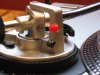
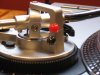


Trekkie4
Retired Member
I believe you are confusing AT-LP120USB (from your picture) for LP120X. Which is what OP has, and his AS is in fact fully functional, maybe even too powerful. But this isn't an issue & can be easily adjusted. Just like on my AT-LP140XP, which is also what @56RETROGRADE said, it does seem to have too aggressive AS which needs to be corrected, slightly decreased. So, instead of 1.5 maybe go for 1.0 AS (assuming the tracking force is set to 1.5g), or 1.5 if the tracking force is 2.0g.Here is a fix I did to mine when I had it. Glued the red bead with hole in it to tone arm pivot frame, run some light fishing line tied to pivot (as shown) thru bead and then attached to fishing weight. Worked great. Set the AT's anti-skate to zero.
View attachment 1735964 View attachment 1735965 View attachment 1735966 View attachment 1735967