• The move to the new server is done. There are some software and database maintenance updates in process. This has us passing the hat around to help out. We appreciate any donations. Seriously, even a dollar helps. The payment page may be found here - https://www.audiokarma.org/support.html

Compact powered book shelve speakers

Raphaz

AK Subscriber
Subscriber
I currently run a bunch of Minimus 7 speakers in a large, open space. They serve as secondary speakers and are driven by a vintage R-2000 ( for the mains I use a pair of Q500 plus a 12” Klipsch sub).
I’d like to replace the M7s with powered and/or WiFi speakers as I want to go wireless for the secondary speakers - or at least with less wires.

Can anyone here recommend active, powered or/and WiFi speakers that are similar in size (or slightly larger) than the M7s and come close to their sound and build quality?

Thanks!
 
Register to hide this ad
I don't think it will be difficult to better the M7s with a modern compact active speaker. I've heard good things about the Edifier R1280 series speakers (there's a sale on this model now). Note that there are several models with similar model numbers, whose prices vary by features or finish. The one I linked has Bluetooth, analog L/R and S/PDIF inputs. If you can go a little larger, the R1700 (also on sale) will give significantly improved bass, and might be more appropriate for a large area like you have.
 
I have a pair of the Edifier R1280DB speakers (Bluetooth, optical and coax digital inputs, 2 RCA inputs), and they’re okay near-field speakers. They only reach down to 60Hz, but you have a sub, so that’s not really an issue. Their tweeters are *really* directional and benefit from being raised to ear level. But I’m not sure they’ll do wireless the way I think you want to do wireless (going off your other thread where you ask about a modern replacement for your Yamaha). You’d need another WiiM or similar receiver on the other end.

What you might consider is something like Audioengine’s wireless audio adapters: https://audioengine.com/shop/adapters/w3-wireless-audio-adapter-w3r-receiver/ which essentially functions like a speaker connection but without the cables. If your powered speakers have RCA inputs, you could use the adapter to send the tape-out on the Yamaha to the receiver attached to the RCA input on the powered speakers. You could play the source on your Yamaha, and the other speakers should play that with very little latency.

Spendy, compared to a WiiM mini, is the only real problem.
 
I had some AudioEngine A5s for about 15 years before the amp for one channel died.

 
I have a pair of the Edifier R1280DB speakers (Bluetooth, optical and coax digital inputs, 2 RCA inputs), and they’re okay near-field speakers. They only reach down to 60Hz, but you have a sub, so that’s not really an issue. Their tweeters are *really* directional and benefit from being raised to ear level. But I’m not sure they’ll do wireless the way I think you want to do wireless (going off your other thread where you ask about a modern replacement for your Yamaha). You’d need another WiiM or similar receiver on the other end.

What you might consider is something like Audioengine’s wireless audio adapters: https://audioengine.com/shop/adapters/w3-wireless-audio-adapter-w3r-receiver/ which essentially functions like a speaker connection but without the cables. If your powered speakers have RCA inputs, you could use the adapter to send the tape-out on the Yamaha to the receiver attached to the RCA input on the powered speakers. You could play the source on your Yamaha, and the other speakers should play that with very little latency.

Spendy, compared to a WiiM mini, is the only real problem.

Thank you. Was wondering about the AE adapters. I’ll loo into that.
 
I have a pair of the Edifier R1280DB speakers (Bluetooth, optical and coax digital inputs, 2 RCA inputs), and they’re okay near-field speakers. They only reach down to 60Hz, but you have a sub, so that’s not really an issue. Their tweeters are *really* directional and benefit from being raised to ear level. But I’m not sure they’ll do wireless the way I think you want to do wireless (going off your other thread where you ask about a modern replacement for your Yamaha). You’d need another WiiM or similar receiver on the other end.

What you might consider is something like Audioengine’s wireless audio adapters: https://audioengine.com/shop/adapters/w3-wireless-audio-adapter-w3r-receiver/ which essentially functions like a speaker connection but without the cables. If your powered speakers have RCA inputs, you could use the adapter to send the tape-out on the Yamaha to the receiver attached to the RCA input on the powered speakers. You could play the source on your Yamaha, and the other speakers should play that with very little latency.

Spendy, compared to a WiiM mini, is the only real problem.

The AE adapters are very intriguing!
I have a couple questions if you don’t mind:

Looks like they can do WiFi (not just Bluetooth), right?

I’m assuming it requires an AE transmitter and AE receiver - I wouldn’t be able to use a Wiim as a transmitter (attached to my old receiver’s out) and then have the AE dongle as a receiver on the speakers, picking up the Wiim’s signal?

I guess I can use pretty much any powered speaker? But not wired, analog speakers?

Thank you!
 
The AE adapters are very intriguing!
I have a couple questions if you don’t mind:

Looks like they can do WiFi (not just Bluetooth), right?

I’m assuming it requires an AE transmitter and AE receiver - I wouldn’t be able to use a Wiim as a transmitter (attached to my old receiver’s out) and then have the AE dongle as a receiver on the speakers, picking up the Wiim’s signal?

I guess I can use pretty much any powered speaker? But not wired, analog speakers?

Thank you!
I don’t actually know. I don’t own a set, but it seems to me that they use their own ad-hoc wifi network for transmission / reception.

So, to do what you want: have the WiiM‘s output on your receiver’s AUX or TAPE in.

Have the AE transmitter on your TAPE out, and the AE receiver on the remote speakers / system’s AUX or TAPE input. If you want to use wired analog speakers at the other end, you’d need another stereo receiver or integrated amp to power them.

This lets you play audio on your old receiver and the remote system simultaneously.

While you can transmit what you play on your receiver over Airplay or WiiM’s connect app to another WiiM or Airplay device using the analog input, you can’t have simultaneous synchronized playback on the local system. With the AE transmit/receive pair, you could do this with the analog source you play on your old receiver’s output.
 
I don’t actually know. I don’t own a set, but it seems to me that they use their own ad-hoc wifi network for transmission / reception.

So, to do what you want: have the WiiM‘s output on your receiver’s AUX or TAPE in.

Have the AE transmitter on your TAPE out, and the AE receiver on the remote speakers / system’s AUX or TAPE input. If you want to use wired analog speakers at the other end, you’d need another stereo receiver or integrated amp to power them.

This lets you play audio on your old receiver and the remote system simultaneously.

While you can transmit what you play on your receiver over Airplay or WiiM’s connect app to another WiiM or Airplay device using the analog input, you can’t have simultaneous synchronized playback on the local system. With the AE transmit/receive pair, you could do this with the analog source you play on your old receiver’s output.

Great! Thank you!
 
Using the Tape Out to send signal to the transmitter will not allow you to control the volume of the "remote" speakers with your receivers volume. Tape Out is a constant output, you need a variable output like a Pre Out to have the receivers volume control affect the remote speakers.
 
I don’t actually know. I don’t own a set, but it seems to me that they use their own ad-hoc wifi network for transmission / reception.

So, to do what you want: have the WiiM‘s output on your receiver’s AUX or TAPE in.

Have the AE transmitter on your TAPE out, and the AE receiver on the remote speakers / system’s AUX or TAPE input. If you want to use wired analog speakers at the other end, you’d need another stereo receiver or integrated amp to power them.

This lets you play audio on your old receiver and the remote system simultaneously.

While you can transmit what you play on your receiver over Airplay or WiiM’s connect app to another WiiM or Airplay device using the analog input, you can’t have simultaneous synchronized playback on the local system. With the AE transmit/receive pair, you could do this with the analog source you play on your old receiver’s output.

Great! Thank you
 
Using the Tape Out to send signal to the transmitter will not allow you to control the volume of the "remote" speakers with your receivers volume. Tape Out is a constant output, you need a variable output like a Pre Out to have the receivers volume control affect the remote speakers.

Good point, thank you!
 
IMHO marketing slogans like the one on the AE site “Buh-bye, speaker cables. Hello, wireless audio with CD-like quality stereo sound” are a bit of a stretch - while you may indeed be able to skip messy speaker cables running across spaces, you end up with a bunch of power chords with clunky plugs, and you can only hope that your remote speakers are somewhere close to a power outlet. That seems to be true for good speakers as well as for adapters.

I wish most quality powered and wireless speakers and adapters/transmitters were either battery-powered/rechargeable. Or at least please make them USB powered - that way one could DIY something like fixing a battery pack to the back of the speakers.

Sigh!
Yeah, I know, I’m asking for too much.
Consider it first world problems.
 
What I’m still a bit confused about is this: “While you can transmit what you play on your receiver over Airplay or WiiM’s connect app to another WiiM or Airplay device using the analog input, you can’t have simultaneous synchronized playback on the local system. With the AE transmit/receive pair, you could do this with the analog source you play on your old receiver’s output.”

Wouldn’t it be the same if I added another Wiim device to my old receiver’s out and yet another Wiim device on the remote speaker’s receiving end? The two added Wiims would essentially do the same as the AE transmitter and receiver would do. What’s the difference?
 
This is what I mean:

When I played with a WiiM Pro Plus last year, I set it up on my receiver's Auxiliary In with the Aux Out going to the WiiM's line-in.

If I wanted to, I could play anything (CD, Phono, Tape) out into the WiiM's line in and transmit it to one of my AirPlay receivers. Basically using it like a tape deck that transmits!

But if I had my volume up on my "local" amp (where my WiiM was), the sound would be out of sync with the AirPlay receiver in another room.

So, to be clear: the sync issue only crops up when playing a non-WiiM source into the WiiM and transmitting it to the other set of speakers.

If I played WiiM content (internet radio, Amazon, Airplay from my phone or my phone's library from the WiiM) there were no sync issues.
 
This is what I mean:

When I played with a WiiM Pro Plus last year, I set it up on my receiver's Auxiliary In with the Aux Out going to the WiiM's line-in.

If I wanted to, I could play anything (CD, Phono, Tape) out into the WiiM's line in and transmit it to one of my AirPlay receivers. Basically using it like a tape deck that transmits!

But if I had my volume up on my "local" amp (where my WiiM was), the sound would be out of sync with the AirPlay receiver in another room.

So, to be clear: the sync issue only crops up when playing a non-WiiM source into the WiiM and transmitting it to the other set of speakers.

If I played WiiM content (internet radio, Amazon, Airplay from my phone or my phone's library from the WiiM) there were no sync issues.
So the latency in the scenario you describe here occured when you (for example) used the CD player and drove speakers wired to the receiver and remote wireless speakers at the same time? The CD player was hooked directly to the receiver (or went through the Pro's DAC first?

I'm assuming you had to tell the Plus to either use the analog out to the receiver's aux, or the wireless/digital out to the wireless remote speakers, correct? From what I understand you can't use two outs on the Wiim at the same time – meaning with described setup you probably couldn't stream Spotify on the Wiim, and listen to it on your wired and the wireless remote speakers at the same time. But maybe I'm wrong about that.
 
To your first paragraph: right. Latency is introduced.

If I ran the CD player into the optical input on the WiiM, the WiiM allows you to either 1) play to the attached receiver's speakers, or 2) play to another streaming target (WiiM or AirPlay). Not both.

When I played from the receiver's AUX output (or TAPE output), I could, of course, turn on Speaker A and listen to music on the receiver while using the WiiM to send to the remote speakers. But there's latency and the audio falls out of sync.

If you are using the WiiM as a streamer and you have another streamer in another room, the WiiM attached to the receiver and the other streamer can play music at the same time, and the music will be synchronized. So you can use Spotify from the WiiM and send to both the RCA line-out OR optical out and to the streamer.
 
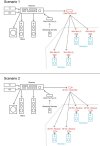
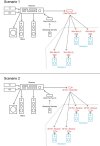
I figured I'll attach a quick drawing showing what I try to do and what I wonder if it can be done with the Wiims (Scenario 1) or the AE W3s (Scenario 2). Keep in mind that this is done with my lack of knowledge, it may be weirdly complicated and overkill, if not impossible, not sure. But I hope this helps a bit.

Devices in red and (powered) speakers in blue I don't have yet.
All sources go through the receiver (only streaming services go through the Pro Plus first, and then to the receiver). The idea is that I get as much as possible of the receiver's sound signature and can control volume and EQ from there.
Btw. this assumes WiFI (not Bluetooth), but I may be willing to compromise on that if it brings down the cost/footprint/complexity/amount of wires significantly. I still hope that there is a more simple way (less gear, less wiring). One possible way could be to use WiFi speakers but that would narrow the speaker selection/choices (difficult enough to find compact but room-filling shelvers to begin with, as most are meant for studio use).

Wireless-remotes.jpg
 

Attachments

  • Wireless-remotes.jpg
    Wireless-remotes.jpg
    65.5 KB · Views: 1
Last edited:
You can do scenario 1 if you can accept that there will be latency between your Mains and any remote speakers.

WiiM are supposed to be working on a solution to this, but who knows when that will be.

You might find the latency acceptable because they are far enough apart that you'll never hear them at the same time.

Scenario 2 is probably the closest you'll get to having a setup that acts like you have done a long speaker-wire run to all your remote speakers. There may be lower-cost solutions besides the AE transmitter/receiver pairs, too; those are just what I remembered off the top of my head.

Dayton Audio, for example.

 
Last edited:
You can do scenario 1 if you can accept that there will be latency between your Mains and any remote speakers.

WiiM are supposed to be working on a solution to this, but who knows when that will be.

You might find the latency acceptable because they are far enough apart that you'll never hear them at the same time.

Scenario 2 is probably the closest you'll get to having a setup that acts like you have done a long speaker-wire run to all your remote speakers. There may be lower-cost solutions besides the AE transmitter/receiver pairs, too; those are just what I remembered off the top of my head.
Are you saying the Wiims are currently still more prone to latency than the AE W3s?

All speakers reside in the same large, open space, the remote speakers are only slightly obstructed. The subwoofer is close to the mains, tucked under a staircase, but still helps a tiny bit with the lower end when I'm closer to the remote speakers (even at lower volumes). With the current setup, with all speakers wired, I get a pretty acceptable mix. I'm hoping to achieve something similar with wireless remotes, but I'll try to keep my expectations realistic.
 
Back
Top Bottom