


HUSKER222
New Member
I have two JBL Studio Monitor MKII and two JBL LSR310S. Hooking it in was a-lot less confusing than I had made it in my head.
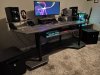
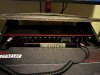
I separated the sub and the monitors. I plugged the right Studio monitor in to the right subwoofer via XLR cable (Balanced) and then from the right subwoofer I used a TRS cable to plug into the right monitor port on the 18i20. I did this same thing for the left speaker as well. XLR from left monitor to left sub then TRS to left monitor port on the 18i20. Once I did this I fired up some music and I joke you not it worked perfectly. I swap to the gaming PC and its like you get to experience it. Fills the room more and movies sound great!!
I hope this helps others who were thinking of doing the same. I will say if you do not have TRS and XLR ports and different brand then it is like geometry and you have to get separate equipment to send the proper signals and its just a mess and a-lot of work from what I saw on youtube. A lot more than doing it this way was.
-HUSKER Triple-Deuce
I separated the sub and the monitors. I plugged the right Studio monitor in to the right subwoofer via XLR cable (Balanced) and then from the right subwoofer I used a TRS cable to plug into the right monitor port on the 18i20. I did this same thing for the left speaker as well. XLR from left monitor to left sub then TRS to left monitor port on the 18i20. Once I did this I fired up some music and I joke you not it worked perfectly. I swap to the gaming PC and its like you get to experience it. Fills the room more and movies sound great!!
I hope this helps others who were thinking of doing the same. I will say if you do not have TRS and XLR ports and different brand then it is like geometry and you have to get separate equipment to send the proper signals and its just a mess and a-lot of work from what I saw on youtube. A lot more than doing it this way was.
-HUSKER Triple-Deuce