• The move to the new server is done. There are some software and database maintenance updates in process. This has us passing the hat around to help out. We appreciate any donations. Seriously, even a dollar helps. The payment page may be found here - https://www.audiokarma.org/support.html

Connecting vintage HiFi & PC to same speakers

flatuswalrus

New Member
Hello all, I have a little vintage HiFi stack in my living room along with my PC which is our main entertainment source. I am wanting to connect the HiFi amp & PC to the same set of speakers and sub. Is that possible to get the speakers wires into the 3.5mm jack in my PC's Sound Blaster SE Z soundcard by using an adapter like THIS, but I would want a better quality one, if much better quality ones exist.

Then, using something like THIS or THIS to be able to select between the HiFi & PC.

Would that work? If it would work, would there be major downsides in introducing noise or volume loss? If what I showed above is not possible, is there anything else I could do to make this possible?
 
Last edited:
Register to hide this ad
I recently wanted to do the same thing. I tried connecting the line out from the PC to analog input on my amplifier. The sound quality was not very good. I bought a USB DAC and connected it between the PC and amplifier. Huge improvement! The SMSL SU-1 costs $80 from amazon.com and will deliver much better sound than anything in your PC. My PC runs windows 10 and the DAC was plug and play. If you run windows 11, there is a driver for the DAC that you install on the PC.
 
I recently wanted to do the same thing. I tried connecting the line out from the PC to analog input on my amplifier. The sound quality was not very good.
What did your first failed attempt entail? Were you using some kind of adapter like I showed to join speaker wire to a 3.5mm jack?
The SMSL SU-1 costs $80 from amazon.com and will deliver much better sound than anything in your PC.
My Sound Blaster SE Z is also a DAC and has quite favorable reviews. When you initially plugged into your PC, was it simply plugged into the PC's generic soundcard, as opposed to having a dedicated sound card like I do?
 
Is that possible to get the speakers wires into the 3.5mm jack in my PC's Sound Blaster SE Z soundcard by using an adapter like THIS, but I would want a better quality one, if much better quality ones exist.
You don't connect the speakers to this 3.5mm plug. You treat this as line level out to an amplifiers aux in. It's just another source, like a CD or tuner etc. So it would be the stereo 3.5mm to stereo pair RCA patch cord.

jeff
 
My PC has no sound card. I was connecting the line output from the PC to the hi-fi amplifier, so just using the basic audio from the PC. I run a squeezeliteX player on the PC to play music from my server. If you remember winamp from back in the day it could generate trippy visuals using a plugin called milkdrop. Milkdrop is now stand-alone and will sync to any audio in the PC, so I connect the TV to the PC and it generates 4k visuals at 60 fps that sync to the music much better than it ever did back in winamp's heyday. I shut off all notifications and system sounds in the PC so that stuff doesn't find it's way into the audio.
 
I think there's some miscommunication. What do you have now and what are you trying to connect to what? What is sending audio to your speakers? What exactly is a "hifi stack"?
 
You can't connect your computer to speakers (unless they are powered speakers, with their own amplifier built into them).

Connect the PC to your vintage amp, not to your speakers.

Option 1 - get a 3.5mm stereo-to-RCA cable of an appropriate length. Something like this:


Option 2 - send digital output from the computer to a DAC via USB. There are lots of good inexpensive DACs available. The DAC converts the digital input from your computer to analog, and sends it to your stereo system (via standard RCA connections).

Option 3 - get something like a Wiim Pro streamer. This keeps your computer from having to be tethered to your stereo system. The streamer uses your wifi to retrieve music from the internet (Spotify, Tidal, Amazon Music, etc) or to retrieve music stored on your computer. It has a built-in DAC, with standard RCA output connections.

The Wiim connects directly into your vintage system, just as would be the case with a CD Player, tape deck, etc.

You control it via the excellent Wiim app, which can be downloaded to your smartphone, tablet, computer, laptop, etc (free). The app turns any device into a remote control. It includes volume control, equalizer, and even a basic room correction capability.

Less than $150, USD.
 
Last edited:
I think there's some miscommunication. What do you have now and what are you trying to connect to what? What is sending audio to your speakers? What exactly is a "hifi stack"?
Sorry, what I currently have in my living room is a PC that I have connected to a subwoofer and 2 bookshelf speakers.

"HiFi stack" obviously isn't the right wording. By that I meant stack of HiFi gear, like, in my case, I have a Pulse Power Supply, Amp, Preamp, Tuner and Cassette Deck. I am wanting to put this HiFi gear in my living room and have the HiFi equipment and my PC connected to the same set of bookshelf speakers and sub.
 
Option 2 - send digital output from the computer to a DAC via USB. There are lots of good inexpensive DACs available. The DAC converts the digital input from your computer to analog, and sends it to your stereo system (via standard RCA connections).
Thank you for your detailed reply. I have a quick question first. Will I need to purchase a separate DAC if my current PC's soundcard is also a DAC. I have a Sound Blaster SE Z and it is advertised as, "Sound Blaster Z SE - High-performance PCI-e Gaming and Entertainment Sound Card and DAC."
 
Thank you for your detailed reply. I have a quick question first. Will I need to purchase a separate DAC if my current PC's soundcard is also a DAC. I have a Sound Blaster SE Z and it is advertised as, "Sound Blaster Z SE - High-performance PCI-e Gaming and Entertainment Sound Card and DAC."

No. To send the (analog) output from you soundcard to your stereo system, use the cable in Option 1.

All computers, phones, etc have a DAC built in. Option 2 addresses the use of an external DAC, bypassing the internal DAC.

In both of these cases, think of your PC as a source component, like a CD player or tape deck. The low voltage signal from the source component goes to your preamp, and then on to the power amp, which boosts the signal with enough voltage to drive your speakers.
 
Last edited:
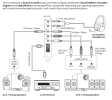
From the soundblaster manual:1728994780300.png

The soundblaster card output is "line level", similar to a CD player, tuner, or tape deck. You are using amplifiers built into the speakers to take the line level output from the soundcard and boost it sufficiently to drive the speakers. If you want to continue to use the computer speakers for the "hifi stack" you need to take a line level output from the hifi and connect it to the speakers. Some stereo gear has a "preamp out" line level output available. You might be able to plug that into a line level input on your PC and use that to get through the Soundblaster. If your PC has no line level input, you'll need a line level switch to switch the speaker input between the soundblaster output and the hifi stack output.

What kind of speakers are you using?
 
If using powered speakers, ignore everything I've said. But why have an amplifier in your hi- fi stack if you are using powered speakers?
 
The problem with you using your PC and your sound card for quality playback is the computer needs to be set to allow the music app to be exclusive. In amazon music this is easy.

"Amazon Music has an exclusive mode that can be used on the Amazon Music app for Windows and Mac to block other applications from playing sounds while music is playing. This mode can improve sound quality and reduce playback errors. To enable exclusive mode, you can:
  1. Click the Devices icon on the player
  2. Check the Exclusive Mode option "
Now, I am sure there are other ways to accomplish this if not using Amazon music, but it will get you started in the right direction. I have myself done what you are attempting, even with the same sound card, and the difference is substantial when in exclusive mode. That being said, there was even more improvement when going to a USB DAC ( I use a Schitt Modi 3+).
 
I don't think you need to buy any computer accessories or add ons. Just some appropriate cables and possibly a mixer.

If your speakers are powered by your amp, the PC audio out should be plugged into the amp as a source as @spark1 says above. However, if you have powered speakers, I suggest a mixer.

I had a similar situation where I needed to plug my electric keyboard and my computer into powered monitors. I have this one but Amazon shows it as unavailable. There are a bunch of alternatives listed below in the "Customers also viewed" section. They all should work for this application.

A mixer will also work if you have no free line level input jacks on your preamp. Plug the PC and one of your other sources (e.g. the CD player) into the mixer and plug the mixer into the CD jacks on the preamp. A very handy device!
 
Last edited:
If using powered speakers, ignore everything I've said. But why have an amplifier in your hi- fi stack if you are using powered speakers?
I was only going to have active speakers because they are going to be also for my PC, unless I can have passive speakers for a PC in conjunction with a powered subwoofer.
 
I was only going to have active speakers because they are going to be also for my PC, unless I can have passive speakers for a PC in conjunction with a powered subwoofer.

Which you can. Just need the proper cable. 3.5mm stereo jack at one end, RCA Left and Right at the other end. I assume your preamp has an available input (excluding phono input). No mixer needed.

Note that the sensitivity of those SVS speakers is on the low side. What is the power rating (RMS) of your amplifier? What will your listening distance from the speakers be?

As I mentioned earlier, you can avoid the need to tether your computer to your stereo system by using a streamer instead of your computer to play music from the internet.
 
Last edited:
If you are going to also use your computer for Zoom meetings and cat videos, I recommend an additional separate powered speaker system just for the PC. Turning on all the hifi stuff just to get the computer to boop when a text comes in is sort of a PITA. A USB teleconference speaker/mike works well for computer sound (I have an ancient Jabra).

I do not have one, but my understanding is that streamers work great. I just checked and I see they are coming down a lot in price. I may have to take another look at them.
 
My working assumption is that the OP wants his PC in the mix because he either a) uses it to stream music from the internet, b) has music stored on it, or both.

My other working assumption is that he wants to get some better, passive speakers for use with his stereo/hi-fi system.

He could just leave his existing powered speakers connected to the PC, but then he's back to needing another device so that he can switch between sending the PC's output to the powered speakers vs his stereo system.

Given that he is looking at spending some significant $ on his passive speakers (and powered sub), I keep coming back to just cutting the PC out of the hi-fi system equation and spending just a bit more to get a Wiim streamer (Pro or Pro Plus) instead to pull music from either the internet or the PC (via his home wifi/LAN). They are inexpensive, easy to set up, easy to use, and work very well.

With this approach, he can simply leave his current powered speakers connected to the PC. No need to connect the PC to the hi-fi system, which in turn means that the PC can be placed wherever he wants, instead of tethered to his hi-fi system. Essentially, he would have two different stystems: 1. his hi-fi system and 2. his PC system.

Sidebar: as for connecting the SVS subwoofer he mentioned, he can use speaker level connections from his hi-fi amplifier, or get a pair of Y cables for his hif-fi pre-amp so that he can connect it to the subwoofer's line level inputs AND to his power amp. The advantage of this arrangement is that it allows him to use the subwoofer's built-in high pass filter, thereby offloading frequencies below 80Hz from his bookshelf speakers and lightening the demand on his power amp.
 
Last edited:
Back
Top Bottom