• The move to the new server is done. There are some software and database maintenance updates in process. This has us passing the hat around to help out. We appreciate any donations. Seriously, even a dollar helps. The payment page may be found here - https://www.audiokarma.org/support.html

DAT recorder needing a bit of help

DAT-junkie

New Member
I have a Tascam DA-20 MK2. Problem is when I play a known good tape.

The vu meters bounce showing audio coming from the head. But no audio output.
also there is a humming that makes me think of a grounding issue.

There aren't too many DAT techs available anymore.

I contacted Eddie Ciletti but unfortunately he's busy 'til sometime next year. but when he is available I must say he is very awesome to deal with.

If anyone has any idea's I'm needing some help.

Thank You.
Shawn
 
Register to hide this ad
Depends where in the playback stream the VU meters are; they may be implemented digitally.

But if they look to be responding correctly to the music being played, then it suggests the tape read mechanism is working, but DAC & downstream is faulty.

If the VUs are connected to the analogue, then look to some output buffer, or possibly a muting circuit.
 
Thank you for the speedy reply..
I have the pdf of the service manual. I'll have to do some studying.
that's great info, appreciated!
 
I haven't tried it yet but I think it's fixed... c937 read as 0ohm no capacitance. not sure exactly but It didn't seem to be correct. ic902 is the DA converter.
I have a donor board so swapped for the same one. (c937)
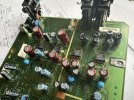
Fingers crossed as I reassemble the DA-20. I attached a pic
 

Attachments

  • IMG_6622.jpeg
    IMG_6622.jpeg
    170.9 KB · Views: 13
I haven't tried it yet but I think it's fixed... c937 read as 0ohm no capacitance
Multilayer ceramic SMD gone short, by the sounds of things, then. Good spot. Supply decoupling cap, perhaps?

A short on the supply might normally be expected to cause other fun & games, but it may have its own local regulator, or series resistor.
 
can you please refrase your reply not sure I understand
It looks like that capacitor is local power supply decoupling for the DAC; the service manual schematic will show you.

A well-designed DAC will use multiple power supplies, to prevent noise coupling to the analogue output. At a minimum, a digital supply and an analogue supply. There may be more supplies for the clock input buffer, and the reference supply.

These supplies are likely to be provided by individual, low noise regulators. If not, they may use a small SMD inductor or even a resistor to provide some LC or RC filtering on the supply.

A shorted capacitor across a power supply is not good (like any unintentional short circuit). Things will get hot, and may burn out. But most voltage regulators these days will be s/c protected. Or a series resistor may limit the current.

So, having hopefully removed the short, you need to check the supplies are in spec. If you can hear something very quiet, look to a muting circuit or a buffer amp; again, check supplies, and trace the signal through the output path.
 
It looks like that capacitor is local power supply decoupling for the DAC; the service manual schematic will show you.

A well-designed DAC will use multiple power supplies, to prevent noise coupling to the analogue output. At a minimum, a digital supply and an analogue supply. There may be more supplies for the clock input buffer, and the reference supply.

These supplies are likely to be provided by individual, low noise regulators. If not, they may use a small SMD inductor or even a resistor to provide some LC or RC filtering on the supply.

A shorted capacitor across a power supply is not good (like any unintentional short circuit). Things will get hot, and may burn out. But most voltage regulators these days will be s/c circuit protected. Or a series resistor may limit the current.

So, having hopefully removed the short, you need to check the supplies are in spec. If you can hear something very quiet, look to a muting circuit or a buffer amp; again, check supplies, and trace the signal through the output path.
Thanks so much !!
 
I think I’m going to check the regulator I found one on the front side of the main board.
Everything I was looking at was on the rear side. And bottom of the board. So idk.
I’ll check it out later on tonight or tomorrow.
 
These are couple pics of my donor board as an example of what I'm seeing. I'm getting myself in gear this morning.
Little background. I'm a pc repair tech but not for board level repairs. So that's why I need an education and clarifying of things I don't understand completely. but these 2 pics I'm going to attach. show (4) 8 pin op amp ic' the pic shows reference to where the regulator is on the board as well. Hopefully this isn't an irrelevant post.
also working on DAT decks is a hobby.
 

Attachments

  • IMG_6629.jpeg
    IMG_6629.jpeg
    154.5 KB · Views: 5
  • IMG_6628.jpeg
    IMG_6628.jpeg
    162.7 KB · Views: 5
What test gear do you have? Multimeter? Scope? Audio probe?

I see a couple of analogue ground traces marked (one 'DA', one '40MHz'). That at least suggests there is a reasonable power/ground strategy to the design.

As I said, first, check the supply voltages on those op amp pins, using a multimeter or scope. The service manual should identify the pins and expected voltages. If all is well, you need to see where the signal goes missing; start at the DAC output, and trace it through to the RCA outputs. That's assuming the digital side is working, which, as the VUs are active, it probably is.
 
I have an oscilloscope and multimeter. no audio probe.
sorry for my ignorance in this. but I am very much appreciating your help!
also the Analog rca in out have broken solder joints at the 3 pin for it. needing to be resoldered
Probably a side issue.
 
Downloaded the service manual from hifiengine. Sadly, no detailed schematics, only block diagrams. So you'll have to do a bit of digging for device pinouts yourself. IC702 & 802 are shown as imaging (low pass) filters on the DAC L/R outputs.

I notice it does have digital out; try feeding that to an external DAC; that will prove that the read and digital side are working correctly.
 
getting frustrated. taking a break.
one good thing is digital in coax is working. no digital out. no analog but like I said taking a break from it.
 
Back
Top Bottom