• The move to the new server is done. There are some software and database maintenance updates in process. This has us passing the hat around to help out. We appreciate any donations. Seriously, even a dollar helps. The payment page may be found here - https://www.audiokarma.org/support.html

Digitizing Vinyl: Recommendations?

As others have mentioned, this sounds like a very nice system. I, too, had 1C's for a few years, and while their performance was, I suppose, optimized with my AVA separates and using the weighted, spiked stands and all the proper tilt and placement guidelines, they were also good-sounding and a ton of fun just sitting on the carpet and driven by an old 25-watt NAD receiver. Without the spiked stands, they were really easy to move around, and sometimes I would have fun making speaker position changes from record to record. I used the long wall of the living room area of my small apartment, and I might separate the speakers a huge amount and angle them in more for large orchestral works, then maybe move them much closer together and point them straight ahead for a small jazz trio. Anyway, very enjoyable speakers whether painstakingly set up or just casually placed here or there as the mood strikes.

I don't think I have any help for you, but I'm curious as to why the Marantz cd player/recorder is irrelevant. Can't that be used to digitize vinyl? I used a similar Sony machine to record vinyl records to cd's so I could play them in my car.
Good thought. I have not tried this in years, but if memory serves, the recording feature of this recorder no longer works properly. I remember giving up on that some years ago. But, you know what... you have made me curious to make one more attempt, so I might.
 
Not a bad point. Of course the OP could also use that for digital recording - and then rip the resulting (Audio-)-CD-Rs/RWs with an optical drive connected to his Macbook Pro. Might even be a better idea than using one of the very cheap USB audio interfaces, such as the one linked to in post #15, as the Marantz recorder would most certainly offer a proper recording level or respectively gain control - and it might also offer better audio quality. But maybe the OP would prefer to not to be limited to 16 bit quantisation and 44.1 kHz sampling rate...

Greetings from Munich!

Manfred / lini
Yeah, as addressed above, that was not working properly, and I gave up on it. But, and sorry for repeating myself, I am curious to try once more.

I like the recommendations provided here folks. Thanks all. I have looked at or will look at each of them. Two of them are in open tabs in my browser.

I do not recall what the problem was with my Marantz recorder anymore. I wonder if maybe it was just picky about the media? I had to buy CD-audio-specific blanks for it to play back discs I burned on my computer. I thought I was using these also in the player itself to record things. But, it's been so long I just don't remember anymore.

I will experiment with this and see what happens. If not, I got some good recs here, and none of them will blow my budget.

You guys are great. Thank you much! (I only wish I could give as much as I get from this site. I’m better at sound quality stuff than the technical stuff when it comes to audio, though. Computers are a different story, but I generally don't like getting into the weeds of the mechanics and electronics themselves of amps, TTs, etc. Although, I got a crash course in TT maintenance not long ago, which some who've been in this thread might recall.)
 
Good day people...

I cannot run out today and purchase anything (Christmas is not far away, and there are some family issues that may require some expenditures). But, I do want to start thinking about this.

My preferred budget is somewhere between US$200 and US$300. To some here, that’s garbage, but I’m an audiophile who cannot spend 5 digits on every component. I try to squeeze out what I can with what I can realistically spend.

Within those constraints, any recommendations? Here’s a brief rundown of my system:

• Pro-ject Xpression II turntable; Denon DL-110 MC cartridge

• Denon AV receiver with a respectable phono section (39 years old, but still humming along with few difficulties)

• Vadersteen 1c speakers

• A Nakamichi cassette deck and a Marantz CD player / recorder, but they’re irrelevant here.

Appreciate it fo
 
I do not recall what the problem was with my Marantz recorder anymore. I wonder if maybe it was just picky about the media? I had to buy CD-audio-specific blanks for it to play back discs I burned on my computer. I thought I was using these also in the player itself to record things. But, it's been so long I just don't remember anymore.

Yup, consumer models would typically require those special Audio-CD-Rs/RWs - while many of the prosumer models would also record on regular CD-Rs/RWs. I'm a bit surprised, that your Marantz wouldn't play regular CD-Rs/RWs, though - as I'd only expect that to happen with discs, that weren't properly finalised or haven't been burned/written in proper CD-Audio format.

Greetings from Munich!

Manfred / lini
 
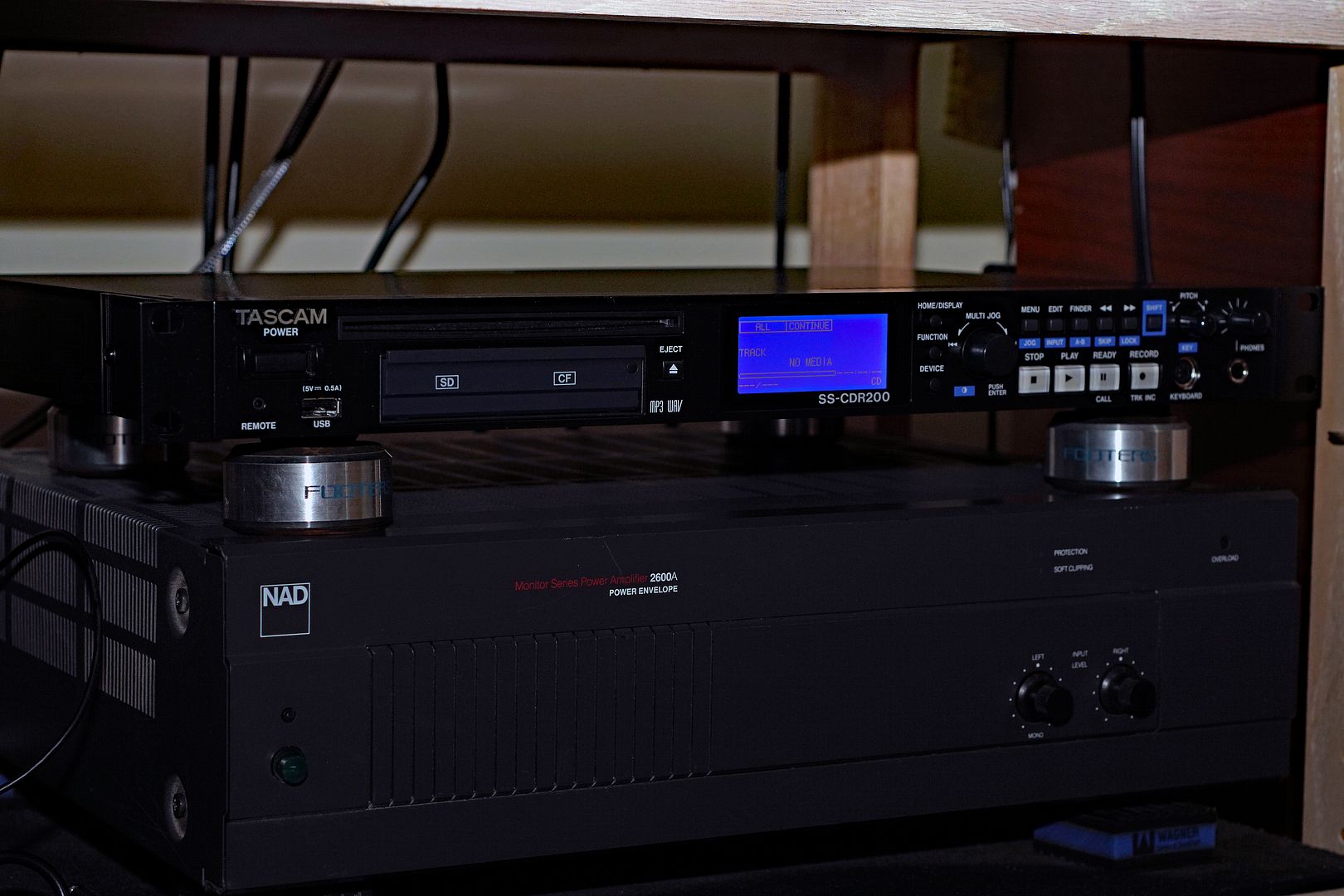
I’ve used my Tascam CDRW900 to make CD copies of records which could then be loaded onto a HD if wanted. I didn’t compress or finesse the music. Not wholly unlike making cassette copies back in the day.
 
I’ve used my Tascam CDRW900 to make CD copies of records which could then be loaded onto a HD if wanted. I didn’t compress or finesse the music. Not wholly unlike making cassette copies back in the day.
Yeah, I’d imagine the process to be the same: One large audio file (see what I did there? audio-file?) on the disc to be captured onto my SSD, and then edited / broken into tracks via Sound Studio. Sheesh... it’s been so long, but I have to think that there’s a manual online somewhere for my Marantz model. Either way, you guys have also provided affordable recommendations for interfaces.

Later that day...

Found a manual online. Printed the recording pages. This will be interesting...
 
Last edited:
Yeah, I’d imagine the process to be the same: One large audio file (see what I did there? audio-file?) on the disc to be captured onto my SSD, and then edited / broken into tracks via Sound Studio. Sheesh... it’s been so long, but I have to think that there’s a manual online somewhere for my Marantz model. Either way, you guys have also provided affordable recommendations for interfaces.

Later that day...

Found a manual online. Printed the recording pages. This will be interesting...
The Tascam easily lets you add breaks between songs on an LP to create tracks. Not one large file. I also can hook a keyboard to it and add labels for tracks and the title of album.

I see Tascam has advances made on these machines now that include sound editing and other features. Mine is 10 years old or so the MKII version, long discontinued.
 
The Tascam easily lets you add breaks between songs on an LP to create tracks. Not one large file. I also can hook a keyboard to it and add labels for tracks and the title of album.

I see Tascam has advances made on these machines now that include sound editing and other features. Mine is 10 years old or so the MKII version, long discontinued.
I have one of these. It is a good unit!

b4206276-7333-423e-a2c5-57e4940db116.jpg


It has both balanced and unbalanced inputs and outputs.
 
ZOOM UAC-232 so you don't have to worry about clipping.

I don't really see much of an advantage of 32 bit float for digitising records. Whereas the disadvante of the UAC-232 would be a pretty sudden ca. +16 or respectively ca. +12 increase in THD at the transition between the higher and the lower sensitivity ADCs, which would appear to be at roundabout 320 mV or respectively 32 mV for the line or respectively the mic inputs (concluding from the graphs in Julian Krause's review). And whether the comparatively low input impedance of 4 kOhm of the TRS/line inputs of the Zoom is a good idea, would also seem questionable.

And apparently the UAC-232 requires the use of a software control panel for setting the behaviour of the direct monitoring, regarding whether it works in mono or stereo mode, whereas some of the competitor's models sport a hardware button for that purpose - which I deem not only more convenient, but also good to have in case one uses an unsopported OS like Linux.

Greetings from Munich!

Manfred / lini
 
Hey guys... Tried the CD recorder today. Seems to have worked!

I am not sure what the original issue was. It may have been something that, years ago, told me that it wasn’t working properly, but it may be because I did not do everything correctly. At this point, I am totally uncertain. But, you guys dropped the thought into my head, and I’m glad you did.

There were two things, however, that bugged me during this process.

1. The Unforgettable Fire just sounded flat, as if the lower and upper frequencies were compressed upward and downward respectively. Changing the loudness setting on my receiver seemed to fix that somewhat. But, this is the second U2 album I’ve bought (last one was “War”, in CD form) that did not sound great.

2. When playing the digital files on my computer from within Apple’s Music app and then later through Sound Studio, the audio coming out of my Altec Lansing multimedia speakers was slightly imbalanced. It seemed, as best as I could tell, that the right channel’s high frequencies were coming through slightly better than they were through the left side. What the heck?? This really put a twinge of disappointment into me. Was something wrong with my turntable? Cables? Receiver? Cartridge?

Was this going on while I was playing the records? I don’t... think so? I thought I heard something while playing the U2 album, but changing my seating position seemed to solve that (sitting up and a bit further back from the speakers seemed to make a difference). Also, when opening the waveform in Sound Studio, nothing looked out of balance. Both left and right seemed evenly amplified. Thirdly, playing the files through my headphones sounded nigh perfect.

So, I’m not sure what’s going on here. Perhaps there’s something wrong with my 26yo computer speakers, or perhaps the cable through which they connect to my computer. I’ll probably play these records again in the near future just to see if anything is off. But, since they sound great through my headphones, I’m at least temporarily calling this a win.

Thanks guys :D:)
 
There were two things, however, that bugged me during this process.

1. The Unforgettable Fire just sounded flat, as if the lower and upper frequencies were compressed upward and downward respectively. Changing the loudness setting on my receiver seemed to fix that somewhat. But, this is the second U2 album I’ve bought (last one was “War”, in CD form) that did not sound great.


Thanks guys
:D:)
How are you connecting the CD burner to the turntable? Are you going through the line-level RCA jack on the receiver or plugging an adapter into the headphone output?

I asked because you said that changing the LOUDNESS setting "fixed" some of the early recording issues. If you are using the headphone jack as the source, you may be getting an impedance mismatch with the burner.

Try using the RCA line-level output as your source.
 
Thanks... I did go through the RCA cables, and was listening through my speakers.

Sorry for not being clearer. The loudness addressed a slightly compressed-sounding signal with the U2 album. The other records I digitized yesterday were fine in terms of overall sound.

The imbalance I noticed later while listening to the digitized recordings from my computer. I tested my TT again with one of the records I’d digitized, and it seemed fine. So, I’m concluding that the imbalance (it’s not extreme, just a slight high frequency weakness in the left channel) is likely a multimedia speaker issue, or a problem with the cable attaching it to my computer. In my headphones, the digitizations sound great.
 
The imbalance I noticed later while listening to the digitized recordings from my computer. I tested my TT again with one of the records I’d digitized, and it seemed fine. So, I’m concluding that the imbalance (it’s not extreme, just a slight high frequency weakness in the left channel) is likely a multimedia speaker issue, or a problem with the cable attaching it to my computer. In my headphones, the digitizations sound great.
Nice!

I use mics to record. So they need to go through a mixer. I can adjust for speaker and mic imbalances and center the imaging. I always use headphones while recording. They're more sensitive at picking up funky stuff than monitor speakers.

Maybe your recording software has a balance feature?
 
Nice!

I use mics to record. So they need to go through a mixer. I can adjust for speaker and mic imbalances and center the imaging. I always use headphones while recording. They're more sensitive at picking up funky stuff than monitor speakers.

Maybe your recording software has a balance feature?
I will tell you that I am all but 100% certain at this point that the problem’s in my computer’s multimedia Altec Lansings. They’re ~26 years old, so I don’t think it would be unheard of for them to start to show some problems. Unless, they normally have lifespans far longer??

I listened to the CD (the one I used for digitizing the records on my Marantz recorder this past Sunday) through my Denon receiver and Vandersteens, and I heard no imbalances.

No, I think my old external computer speakers may be at the beginning of their decline. Time will tell, but I will eventually look for a replacement pair, and one that maybe could be hooked up to both my Macbook Pro and Win11 station. But, I’ll miss these guys, because they harken back to the early iMac days, donning the translucent turquoise color of the original iMac they were hooked up to.
 
I will tell you that I am all but 100% certain at this point that the problem’s in my computer’s multimedia Altec Lansings. They’re ~26 years old, so I don’t think it would be unheard of for them to start to show some problems. Unless, they normally have lifespans far longer??

I listened to the CD (the one I used for digitizing the records on my Marantz recorder this past Sunday) through my Denon receiver and Vandersteens, and I heard no imbalances.

No, I think my old external computer speakers may be at the beginning of their decline. Time will tell, but I will eventually look for a replacement pair, and one that maybe could be hooked up to both my Macbook Pro and Win11 station. But, I’ll miss these guys, because they harken back to the early iMac days, donning the translucent turquoise color of the original iMac they were hooked up to.
Use good headphones and compare them to the speakers if you can.

That will sort out any speaker issues.

Even with mics, you should be able to center the imaging with either a mixer or audio software.

True.
Spandau Ballet's "True." Mobile Fidelity. MFSL 1-152. 1/2-speed remaster. Jack Hunt mastered. 1984.
Run-out: MFSL 1-152 B2 JH/2 H 1 2 1 ✲

7b6e57fe-c67d-48d3-95b2-6d95d486e0fb.jpg

Mics → mixer → Sony camera's MP4 audio → computer (via the camera's portable SD card) → computer MP4 file → YouTube MP4.


:thumbsup:
 
Last edited:
Back
Top Bottom