

You are using an out of date browser. It may not display this or other websites correctly.
You should upgrade or use an alternative browser.
You should upgrade or use an alternative browser.
Fisher tube chassis balance controls
- Thread starter audmod01
- Start date

audmod01
Super Member
A Pic after several Wiring Changes
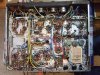
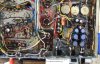
I took this picture today after I had finished adding the negative feedback wires to V5 & V6 plus the screen grid 100 ohm resistors, the 10 ohm cathode resistors, and adding the 25.2VAC filament transformer. I laid the prototype board in place under the power transformer and showed the filament wires coming from V1 & V3 and V2 & V4. For V1 & V3 I connected a yellow wire to their pin 4 lugs. For V2 and V4 I connected a green wire to their pin 5 lugs. One will get connected to the -12VDC output and the other will be connected to the +12VDC output of the LV power supply. It makes no difference which one is connected to + or -.
The terminal strip near where the common lead of the output transformers are grounded also has two wires from the speaker switch that attach on either side of the ground. The left one is for Ch A (left) and the right hand one is for Ch B (right). The old negative feedback wires (blue for left and orange for right) were removed. New wires will be added as necessary to finish rewiring the speaker circuitry.
I hope you can see the text notes OK.
Joe
I took this picture today after I had finished adding the negative feedback wires to V5 & V6 plus the screen grid 100 ohm resistors, the 10 ohm cathode resistors, and adding the 25.2VAC filament transformer. I laid the prototype board in place under the power transformer and showed the filament wires coming from V1 & V3 and V2 & V4. For V1 & V3 I connected a yellow wire to their pin 4 lugs. For V2 and V4 I connected a green wire to their pin 5 lugs. One will get connected to the -12VDC output and the other will be connected to the +12VDC output of the LV power supply. It makes no difference which one is connected to + or -.
The terminal strip near where the common lead of the output transformers are grounded also has two wires from the speaker switch that attach on either side of the ground. The left one is for Ch A (left) and the right hand one is for Ch B (right). The old negative feedback wires (blue for left and orange for right) were removed. New wires will be added as necessary to finish rewiring the speaker circuitry.
I hope you can see the text notes OK.
Joe
Attachments
audmod01
Super Member
Working Under The Chassis
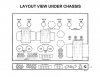
It is easy to get dis-oriented while working under the chassis, so I took the OEM drawing of the top of the chassis and made a mirror image of it and re-entered the text to identify tube position numbering and function. I also used dashed lines to represent the major parts on the top of the chassis. This may help others as they modify their X-101C amplifiers or while servicing them.
Joe
I discovered a mistake I made on the illustration today June 5, 2015 and have corrected it. A new file is now attached. I apologize if this has mislead anyone. I managed to confuse myself due to my own mistake!
Joe
I discovered that the tube lay-out V numbers do not match the schematic or vice versa. At this point I am uncertain which is correct so, I have removed the Under Chassis Layout diagram until I can determine which is correct. June 5, 2015 @ 5:16PM
Joe
I did determine that the error made at the factory swapped the Left & Right channel connections at the Reverb In-Out jacks. Otherwise the chassis was wired correctly, so I have redrawn the Underchassis Layout drawing to reflect the correct function by tube V number and channel identification. 06/21/2015
Joe
It is easy to get dis-oriented while working under the chassis, so I took the OEM drawing of the top of the chassis and made a mirror image of it and re-entered the text to identify tube position numbering and function. I also used dashed lines to represent the major parts on the top of the chassis. This may help others as they modify their X-101C amplifiers or while servicing them.
Joe
I discovered a mistake I made on the illustration today June 5, 2015 and have corrected it. A new file is now attached. I apologize if this has mislead anyone. I managed to confuse myself due to my own mistake!
Joe
I discovered that the tube lay-out V numbers do not match the schematic or vice versa. At this point I am uncertain which is correct so, I have removed the Under Chassis Layout diagram until I can determine which is correct. June 5, 2015 @ 5:16PM
Joe
I did determine that the error made at the factory swapped the Left & Right channel connections at the Reverb In-Out jacks. Otherwise the chassis was wired correctly, so I have redrawn the Underchassis Layout drawing to reflect the correct function by tube V number and channel identification. 06/21/2015
Joe
Attachments
Last edited:
audmod01
Super Member
A Good Picture of Volume & Balance Control Wiring
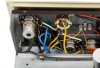
I was lucky enough to find some really clean and good quality pictures of the X-101C from an on-line ad for one. This view was taken from a portion of one of those photographs. It answers many of the questions I had about the wiring to/from and between the volume and balance controls.
Joe
I was lucky enough to find some really clean and good quality pictures of the X-101C from an on-line ad for one. This view was taken from a portion of one of those photographs. It answers many of the questions I had about the wiring to/from and between the volume and balance controls.
Joe
Attachments
audmod01
Super Member
Original versus Modified Speaker & Earphone Connections
I finally was able to do enough point to point wiring resistance checks to determine just how the original speaker and earphone wiring was connected. In the process I have had to identify every wire and marked up the original schematic to show that information. Then I studied Dave's pictures and comments plus the schematic that he and I worked on to develop a multi-step procedure telling how to do it. I am at 13 steps so far and will have to add some more to describe adding the .0024uF, 820pF and 1.2K resistors to the negative feedback circuitry.
I made a sketch of the rear view of the speaker/earphone selector switch and described each wire type and color and will do a drawing in Adobe Photoshop to show its connections. This will help anyone who undertakes that part of the modifications.
I am making progress on my Fisher Kit!
Joe
I finally was able to do enough point to point wiring resistance checks to determine just how the original speaker and earphone wiring was connected. In the process I have had to identify every wire and marked up the original schematic to show that information. Then I studied Dave's pictures and comments plus the schematic that he and I worked on to develop a multi-step procedure telling how to do it. I am at 13 steps so far and will have to add some more to describe adding the .0024uF, 820pF and 1.2K resistors to the negative feedback circuitry.
I made a sketch of the rear view of the speaker/earphone selector switch and described each wire type and color and will do a drawing in Adobe Photoshop to show its connections. This will help anyone who undertakes that part of the modifications.
I am making progress on my Fisher Kit!
Joe
audmod01
Super Member
2SA1013 Transistors
Today I received the 2SA1013 transistors I had ordered from an ebay source. These will replace the KSA10130 transistors listed in the BOM that Dave and I developed for the Fisher X-101C Modifications. It turned out that Mouser had everything else I needed except this one transistor type. Fortunately these were available at a reasonable cost.
Now I have most all the parts I need to begin the LV power supply build plus the Screen Bias circuitry.
Unfortunately I have to stop in order to deal with some black mold that entered our house after recent heavy rains. We repaired the roof leak that caused it, but still have an area less than 10sq. ft. that has to be dealt with. We sprayed the visible area in the bathroom that was affected with a chlorine bleach mix but still have the attic area to inspect and deal with. I have hazmat suit and other supplies on order.
Joe
Today I received the 2SA1013 transistors I had ordered from an ebay source. These will replace the KSA10130 transistors listed in the BOM that Dave and I developed for the Fisher X-101C Modifications. It turned out that Mouser had everything else I needed except this one transistor type. Fortunately these were available at a reasonable cost.
Now I have most all the parts I need to begin the LV power supply build plus the Screen Bias circuitry.
Unfortunately I have to stop in order to deal with some black mold that entered our house after recent heavy rains. We repaired the roof leak that caused it, but still have an area less than 10sq. ft. that has to be dealt with. We sprayed the visible area in the bathroom that was affected with a chlorine bleach mix but still have the attic area to inspect and deal with. I have hazmat suit and other supplies on order.
Joe
audmod01
Super Member
Proceding with the LV Power Supply
Since I now have all the necessary parts to assemble the LV +12VDC and -12VDC power supply I decided to begin today. I had some 1/32 in. plexiglass to use as an insulator under the prototype board, so I cut a piece using the special plastic scoring tool I have owned for many years. Once the piece had been separated from the larger sheet, I held the plexiglass against the prototype board and used the tip of my pencil iron to melt through the plexiglass at the four corners using the prototype board as the guide. It worked flawlessly.
The glue is now curing the plexiglass against the chassis bottom with the twist-ties already in place to secure the prototype board once it is finished and checked out. The wires to the 12AX7 filaments are already in place awaiting the installation of the board.
Joe
Since I now have all the necessary parts to assemble the LV +12VDC and -12VDC power supply I decided to begin today. I had some 1/32 in. plexiglass to use as an insulator under the prototype board, so I cut a piece using the special plastic scoring tool I have owned for many years. Once the piece had been separated from the larger sheet, I held the plexiglass against the prototype board and used the tip of my pencil iron to melt through the plexiglass at the four corners using the prototype board as the guide. It worked flawlessly.
The glue is now curing the plexiglass against the chassis bottom with the twist-ties already in place to secure the prototype board once it is finished and checked out. The wires to the 12AX7 filaments are already in place awaiting the installation of the board.
Joe
audmod01
Super Member
Building the LV Pwr Supply
I spent time today building the LV power supply. I am about 2/3 done so far. I deliberately looked for electrolytic capacitors that were no taller than 15 or 16mm to allow room for them to fit in the vertical space available.
The attached photo shows the board at its current state of completion. The image also contains a knob and some jewels I bought from ebay. The set of jewels contained a green one that is now installed in the front panel. There is an image of that on another thread on AudioKarma.org. The control shown is the volume control I was able to obtain. It has a rather long shaft which may lend it to the use of a microswitch for AC power control. You can see the opening in the rear part of the control showing that it does not have the trip mechanism that would be needed for adding a switch to the rear.
I am slowly getting there.
Joe
I spent time today building the LV power supply. I am about 2/3 done so far. I deliberately looked for electrolytic capacitors that were no taller than 15 or 16mm to allow room for them to fit in the vertical space available.
The attached photo shows the board at its current state of completion. The image also contains a knob and some jewels I bought from ebay. The set of jewels contained a green one that is now installed in the front panel. There is an image of that on another thread on AudioKarma.org. The control shown is the volume control I was able to obtain. It has a rather long shaft which may lend it to the use of a microswitch for AC power control. You can see the opening in the rear part of the control showing that it does not have the trip mechanism that would be needed for adding a switch to the rear.
I am slowly getting there.
Joe
Attachments

audmod01
Super Member
LV Power Supply Installed
Here is a photo that shows the LV power supply installed in the chassis. In my case, one lug of the fuse holder had to be moved to permit the installation of the board. With a slightly smaller board it may have been possible to install the board without having to move the one lug of the fuse holder.
Currently the Op Amp and its small board has not been built up. Consequently the + & - 11.0VDC tie points on the LV board are not connected to anything.
There is one blue wire running from the LV power supply board to the other side of the chassis where the Screen circuitry will be added. Parts are on hand, but need installation. I will take more pictures as work progresses.
Joe
Here is a photo that shows the LV power supply installed in the chassis. In my case, one lug of the fuse holder had to be moved to permit the installation of the board. With a slightly smaller board it may have been possible to install the board without having to move the one lug of the fuse holder.
Currently the Op Amp and its small board has not been built up. Consequently the + & - 11.0VDC tie points on the LV board are not connected to anything.
There is one blue wire running from the LV power supply board to the other side of the chassis where the Screen circuitry will be added. Parts are on hand, but need installation. I will take more pictures as work progresses.
Joe
Attachments

audmod01
Super Member
Disaster and Recovery
Yesterday I was working on the Earphone/Speaker Selector Switch doing the re-wiring that is part of Dave's modifications on the X-101C. In the process of moving some wires, one of the lugs of the switch broke off! I was really irritated, so I stopped. This morning after receiving an e-mail back from Dave in which I had mentioned the broken switch, he suggested I try removing some of the ceramic material around the broken off lug, enough to solder a wire back to the remaining metal.
Today, I looked at it again and thought, I have nothing to loose. I will either repair this switch or totally destroy it. After formulating a plan, I first snipped a small strip of copper from some copper grounding strap material I have left from grounding my antenna tower outside (part of a lightning protection design). I carefully folded it in half and used my Hemostats (also called Siezers in electronics) to hold it while I drilled a tiny hole in it with my Dremel tool. I prepared a short piece of green stranded hook-up wire and inserted it in the hole. I dipped the end in some rosin flux I have and carefully tinned just the end with the wire wrapped through the hole in the copper strap. I used my flush cutting wire cutters to carefully trim the slit at the other end of the folded copper strap and spread it enough to slide over the remaining metal of the switch lug. I pre-tinned the remaining part of the switch lug. I dipped the end of the folded copper strip with the green wire attached in some rosin and using some tweezers held it in place while applying heat and a small amount of solder with my pencil iron. The connection quickly mated and cooled down. A gentle tug on the end of the wire proved it is securely attached.
Using stranded wire will allow me to make a connection to the 25 ohm 5W resistor and avoid applying any added stress to the repaired lug of the switch. If Dave had not mentioned the possibility, I might not have thought of this method of repair. He is a truly ingenious person! So after some time and effort I saved buying another switch to repair this amplifier.
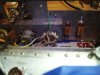
In the attached photograph, you will see that I also replaced both of the slide switches to the right of the Earphone/Speaker Switch. It was another case of having to use special grinding bits with diamond material to grind away the ends of the steel rivets that held the old switches.
I can use one of the slide switches as an AC On-Off switch. The contacts are rated at 5A or more so they should work fine. I wondered how the contacts could be rated so high until I looked closely at the construction of the switches. Instead of the usual raised surface seen in most slide switches, these have a raised blade as the business end of each contact. The moving contact of the switch slider consists of a U-shaped channel that slides along the entire raised business end of each contact and makes contact with both sides of the contact. These switches were from Antique Electronic Supply and were originally used by Fender Guitar Amplifiers. These are significantly better than most other slide switches I have seen.
I saved the OEM Fisher slide switches for the long slider tab that they came with. That tab is the usual Fisher reddish-brown color that makes them pretty much Fisher specific. The slide switches I am installing will all match each other and have black tabs and are slightly shorter, but still easy to operate.
I may get the rest of the speaker wiring mods finished today and take some more pictures.
Joe
Yesterday I was working on the Earphone/Speaker Selector Switch doing the re-wiring that is part of Dave's modifications on the X-101C. In the process of moving some wires, one of the lugs of the switch broke off! I was really irritated, so I stopped. This morning after receiving an e-mail back from Dave in which I had mentioned the broken switch, he suggested I try removing some of the ceramic material around the broken off lug, enough to solder a wire back to the remaining metal.
Today, I looked at it again and thought, I have nothing to loose. I will either repair this switch or totally destroy it. After formulating a plan, I first snipped a small strip of copper from some copper grounding strap material I have left from grounding my antenna tower outside (part of a lightning protection design). I carefully folded it in half and used my Hemostats (also called Siezers in electronics) to hold it while I drilled a tiny hole in it with my Dremel tool. I prepared a short piece of green stranded hook-up wire and inserted it in the hole. I dipped the end in some rosin flux I have and carefully tinned just the end with the wire wrapped through the hole in the copper strap. I used my flush cutting wire cutters to carefully trim the slit at the other end of the folded copper strap and spread it enough to slide over the remaining metal of the switch lug. I pre-tinned the remaining part of the switch lug. I dipped the end of the folded copper strip with the green wire attached in some rosin and using some tweezers held it in place while applying heat and a small amount of solder with my pencil iron. The connection quickly mated and cooled down. A gentle tug on the end of the wire proved it is securely attached.
Using stranded wire will allow me to make a connection to the 25 ohm 5W resistor and avoid applying any added stress to the repaired lug of the switch. If Dave had not mentioned the possibility, I might not have thought of this method of repair. He is a truly ingenious person! So after some time and effort I saved buying another switch to repair this amplifier.
In the attached photograph, you will see that I also replaced both of the slide switches to the right of the Earphone/Speaker Switch. It was another case of having to use special grinding bits with diamond material to grind away the ends of the steel rivets that held the old switches.
I can use one of the slide switches as an AC On-Off switch. The contacts are rated at 5A or more so they should work fine. I wondered how the contacts could be rated so high until I looked closely at the construction of the switches. Instead of the usual raised surface seen in most slide switches, these have a raised blade as the business end of each contact. The moving contact of the switch slider consists of a U-shaped channel that slides along the entire raised business end of each contact and makes contact with both sides of the contact. These switches were from Antique Electronic Supply and were originally used by Fender Guitar Amplifiers. These are significantly better than most other slide switches I have seen.
I saved the OEM Fisher slide switches for the long slider tab that they came with. That tab is the usual Fisher reddish-brown color that makes them pretty much Fisher specific. The slide switches I am installing will all match each other and have black tabs and are slightly shorter, but still easy to operate.
I may get the rest of the speaker wiring mods finished today and take some more pictures.
Joe
Attachments
audmod01
Super Member
Finishing Speaker Sw Wiring Mods
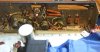
Today I finally finished the wiring mods on my X-101C. The modification instructions for this area are located on the X-101C Improvements thread that Dave Gillespie started on the Fisher Forum here. The final part of the modifications involved adding three 4.7K ohm 1W resistors to feed the Center Channel output terminals at the back of the chassis. You can see those resistors in these two pictures. Two of them are located at the front terminal strip near the 330 ohm 1W resistors and the 25 ohm 5W resistors near the Earphone/Speaker Selector Switch and the Earphone Jack.
In the pictures the dial lamp & socket were moved aside so the wiring changes would be easier to see. The Red Fabric covered wire that comes from Ctr. Ch. Speaker Terminal Y is originally connected to Lug 10 of the Earphone/Speaker Selector Switch. It was carefully disconnected from that lug after solder was wicked away. The free end of this wire was then connected to the junction of the two 4.7K ohm 1W resistors connected to the junctions of the 25 ohm and 330 ohm resistors near the earphone jack. Heat shrink tubing was used to insulate the connection which stands freely in the air.
Now that I have finished this part of the modifications, I can move on to repairing the signal wiring to the push-button function selector switches.
Joe
Today I finally finished the wiring mods on my X-101C. The modification instructions for this area are located on the X-101C Improvements thread that Dave Gillespie started on the Fisher Forum here. The final part of the modifications involved adding three 4.7K ohm 1W resistors to feed the Center Channel output terminals at the back of the chassis. You can see those resistors in these two pictures. Two of them are located at the front terminal strip near the 330 ohm 1W resistors and the 25 ohm 5W resistors near the Earphone/Speaker Selector Switch and the Earphone Jack.
In the pictures the dial lamp & socket were moved aside so the wiring changes would be easier to see. The Red Fabric covered wire that comes from Ctr. Ch. Speaker Terminal Y is originally connected to Lug 10 of the Earphone/Speaker Selector Switch. It was carefully disconnected from that lug after solder was wicked away. The free end of this wire was then connected to the junction of the two 4.7K ohm 1W resistors connected to the junctions of the 25 ohm and 330 ohm resistors near the earphone jack. Heat shrink tubing was used to insulate the connection which stands freely in the air.
Now that I have finished this part of the modifications, I can move on to repairing the signal wiring to the push-button function selector switches.
Joe
Attachments
audmod01
Super Member
Push-button Function Switch Re-connected
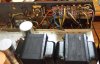
Today I managed to get the audio coax cables repaired and reconnected to the push-button function switch - all except one coax and one orange plastic coated wire and one white plastic coated wire. There was enough of each coax left that I was able to carefully trim back a small portion, strip the signal leads and tin the wires, add a small hook on each and solder them back together. Then a very small piece of white 3M electrical tape was used around the joined signal leads, followed by solder tacking the ground drain wires back together. I used color heat shrink sleeving to cover each reconnected area and then applied heat. The finished repair areas are sturdy and very close to original jacket colors. Each one has a colored stripe that helps signal tracing in these amplifiers, so keeping the original coax cables is a plus.
I think the orange wire may go to the mode switch and the white wire may have been connected to the tape/phono equalization switch. I am not going to be using a tape head for playback, so I will install new magnetic phono equalization parts right at the preamp tubes. The original tape head inputs will become extra magnetic phono inputs. I still have these remaining wires to trace out and locate where their source or destination is. That should not take too much trouble.
I will be working on the mode switch wiring to get the functionality right before I install it in the chassis. Because I am not using an OEM switch the wire connections from switch section to section will be different, but the end result will be the same.
Joe
Today I managed to get the audio coax cables repaired and reconnected to the push-button function switch - all except one coax and one orange plastic coated wire and one white plastic coated wire. There was enough of each coax left that I was able to carefully trim back a small portion, strip the signal leads and tin the wires, add a small hook on each and solder them back together. Then a very small piece of white 3M electrical tape was used around the joined signal leads, followed by solder tacking the ground drain wires back together. I used color heat shrink sleeving to cover each reconnected area and then applied heat. The finished repair areas are sturdy and very close to original jacket colors. Each one has a colored stripe that helps signal tracing in these amplifiers, so keeping the original coax cables is a plus.
I think the orange wire may go to the mode switch and the white wire may have been connected to the tape/phono equalization switch. I am not going to be using a tape head for playback, so I will install new magnetic phono equalization parts right at the preamp tubes. The original tape head inputs will become extra magnetic phono inputs. I still have these remaining wires to trace out and locate where their source or destination is. That should not take too much trouble.
I will be working on the mode switch wiring to get the functionality right before I install it in the chassis. Because I am not using an OEM switch the wire connections from switch section to section will be different, but the end result will be the same.
Joe
Attachments

This piece is really a Phoenix, rising out of little more than ashes. When you consider just how much work it is taking to put Humpty-Dumpty back together again -- AND -- just how poor the result was from tearing it apart to modify it in the first place -- AND -- how poorly it was stored, the progress you've made is nothing short of amazing!
Dave
Dave
tube-a-lou
Addicted Member
Wow your doing a great job on that amp, in my case it took me about a year to
get my KX200 amp working and sounding the way I like, and with the help of Dave
and everybody here your's should sound great, keep at it.
Tube
get my KX200 amp working and sounding the way I like, and with the help of Dave
and everybody here your's should sound great, keep at it.
Tube
audmod01
Super Member
Replacing missing Mode Switch
The Mode Switch and Volume Control were missing from this Fisher X-101C when I received it. I am now at the point where I can move forward with audio circuitry corrections only by adding a new Mode Switch and Volume Control. I found a suitable replacement switch which I can wire to take the place of the original switch. Like the original, it operates with 30 degree increments and stops at position 3 which is the Stereo Reverse position. Position 1 is Monophonic operation which has two 100K ohm resistors that combine the stereo signals to create monophonic sound to following stages.
I made a diagram to help me understand how to connect the switch and it is attached.
Joe
The Mode Switch and Volume Control were missing from this Fisher X-101C when I received it. I am now at the point where I can move forward with audio circuitry corrections only by adding a new Mode Switch and Volume Control. I found a suitable replacement switch which I can wire to take the place of the original switch. Like the original, it operates with 30 degree increments and stops at position 3 which is the Stereo Reverse position. Position 1 is Monophonic operation which has two 100K ohm resistors that combine the stereo signals to create monophonic sound to following stages.
I made a diagram to help me understand how to connect the switch and it is attached.
Joe
Attachments

audmod01
Super Member
Control Shafts & Front Panel
I finished wiring the logic of the rotary switch that I bought and have it temporarily mated to the chassis and installed the front trim panel on the front of the chassis. The shaft of the switch I have will have to be trimmed and a flat made on the end to receive a knob.
On the X-101C the volume and mode switch control shafts project in front of the front trim panel. I measured the distance a standard Fisher volume knob for this model pushes onto the volume control shaft. A little bit of space needs to be allowed between the front surface of the trim panel and the back side of the knob outer flange. It looks like the shaft needs to be no longer than to 1/2 inch from the front surface of the trim panel. I don't want to cut the mode switch shaft too short and have the knob push up against the front panel and scratch it.
Can someone confirm this? To do so, just slide the knob off and measure with a ruler to the end of the volume or mode switch shaft.
Thanks in advance.
Joe
I finished wiring the logic of the rotary switch that I bought and have it temporarily mated to the chassis and installed the front trim panel on the front of the chassis. The shaft of the switch I have will have to be trimmed and a flat made on the end to receive a knob.
On the X-101C the volume and mode switch control shafts project in front of the front trim panel. I measured the distance a standard Fisher volume knob for this model pushes onto the volume control shaft. A little bit of space needs to be allowed between the front surface of the trim panel and the back side of the knob outer flange. It looks like the shaft needs to be no longer than to 1/2 inch from the front surface of the trim panel. I don't want to cut the mode switch shaft too short and have the knob push up against the front panel and scratch it.
Can someone confirm this? To do so, just slide the knob off and measure with a ruler to the end of the volume or mode switch shaft.
Thanks in advance.
Joe
audmod01
Super Member
Mode Switch Pre-wired & In Place
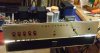
Here are some pictures of the Mode Switch pre-wired and in place before cutting the shaft. The switch material is G10 fiberglass which will be quite durable. The shaft is way more than long enough.
I just managed to order a Fisher concentric type bass control with the special brass adapter shank that extends the shank far enough forward for it to protrude through the front trim panel. When I get this on hand, the brass part is what I really need, so the bass control may not be used. I can add a thin flat washer and the 3/8 in. nut in front of the trim panel to hold it against the 1/4 in. standoffs located behind the front trim panel. On the X-101C there are no screws to hold the top portion of the front trim panel to the standoffs. On the lower portion of the front trim panel there are two screws that do hold it against the lower standoffs. These screws are concealed behind the front door.
Next step is to trim the switch shaft and add the flat for the knob.
Things are moving forward.
Joe
Here are some pictures of the Mode Switch pre-wired and in place before cutting the shaft. The switch material is G10 fiberglass which will be quite durable. The shaft is way more than long enough.
I just managed to order a Fisher concentric type bass control with the special brass adapter shank that extends the shank far enough forward for it to protrude through the front trim panel. When I get this on hand, the brass part is what I really need, so the bass control may not be used. I can add a thin flat washer and the 3/8 in. nut in front of the trim panel to hold it against the 1/4 in. standoffs located behind the front trim panel. On the X-101C there are no screws to hold the top portion of the front trim panel to the standoffs. On the lower portion of the front trim panel there are two screws that do hold it against the lower standoffs. These screws are concealed behind the front door.
Next step is to trim the switch shaft and add the flat for the knob.
Things are moving forward.
Joe
Attachments

The light at the end of the tunnel shines ever brighter on this unit. The transformation is amazing to watch!
Dave
Dave
audmod01
Super Member
More Mode & Other Controls Added
Today I managed to cut the mode switch shaft and add a flat to it, then installed its knob. I added a flat to the balance control which had a shaft that was rather short. I had to add an extension for the flat metal tab inside the knob so it would mate with the flat on the balance control shaft. It turned out I made the flat on the balance control 180 degrees out compared to the pointer on the knob, so I rotated the control in the mounting hole. It wound up causing the balance control terminals to line up in the same direction as all the other Fisher installed controls, so in the end my mistake actually produced a more desirable result from the wiring standpoint.
Next will come wiring the controls that I have in place followed by determining how to mount the volume control I have and use the micro-switch to turn the AC on and off.
Joe
Today I managed to cut the mode switch shaft and add a flat to it, then installed its knob. I added a flat to the balance control which had a shaft that was rather short. I had to add an extension for the flat metal tab inside the knob so it would mate with the flat on the balance control shaft. It turned out I made the flat on the balance control 180 degrees out compared to the pointer on the knob, so I rotated the control in the mounting hole. It wound up causing the balance control terminals to line up in the same direction as all the other Fisher installed controls, so in the end my mistake actually produced a more desirable result from the wiring standpoint.
Next will come wiring the controls that I have in place followed by determining how to mount the volume control I have and use the micro-switch to turn the AC on and off.
Joe
Attachments

audmod01
Super Member
Touch-up Paint Color
The Fisher X-101C is rather unique due to the paint that was used on the front inside behind the door. I have replaced the OEM slide switches and of course the rivets had to be drilled/ground away in order to do so. The M3 screws I used to mount them are a bright finish and I want to find a touch-up paint that will match that paint color as closely as possible. I noticed that the color of the plastic used for the knobs is the same color. Has anyone found a paint color that matches? If so what is the brand, finish and color of paint chosen? The paint appears to be a satin or perhaps flat finish - not shiny.
Thanks in advance.
Joe
The Fisher X-101C is rather unique due to the paint that was used on the front inside behind the door. I have replaced the OEM slide switches and of course the rivets had to be drilled/ground away in order to do so. The M3 screws I used to mount them are a bright finish and I want to find a touch-up paint that will match that paint color as closely as possible. I noticed that the color of the plastic used for the knobs is the same color. Has anyone found a paint color that matches? If so what is the brand, finish and color of paint chosen? The paint appears to be a satin or perhaps flat finish - not shiny.
Thanks in advance.
Joe