Agree. My DB is “unmolested”. Stock as they day it was made. The rest of the unit has had lots of work though. A lot of broken traces, transistors and such. It led a hard life of neglect and misuse, but the DB came through it all ok.I still think that to properly restore an X0X0 DB model, the Dolby function should be restored, not bypassed. That was my original intent with the 8080DB I just bypassed. I went the bypass route because this particular Dolby board had serious issues to begin with. I had to replace a number of the geranium diodes and I was never certain about the quality of the no name geranium diodes I bought to replace them. I've successfully pinned several Dolby boards but this one continued to have intermittent drop out issues. It sat on my bench open for years and I would fiddle with when I was in the mood. The board had been reworked so many times that more manipulation could cause as many issues as it solved. So I used the nuclear option and just bypassed the damn thing.
- Pete


You are using an out of date browser. It may not display this or other websites correctly.
You should upgrade or use an alternative browser.
You should upgrade or use an alternative browser.
Fix that Sansui 9090db with a Bad db board
- Thread starter CharlieBee
- Start date
I've got two 9090DB's Just completed installing a completely new redesigned (no pinning necessary) Dolby board into the first unit after moving all the components over and replacing the caps and transistors. Worked perfectly. Second unit did the same work but no audio is coming out but instead of troubleshooting it I'm just going to just do the bypass. But to answer your question. Setting the switch to off on the Dolby board does not bypass the Dolby board. The signals still go through the board and the rotary switch which is always an issue and needs to be disassembled and thoroughly cleaned to get the signals to pass through. Getting the switch apart is a major process. The signals exit through the Dolby board not the switch board no matter what position you put the switch in.I think I’m misunderstanding what was written in post #34:
if the dolby switch is set to “off”, the dolby board is already bypassed? Assuming there is no faults in the other circuits/wiring external to the dolby board?
Wouldn’t that eliminate the need to repin/reflow the dolby board if the sound fails?
I must be not understanding that fully. If that is the case, then all these guys have been reworking dolby boards all these years when they didn’t have to?
Something is just not tracking there for me. Not trying to call anyone out, I’m just trying to understand the workings going on in there.
Its more just me being curious than anything else as my 8080db board hasn’t caused me any issues. But I also do keep the dolby selector in the off position so maybe I just don’t know theres an issue? At least I’ve never noticed any problems on the other positions when/if I rotate through them…

Radiosky
Active Member
Pete, et al,Remove the ribbon cable from both the Dolby board AND the push switch board. The jumpers are all installed on the push switch board in the indicated holes formerly used by the ribbon cable. When you are done with this bypass, the Dolby board is completely disconnected. You can just clip off the loose yellow and black wires. You don't have to install it at all except without it, there will be open holes in the face plate.
He used red and blue to indicate the left and right channels continuing the Sansui format for the gray wires and blue signal wires. The white wire in each of shielded signal wires, is the wire carrying the signal. They go to pins one and two. Blue to one and Gray (red) to two. The other mesh wire is the ground. You will need to extend the ground wires to reach the indicated ground point on the push switch board.
Thank you for the clarification about disconnecting the ribbon cable from both the switch board and the Dolby board to effect the bypass as mentioned. Also yes about the blue / gray(red) relocation and the braided wire as the ground.
Is there a good thread to research/read on doing a Dolby Board repining? I’ve looked but yet to locate that
Also pondering the new Dolby boards available and moving components over to that as a fix
I’m weighing options about best solution
What time I have is limited to weekends due to work.
This 9090DB is unmolested as best as can tell and is worth the effort for sure.
The Rec-1 & Rec-2 switch positions & Rec Cal Tone & Meter buttons do not create the test tone
Audio (both channels present) is very faint. I’ve cleaned switches and buttons over and again.
I’ve been reading what I can find on the available solutions to these issues but have not been able to improve the situation past the symptoms listed above.
Advice is appreciated – I’m something of a newbie but have experience.
Progress on this 9090DB is stuck I think until one of the three options (re-repin, bypass or new Dolby board) is implemented.
Is there a good thread to research/read on doing a Dolby Board repining?
Thanks Folks!
Radiosky
Active Member
Great - thanks a lot Biroc
That will help locate and tick them off for sure.
I'm working on the RF power supply and re-capped the tuner board over the weekend.
Really not finding may bad values amongst the caps expect the 1uF orange caps often had high ESR values.
The transistors on the RF power board all gave strange or damaged readings
Working myself up for taking on the Dolby Board!
That will help locate and tick them off for sure.
I'm working on the RF power supply and re-capped the tuner board over the weekend.
Really not finding may bad values amongst the caps expect the 1uF orange caps often had high ESR values.
The transistors on the RF power board all gave strange or damaged readings
Working myself up for taking on the Dolby Board!
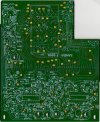
For reference, here is a rev A board with the same number marked
Sansui 9090DB Dolby Board Specialist needed!!!
Hi I have the common Dolby Board Blues here. Rescued this 9090DB and got it up and running with the help of (Paul) ManyMoonsAudio. I have read all of the FAQ pages but still need some guidence. Here is what is happening. On FM left channel is good, right channel is down in level, if I remove...
audiokarma.org
Radiosky
Active Member
Thanks Folks
Really appreciate the graphic info and accounts of getting things to work
it seems a single channel dropping out is a normal Dolby Board symptom.
This unit has both channels playing but both very, very, faint
Loudness button doesn't do anything
No Dolby signal when engaging that button
No change in meter reading to Dolby position when button is engaged
The Dolby switch doesn't seem to make any difference in anything - I'm wondering if its a bad connection/operation there
The faint signal is present at the Preout 2 ports
External signal ported into MainIn ports are amplified.
I've read other accounts of people finding a solder short on a board - Tone board for example.
Really appreciate the graphic info and accounts of getting things to work
it seems a single channel dropping out is a normal Dolby Board symptom.
This unit has both channels playing but both very, very, faint
Loudness button doesn't do anything
No Dolby signal when engaging that button
No change in meter reading to Dolby position when button is engaged
The Dolby switch doesn't seem to make any difference in anything - I'm wondering if its a bad connection/operation there
The faint signal is present at the Preout 2 ports
External signal ported into MainIn ports are amplified.
I've read other accounts of people finding a solder short on a board - Tone board for example.
I did the bypass on my 9090DB, no audio, I'm double checking everything, question, on your bypass schematic you have 51 and 52 circled in blue. Is there a need to do something with that? only because of the comment: "can it be ignored, No" Also, you mention 33 and 34 are the outputs to F-2693. is that a reference for testing? ThxI just performed this bypass on an 8080DB and it works as advertised. It completely eliminates the Dolby board and maintains the tape functions. The Dolby board is completely disconnected, no wires attached. I've installed it back in the chassis so it's rotary switch and pots fill the holes in the face plate but they have no function at all.
To relocate the shielded Gray and Blue shielded inputs, the ground for the shields needs to be extended. In my case, I also had to do some therapy on the tiny traces on the push switch board. They lift and break so easily.
This 8080DB has a history of Dolby issues. I've been messing with it for years. Originally it had failed diodes and other components on the Dolby board. I completely rebuilt it, pinning all the pass throughs but never completely eliminated random channel drop out. I was faced with having to redo it. With the bypass, it's singing out of both channels and the tape functions work. Thank you for solving this vexing problem.
- Pete

The blue rectangles indicate points that are not involved in the bypass. I don't recall what was in 51 and 52 to begin with but it's not really important, they are not part of the bypass. 33 and 34 are not involved either. You can completely remove the ribbon cable from the push switch board and the Dolby board. It's not needed after this bypass. He used red to indicate the gray input wire and blue for the blue input wire.
Did you have sound from both channels before you started the bypass? If not, you may still have that dropout in the signal path before it gets to the Dolby board. If you had a good signal before doing the bypass, and you confirm it's wired correctly check/ clean the push switches.
- Pete
Did you have sound from both channels before you started the bypass? If not, you may still have that dropout in the signal path before it gets to the Dolby board. If you had a good signal before doing the bypass, and you confirm it's wired correctly check/ clean the push switches.
- Pete
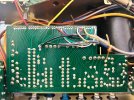
I just completed the bypass on a 9090db. Dolby board is completely removed. but no audio on right channel. When I press the mono button, both channels have sound on all functions. I double checked my bypass wiring. This was the original issue before removing the Dolby board. Any suggestions?

plyzo
Super Member
Have you tried running just audio into Main In?I just completed the bypass on a 9090db. Dolby board is completely removed. but no audio on right channel. When I press the mono button, both channels have sound on all functions. I double checked my bypass wiring. This was the original issue before removing the Dolby board. Any suggestions?
Thanks for responding, I'm not sure what that is. Can you clarify?Have you tried running just audio into Main In?
plyzo
Super Member
On the back of the unit you should have a jumper going from PreOut to Main in. If you remove those and just run an audio source like your phone to it that you can control volume. If issue remains then you have something going on with the driver board. If you don’t have an issue then it’s before the driver board which could be your tone board or something with dolby board still.Thanks for responding, I'm not sure what that is. Can you clarify?
If you get sound from both channels when pressing the mono switch, the dropout is occurring in the preamp prior to the mono switch. It means both channels of the amp are working so no need to feed a signal into the main-in.
If the the Dolby board has been properly bypassed, that pretty much leaves the eq board F-2653, the function switch on that board and the wiring to and from it. But before diving into that, check your solder joints for the bypass. Take a wooden stick and press each new solder joint to see if it changes anything.
- Pete
If the the Dolby board has been properly bypassed, that pretty much leaves the eq board F-2653, the function switch on that board and the wiring to and from it. But before diving into that, check your solder joints for the bypass. Take a wooden stick and press each new solder joint to see if it changes anything.
- Pete
Got it, thanks I'll test it over the weekend.On the back of the unit you should have a jumper going from PreOut to Main in. If you remove those and just run an audio source like your phone to it that you can control volume. If issue remains then you have something going on with the driver board. If you don’t have an issue then it’s before the driver board which could be your tone board or something with dolby board still.