• The move to the new server is done. There are some software and database maintenance updates in process. This has us passing the hat around to help out. We appreciate any donations. Seriously, even a dollar helps. The payment page may be found here - https://www.audiokarma.org/support.html

G-9000 No Right Channel - Microphone ribbon cable?

Okay, we're getting somewhere on two levels;

I've got the oscilloscope properly set up - I've set the probe from 10x to 1x and checked calibration for a square wave. Now I have a very clean sine wave from the signal generator - it no longer looks fuzzy, And, now I know that the 10x setting is an attenuator, so not looking at signal noise, but a nice sine wave. And this is with the probe grounded to chassis and touching the micrograb directly to solder joints. Duh!

Secondly, the signal travels through the mic preamp board to the FM accy board and onto the Tone Control Board.

On the Volume Control sub board, things change. There is a signal going into and also coming out of the left channel of the volume pot (attenuated when volume turned down) but nothing going in or out the right channel. Turning the Balance pot, the signal drops when turned to the right but remains hot when the pot is twisted to the left channel.

So, getting it narrowed down. Until you point me in the next logical direction, I am going to keep probing around on my own.

Thank you, Lee!
 

Attachments

  • web-Sine-Wave.jpg
    web-Sine-Wave.jpg
    126.9 KB · Views: 16
  • web-Volume-Pot-trouble-font.jpg
    web-Volume-Pot-trouble-font.jpg
    138.8 KB · Views: 15
Found it!

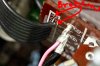
Broken wire on the ribbon cable from the Tone Control Board to the Volume Sub Board - yep, Right channel. I've complained about the stress these ribbon cables place on the pcb - well, this wire broke just before the pcb. So, I could quick - booger a jumper wire, or I could more responsibly repair it by unsoldering the ribbon cable, strip long leads and resolder it along the traces, if there's damage to the pcb. When moving around the Volume board, you can see the stiff, rigid, unforgiving (like when I called my ex-wife a fat pig) ribbon cable lifting up where it's soldered to the pcb. But the solid wire ribbon cable just isn't long enough. I could replace it with a softer, flexible ribbon cable of twisted wire, like an old computer EIDI drive ribbon cable, and prevent this from happening again.

web-Vol-Right-Ch-broken-wire-G-9000-font.jpg
 
Most Excellent. And you got your feet wet so to speak in scope use. For your information, the next step would be to continue on from the balance control with power to the unit on as once the signal gets into the tone board it is amplified by the circuits at certain points. You would start by setting those two points on the balance control out to the same level on the scope as the input side to the volume control using the volume control to set the signal level. The reason I had you work with power off at first was to get you used to setting and using the scope and preventing you from seeing weird traces pop up as you in-inadvertently probed the wrong points, some of which carry voltages above what you are looking for. Useful in checking other parts of the circuit but distracting when we are learning our way around the scope.
 
Lee and everyone, thank you so much for helping me repair this G-9000 - I'm the second owner, have had it, gosh, at least ten years, and finally have it right.

Sure thing about having the power off, Lee.

Now I can set this up in the living room and not have to endure the crappy Sony surround sound system with terrible EQ settings - I would run a turntable, cassette and yes, 8 track through an old Realistic DJ mixer to the "video" input, just to get some sound. Lately I've been using my brother's Pioneer SX-450 into some RTR 300D speakers (from the G-9000 original owner), and the cracked foam surrounds have fallen off the cones - another project. Need to lube and clean up my brother's Dual 1237 (early model) and pair it with the SX-450 in my office, and continue using the Akai AP-D3 turntable with the Sansui (great space saving TT). There's a Technics direct drive TT to repair, an old Bohsei reel to reel and a Teac 4300 to repair, and the Sansui orig owner's Dual 604 direct drive to repair. I did get my neighbor's Akai GX-215D Reel to Reel cleaned up and working better (he bought it in Japan, I think, when serving in the Air Force), and it would be cool to have a full audio system going with reel, cassette, TT, etc. Might still need that little mixer to handle some of this traffic.

And the 8 track recorder I got going last week is a Craig H260 recorder I picked up for free in 2002 - it was stuck in Track 4 with no right channel, so I /cleaned/lubed/played with the cam wheel adjustment in relation to the azimuth to get it working. Learning how to repair cartridges and have a (new in the box from eBay) Kraco player to install in my '75 Spitfire - so I can record some 8 track tapes and listen to them in the little car. Too much info for sure, but having repaired five or six pieces of stereo equipment the past few weeks has been fun and rewarding, and now I have an oscilloscope (my girlfriend's deceased husband's) to work with. It's opened a new door for me, thanks to y'all.

Got the ball rolling! I'll need some more oscilloscope skills for finding bad components but we'll cross that bridge later. Been putting off these repairs for years - procrastination!
 
Catphish Phil,

can you tell me how you were able to properly examine the volume dial board - it’s so buried in that mess of the universe that is the belly of the beast. Am I correct in assuming you stripped this thing down and disassembled it very much completely; prior to being able to locate, remove and properly examine that board you mentioned discovering a disconnected portion of a ribbon cable.

have no right channel on my 9KDB and been chasing this one for over a year. The unit has been in my family longer than the 41 years I have existed. I am not about to give up - even if I must completely disassemble and rebuild it. I discovered the edge wire of the mic ribbon cable was dangling in the universe open ended and unconnected. Of course I thought hell yes I got this now. But upon reboot-no dice. Same issue as before. At least I didn’t mess her up any worse.
So I’m struggling to reach that epiphany where you realize what one minuscule wire is not making enough contact and messing up the entire works.
 
Back
Top Bottom