• The move to the new server is done. There are some software and database maintenance updates in process. This has us passing the hat around to help out. We appreciate any donations. Seriously, even a dollar helps. The payment page may be found here - https://www.audiokarma.org/support.html

Harman Kardon A402 - dead left channel aux1 only

sony ps 2000

AK Subscriber
Subscriber
Hello AK Members:

Here is my HK A402 that I picked up at an estate sale a few years back for around $80-. It's only been semi-functional since I have had it and I want to finally fix it up good. I am pretty much still a beginner at electronics. I think I have the necessary tools and can do some basic testing, but I am in need of guidance for diagnosing the specific issue.

IMG_5260.jpg

IMG_5261.jpg

Issues:

1. AUX1 input, left channel does not produce any signal output;
2. All inputs have a low "tape hiss" type sound which you can hear during lulls/gaps in the music;
3. After powering amp off, music continues for 5-7 seconds, then fades out.

Testing output power clipping:

AUX1: L = no wave; R = 19.98v
AUX2: L = 19.36v; R = 18.55v
TUNER: L = 19.58v; R = 19.43v

This amp is rated 40 watts per channel, so all these measurements are within spec except for AUX1/LEFT.

I did not take voltage output measurements on the Tape Input or Phone Input. For the Tape input music plays fine through both Left and Right Speakers. For the Phono input I am not sure how to do the signal input for that.

I also tested preamp for AUX1 alone by pulling out the jumpers. The result was the same: Left Channel--no wave, Right channel--normal looking wave.

Apart from these issues, it sounds great when you play through the other inputs at volumes high enough to cover the "tape hiss."

Wondering where do I start diagnosis? What is the next set of tests I should do?

Any advice or assistance would be greatly appreciated. Thanks
 
  • Like
Reactions: mbz
Register to hide this ad
Don't know the amp

Such symptoms are typically caused by dirty function selector or bad solder connection on the AUX RCA
Suggest work the AUX function selector 10-20times noting any change either good or bad would point to the switch. Also inspect AUX1 RCA solder joints. You could try continuity check from the input AUX1 RCA to the function selector and compare with right channel.
 
Thank you for the reply. I forgot to add that into my first post. My first step was to open the amp up and thoroughly work all switches and pots with contact cleaner.

While I am always on the lookout for loose solder joints, I will check again because I was not specifically looking in that area.
 
OK great call, that was quick!

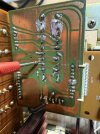
So went to do the continuity check on the selector switch to AUX1 input , and it looks like someone has definitely been here before.

SELECTOR SWITCH BOARD
IMG_5281.jpg
There was continuity for the rt channel fine.


IMG_5284.jpg
For the left channel, there was only continuity of the copper trace up to a certain point.

IMG_5286.jpg

So the trace is missing and not making it to the contact point.
 
  • Like
Reactions: mbz
So do I do this with a jumper, or try to repair the trace?

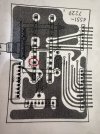
I am also bit confused because the remaining part of the trace which has continuity does not appear to be connected--it's not soldered to any pin like the others?


badtracecrop.jpg
 
Here is the schematic view of the other side of that board, and I *think* where I circled is connected to the trace in question on the other side. If it is not connected to anything, then that trace had continuity from somewhere else bc of all that sloppy solder maybe?

slctrboardmarkup.jpg
 
All those non-connected eyelets look like test points in post #5. Post #6 is even more confusing as it shows a connector on the right edge which then go to the non-connected eyelets. Check if you have a double sided board, tracks on the component side, that would then make sense.

If you need to jumper then use insulated wire between solder blob and the "non-connected eyelet"

that trace had continuity from somewhere else bc of all that sloppy solder maybe?
Yeah, I was going to mention the solder splatter, need to clean it up, some IPA and a old toothbrush
 
IIRC the eyelets are feed throughs, to traces on the other side of the PCB. I agree - insulated piece of wire from the "solder blob" to the eyelet trace.
 
IIRC the eyelets are feed throughs, to traces on the other side of the PCB. I agree - insulated piece of wire from the "solder blob" to the eyelet trace.
It does appear that the trace continues through that hole to the other side of the PCB. But the image from the Service Manual above shows the other side of that PCB (not the side with the broken trace), and the trace from that particular hole is not connected to anything. I will double check all of this later to day to make sure my information is accurate.

What type of wire should I use for the jumper? solid or stranded? and gauge?

I have a bunch of very thin gauge pre-cut jumper wires from a bread board kit, would those be OK?
 
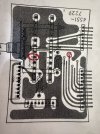
OK I had it all mixed up. Below shows where both sides of that broken trace come out on the other side of that board.

pcbmarkup2.jpg
 
  • Like
Reactions: mbz
OK so here's what I did:

IMG_5305.jpg

Not great, but a little bit neater than my predecessor.

I ended up using a strand from ethernet. It's the only solid copper conductor I had handy that was thin enough gauge. Is this Kosher? If not, what wire should I order to replace it.

Tested it, and now AUX1 Left channel gets same output volts as other inputs (~19.5) :cool:

So now what remains:

1. Background hiss;
2. music plays after power off;
3. Rt speaker channel is delayed for 5 or so seconds when I power on.

How do I approach these remaining problems? Full re-cap?

Also I see re-build kits on EB for $175- or $75- for just caps. Is this deal for suckers? If I buy all these pieces individually is it much cheaper?
 
OK so here's what I did:
Looks fine

1. Background hiss;
Use scope to determine if it's L or R channel and also note appearance then trace audio path to see where it is introduced, eg, Q409c and Q409e. If both channels are affect then look at power supply +/-B1 on amp boards, there will be ripple but look for addition noise.
2. music plays after power off;
This is not an issue, common for amps without a protect circuit, main caps still have charge and need to run down.

3. Rt speaker channel is delayed for 5 or so seconds when I power on.
Normally that would be a positive, that's what protect circuits do, provide a short mute period to allow the amp to stabilize. Do you get any noise/pops out of the left channel which I assume plays audio immediately on power on?

The unit does not have a relay based speaker protection circuit. It relies on a bimetalic circuit breaker. If you plan to keep the unit then maybe consider fitting a chi speaker protection kit, found on the bay anywhere from about USD10-15, I normally add a seperate transformer and fuses, job done for about USD20?
 
Thanks again for the continued guidance.

This part is a bit slower for me as try to figure it all out.

In addition to that, my assessment of the symptoms has changed:

1) The hiss itself may have been from the music source I was using. I am now testing with my iphone wired into it and I am not getting the hiss;

2) But I notice the Left speaker channel produces low static and light popping. This happens even when volume is turned all the way down.

My lack of knowledge becomes very apparent when trying to properly following the signal path. I was able to determine:
1) The static was visible on the scope at Q410 b and e;
2) The static was not visible at the Preamp to Main Amp jumper.
3) Most of the other transistors seem inaccessible without me risking shorting stuff out.

Is the idea to go in descending order from there (Q408, Q406, etc....)? And do I just test the b and e legs?

MAINAMPmarkup.jpg
 
  • Like
Reactions: mbz
This board is plugged in at the bottom, so if I remove it for better access I won't be able to test it in circuit.

IMG_5334.jpg
 
1) The static was visible on the scope at Q410 b and e;
Was it visible at Q410c?

Appreciate access is difficult, possibly long nose minnigrabbers?

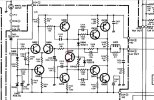
The typically candidates for such noise is the differential pair Q2, Q4 but it could be any of the preceeding transistors. Can you try testing for noise at R412 and R416 marked.
 

Attachments

  • HK402diff.png
    HK402diff.png
    367.8 KB · Views: 1
Progress Report:

Static Noise viewable on scope on all legs of Q410 including c

Also R412 and R416 static viewable on scope

still working...
 
Q410 will have the same AC signal as the output so doesn't rule it out or in, however if there were a problem, I would expect there to be flaky current issues also - blown fuses or outputs, or dim bulb light going up and down.
The problem with your method of trouble shooting is that all amplifier signals are tied together with feedback, so hard to just look at some thing because everything gets affected. Most likely suspect is still the input pair - 402 and 404. One trouble shooting technique is the "chop stick" test - tapping on components with a hard non conductive object (like a chopstick...) and see if problem can be induced by components. Also, sometimes heat or cold can isolate bad component. Semiconductors are far more likely to cause this type of problem, but you never know. My 2 cents.
 
Hitting parts with a chopstick....now that's more within my skillset. :)

I did try that in a few spots and I couldn't get any reaction. But I will try again on Q402 and Q404 specifically.
 
Try the freeze spray, a short burst while monitoring the scope, give it 5-10 seconds for the transistor to fully recover before moving to next. Keep it short since don't want to "shut down" the transistor, just look for a change in the noise level.
 
Back
Top Bottom