

You are using an out of date browser. It may not display this or other websites correctly.
You should upgrade or use an alternative browser.
You should upgrade or use an alternative browser.
Harman Kardon CD491
- Thread starter vegas79
- Start date
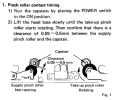

genesmasher
Active Member
So what did you do to restore function?
Before you start messing with pinch roller adjustment, did you try to adjust head azimuth? This deck does NOT have muffled sound, when properly set up.
There is a reason why power regulators are mounted on a huge heat sink. They are supposed to get hot.
Replace with this LED (make sure polarity is correct and put 470ohm-1KOhm resistor in series).
Before you start messing with pinch roller adjustment, did you try to adjust head azimuth? This deck does NOT have muffled sound, when properly set up.
There is a reason why power regulators are mounted on a huge heat sink. They are supposed to get hot.
Cassette well light is not working as well.
Replace with this LED (make sure polarity is correct and put 470ohm-1KOhm resistor in series).
genesmasher
Active Member
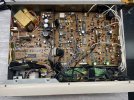
Have a look at this photo and set your internal VR's to roughly these positions as a starting point (playback amp VR's are towards the right side of main board). Adjust head azimuth by ear, using a recording you know well, preferably commercial pre-recorded tape with a lot of high frequencies. 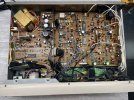
Attachments
Haven't completely solved the sound issue yet. I was simply putting a bit of pressure (with finger pushing toward back of the player) on the upper right side of a prerecorded tape, while playing, and the sound improved quite a bit. The highs are not quite there yet. Have never had an occasion to adjust azimuth before so this will be a learning experience. Will try again tomorrow.
genesmasher
Active Member
There is a small hole above the STOP button. You will need a small flat head screwdriver to adjust the azimuth screw, during playback.
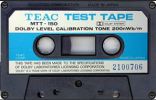
Apparently there is a way to adjust playback amp levels with a Multimeter. Set MM to AC and attach red probe to TP501 and black to chassis. Correct voltage should be 580mv using VR101. Repeat with TP502 and VR102. The trick is that you are supposed to be playing a special tape MTT-150, whatever that is. I am wondering if any good prerecorded tape or test tone will work?Have a look at this photo and set your internal VR's to roughly these positions as a starting point (playback amp VR's are towards the right side of main board). Adjust head azimuth by ear, using a recording you know well, preferably commercial pre-recorded tape with a lot of high frequencies. View attachment 3011144

Calibrated tape for setting Dolby levels, 400Hz tone. (Not used for azimuth alignment)... playing a special tape MTT-150, whatever that is.
Last edited:
genesmasher
Active Member
1. Adjust head azimuth by ear.
2. Set the VR101 and 102 as in the picture above - about 75-80% of max value. This will get your playback level to within 10-20% of spec.
3. Set VR252-257 to ~60% of max value. This will set your bias to within 10-20% of optimal for all tape types.
For more accurate adjustments you will need test tapes and calibration hardware/software. Good luck finding a genuine MTT-150. Last one sold on ebay went for $150.
2. Set the VR101 and 102 as in the picture above - about 75-80% of max value. This will get your playback level to within 10-20% of spec.
3. Set VR252-257 to ~60% of max value. This will set your bias to within 10-20% of optimal for all tape types.
For more accurate adjustments you will need test tapes and calibration hardware/software. Good luck finding a genuine MTT-150. Last one sold on ebay went for $150.
Any suggestions on a replacement lamp for the tape monitor indicator light?So what did you do to restore function?
Before you start messing with pinch roller adjustment, did you try to adjust head azimuth? This deck does NOT have muffled sound, when properly set up.
There is a reason why power regulators are mounted on a huge heat sink. They are supposed to get hot.
Replace with this LED (make sure polarity is correct and put 470ohm-1KOhm resistor in series).
Could someone please upload Service Supplement 1 and Service Supplement 2 for the Harman Kardon CD491 from HiFi Engine (https://www.hifiengine.com/manual_library/harman-kardon/cd491.shtml)? My account was deleted and new registrations are currently closed. Thanks in advance!