• The move to the new server is done. There are some software and database maintenance updates in process. This has us passing the hat around to help out. We appreciate any donations. Seriously, even a dollar helps. The payment page may be found here - https://www.audiokarma.org/support.html

Headshell/tonearm hum due to dirty or loose connection?

bscepter

Active Member
I've recently run into a background hum problem with my Thorens TD 145 (TP-16 tonearm/Ortofon Super OM 20 cart). After removing the headshell to invert the deck and adjust the suspension, I now have a background hum that gets worse (or at least different) when you touch the tonearm and especially if you move a finger underneath the cart right by the headshell leads.

I tried sort of messing with the connections - moving them slightly to make sure none was touching another one, and that caused the left channel to cut out completely. Then I did the same thing again, and the left channel came back, but the hum was still there. (It's background 60-cycle hum, not buzz and is tolerable but annoying)

I've heard that the TP-16 can have issues with the headshell connection getting dirty and that cleaning the female connectors with Deoxit can help. My question is, can I simply give a squirt of Deoxit right into the headshell receptor on the tonearm? Do I need to replace the leads? They look fairly tight and aren't touching each other.
 
Register to hide this ad
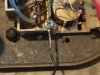
BTW, here's a pic I took of the internals when I was adjusting the suspension. Does anything look out of sorts? I did move that pink wire away from the bearing well, in case that was it, but it didn't change anything.

KZWAiAC.jpg
 
I just noticed the ground wire (mine has a separate ground wire that was installed by the previous owner) looks as if it may be touching that suspension spring right by it. would that do something?
 
you need to check the grounds in the table. verify that the arm ground and the turntable ground are part of the ground wire added. if you don't remove the cover over the connections, we'll never know.

Then check that each phono cable connector has a great connection from the RCA plug all the way to the cartridge tags.

I guess that other thread just didn't get the answer you needed. Hope you get this solved.
 
you need to check the grounds in the table. verify that the arm ground and the turntable ground are part of the ground wire added. if you don't remove the cover over the connections, we'll never know.

Then check that each phono cable connector has a great connection from the RCA plug all the way to the cartridge tags.

I guess that other thread just didn't get the answer you needed. Hope you get this solved.

Thanks. Yeah - I moved it to this thread since it was a specific issue, and the other thread was about footfall-induced skipping.
 
yes, that is why I didn't complain about multiple posts but I'm still looking for the picture of the under cover connections for the phono cable in the table. But that means flipping it over again. But if it hums, you might as well pull it out and get it working right.
 
yeah, inside the box shot ought to explain a lot.

I did have some crust in the joint between the headshell and the plug on mine. Its meant to rotate so you can fix the azimuth but after decades they get pretty stuck. If you can dribble a small amount of contact cleaner and/or lube (a combo cleaner + lube is perfect here) under the wave spring that holds that together and get it to rotate that a little bit it should sort out any bad connections at the shell itself. That wouldnt' account for hum when touching the arm tube though. Just make sure you get the bottom of the cartridge level relative to a record when you put it back.
 
That wouldnt' account for hum when touching the arm tube though.

It's weird, though, that it happened all of a sudden and only after I removed and reattached the headshell. I suppose I could've inadvertently knocked something loose in that internal box when I had the cover off though.
 
I would be willing to bet this is related to your headshell leads based on your description of the channel cutting out when you touched them (sounds like one or more of them are shorting). I would get a replacement set and see if the problem goes away. Also, I believe that Thorens generally grounded the table through the right channel so often times you will induce a ground loop if you hook up a ground wire from the table itself. Try it with and without the ground wire connected to your amp.

I know what you are going through. These Thorens are such nice tables when everything is working properly and they are setup correctly. I dread every time I have to take one down and open it up to fix or adjust something. Something else always seems to happen, one little issue leading to the next. You'll get it eventually, good luck...
 
These Thorens are such nice tables when everything is working properly and they are setup correctly. I dread every time I have to take one down and open it up to fix or adjust something. Something else always seems to happen, one little issue leading to the next. You'll get it eventually, good luck...

You're right; they do sound great. I had no idea they were so finicky though.
 
The Thorens TD 145 in stock form is grounded by a gold wire that comes out of the tonearm with the other four wires. If it is stock, the gold should be soldered to the green wire (right channel ground). The Thorens service manual offers a solution that many Thorens owners have completed. The solution in the service manual is to unsolder the gold wire from the green wire and unsolder the lug that is attached to the green wire. You then solder the gold wire to the lug and from the lug you add a ground.
 
Last edited:
IMAG0832.jpgI performed this today, but have yet to test it. But I had a similar issue where there was a constant hum and touching the headshell would make it worse. This photo is after the fact.
 
Here's the Thorens official word on how the external ground lead should be done

http://www.theanalogdept.com/images/spp6_pics/TT manuals/Thorens/svc_man145_160_165web/Page06 copy.gif
Thanks. Yes, I've seen this. My question is, why did it suddenly start humming if it's a case of it needing to be rewired? The deck was dead-quiet until I took the headshell off and opened it up to adjust the suspension. After that, the hum appeared. Either way - I'll open it up again at lunch today to have a closer look.

Thanks for all the input. This forum has been invaluable.
 
Don't know if this will apply here as I'm not familiar with Thorens, but I've had two AR-XAs that exhibited the same type of behavior when fiddling with the headshell. I finally took some fine emery cloth to the headshell contacts, very lightly, just to remove any possible oxidation. It cleared up the issue on both tables.
 
Don't know if this will apply here as I'm not familiar with Thorens, but I've had two AR-XAs that exhibited the same type of behavior when fiddling with the headshell. I finally took some fine emery cloth to the headshell contacts, very lightly, just to remove any possible oxidation. It cleared up the issue on both tables.

Considering this deck is about 45 years old, that could certainly be a possibility. I tried a little Deoxit, but that didn't do the trick. I just applied it with a Q-tip, though. Maybe it could use some actual abrasion.
 
Oh, man - you guys are gonna laugh. So, I opened it up again and took off the cover under the tonearm (see pic). I noticed that the shielding of one of the RCA interconnects was soldered to the ground terminal - along with the ground wire. I remember reading that these decks originally had an integrated ground in one of the interconnects. So whoever added the new cables also added a ground wire - but also grounded the shielding. So I unhooked the ground at the receiver and... voila... NO HUM. (I swear I tried unhooking it before and it buzzed, but who knows.) So I'm guessing the reason it didn't hum before is I didn't have the ground wire hooked to the terminal properly. Either way, it sounds great now!

I feel like an idiot, and I appreciate all the input in this thread.

8wduxWr.jpg
 
You had a ground loop with both grounds hooked up and it only took us a few posts for you to find the time to get inside again and poke around. We are tough taskmasters at time, not knowing the time available for those doing the work. But you got that cover off, looked over the issue and got the unit hooked up correctly for use with the new receiver. Enjoy!!
 
Back
Top Bottom