• The move to the new server is done. There are some software and database maintenance updates in process. This has us passing the hat around to help out. We appreciate any donations. Seriously, even a dollar helps. The payment page may be found here - https://www.audiokarma.org/support.html

Help a Newbie, Mcintosh MX136 Won't play sub in Pure Stereo Mode

DenverJW

New Member
Hi,

I'm a newbie to this forum and have a decent but not expert level understanding of audio, and I'm not very experienced with AV Processors. I have a MX136 with Harbeth Compact 7 speakers and a small B&W active Sub with a crossover. The selected settings in the MX136 are Small L and R speakers and Sub is ON, all other speakers are set to None. I'm not getting any sound from the SUB in Pure Stereo Mode. The sub is set for "Auto on" mode with the crossover set to its "Highest Setting" of 140 on the amp plate. Am I doing something wrong? Sub works in the Digital Domain. The Sub light is illuminated in Pure Mode, but no sound. additionally, can someone explain how the 2 Channel and Pure modes are different in my set up?

After reading the posts and manual It looks like the 2 channel mode plays full range out of my L and R speaker with no Sub and the Pure Mode (is supposed to) plays a crossed over frequency to the L and R and sends some of the lower range to the Sub? But all I get is the sub light and no bass action in Pure Mode. Thanks, John
 
Register to hide this ad
I had the same issue when I had a sub hooked up to my DVD Player which also does my home theater processing. It would only play the sub on the LFE track. I ended up using the second set of full range outputs on my receiver to run the sub. It is also nice because I can turn it on and off with a button on the front of my receiver. SVS and other places make RCA Y-connectors meant to combine the LFE and full range signals into the sub, too (I have not tried that yet). I am not sure if the MX136 has a second output or not - I would guess that it does - but that is the standard workaround if you can't configure it in the processor.

-Geoff
 
Hi Geoff, thanks for the tip. When you say 2nd set of outputs are you attaching to Zone B? And where are you hooking the single RCA cable?
 
Pure Stereo Mode = Stereo signal source coming from an analog audio input without processing.
2 Channel Mode = All multichannel sources combined to 2 channel in stereo mode
DSP Stereo = Digital audio input is in Stereo Mode

DenverJW,
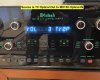
I do have a MX136 in the kids media room and I can attest that you will have to spend "MANY HOURS" with the MX136 to comfortably know what it can do and not do. Since you can hear your subs in other modes, lets try something simple thinking all connections are correct within the menus for speaker setup. For this example my MX136 is receiving an optical output from an 80 inch Samsung LCD going into an Optical input on the MX136. I labeled this TV Optical on the display.
1. Use your remote from here on
2. Place your system into your stereo mode where subs "Are Not" playing
3. Is your SUB light lit ? If No = Stop Here. If Yes = continue to # 4 on.....
4. Bring up the volume to a comfortable level
5. Now, with your remote press your "TRIM" button
6. Navigate to the "SUB" option and using your + and - adjust until you have a 5+ or 6 + on the menu for Sub
Note: There is a bass Trim Level and a SUB Trim (among others) evel so just bring both of them to +5 or +6 to avoid any confusion.
7. If you still don't hear your sub, then unplug your sub AC power and plug back in (this may trigger the sub)

Let me know what happens and hope this helps. Good Luck

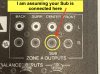
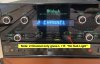
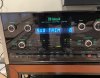
Sub Out.JPG TV Optical Out.JPG 2 Chan.JPG Pure Stereo.JPG
 

Attachments

  • Sub Trim.JPG
    Sub Trim.JPG
    110.4 KB · Views: 6
  • 2 Chan  No Sub.JPG
    2 Chan No Sub.JPG
    124.3 KB · Views: 6
Last edited:
Thank you Hofvox! I will try this and let you know. I do have the sub hooked up as in your photo, one RCA to Sub out Zone A. And I am using a DAC with analog output to the analog inputs on the MX136, also just the 2 front speakers and a sub at this time. But I can try my Samsung digital out and let you know.

Right now, my output format lights illuminate the same as yours in Pure Mode and in 2 Channel mode the sub light goes off and just the L and R are illuminated.

Do you know if 2 channel mode and Pure modes bypass the digital processor when I use analog signal? the goal is to use my analog input, avoid digital processing and have the Sub play the low notes my speakers won't reproduce, this is anything under 45hz. You guys are amazing, thank you for the help!!
 
Pure Stereo Mode bypasses the processor ( I am pretty sure I read that in the manual ).

Also try: Using your remote, Press your MODE button and watch the red LED light up as you go around the circle of Music 1, Music 2, Music 3, Music 4, External, Cinema 2, Cinema 1 and the WATCH closely as you press looking for Stereo. As you press the remote MODE button may have default set to have Pure Stereo and then Press Again you get 2 Channel. Use the one with the SUB lit, make music play and press TRIM button to get to the Sub Menu and go to +6 or +8. Let me know.

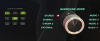
Surround Mode with Sub Lit.png
 
Hi Geoff, thanks for the tip. When you say 2nd set of outputs are you attaching to Zone B? And where are you hooking the single RCA cable?
The receiver doesn't have zones, it just has two variable pre-outs. I looked at a pic of the back of the MX136 and I think the zones would work, but I don't know what kind of signal it sends. I also saw that there are balanced and unbalanced pre-outs for Zone A, maybe using those would work? Just a thought. I think it would be best if you could do it in the processor (you would get more control over the sub output). Using two outputs is more of a work-around. It would probably be worth trying both though and see which one you like best.

-Geoff
 
So I finally got around to working on this and you suggestions were very helpful in learning tons about my Mcintosh, thank you!!.

When I use the Digital out from my DAC to a Digital IN on the MC136 the Sub works in ALL modes except 2 Channel. When I use the analog output on my DAC to a analog input on the MC136 the sub works in all modes EXCEPT Stereo-"Pure Stereo" and Stereo-"2 Channel" mode.

And the crazy part is the manual says "when the input source is Analog and the Surround Mode is set to Stereo (the alphanumeric display will indicate PURE STERO) the crossover frequency will default to 80Hz (I'm assuming it also crosses at 80Hz in "2 Channel" since this is also a stereo mode, haven't tested this yet)

So it sounds like when I hook up my DAC with Analog and Choose Stereo - "Pure Stereo" mode OR Stereo - "2 Channel" the MX136 crosses over at 80Hz and does not let me use a Sub, hence my problem. I want to use analog input and the Mcintosh Crossover and my Sub....Strange, why can't I use a Sub when I am using my DAC? Especially when the MX136 crossed over the frequency from an analog source.

I would like to use the MX136 in pure stereo audio path with no digital processing.

Looks like the only way to use the mx136 pure stereo audio path with no digital processing is to have Large speakers that play down to 35Hz or below and set them up in the Menu as Large.

Is it correct in thinking the Stereo Mode is a "pure stereo audio path" with no digital processing when the display reads PURE and when it reads 2 Channel ?
 
Pure Stereo Mode = Stereo signal source coming from an analog audio input without processing.
2 Channel Mode = All multichannel sources combined to 2 channel in stereo mode
DSP Stereo = Digital audio input is in Stereo Mode
"See photos above"

Ok, here is the Hail Mary that actually McIntosh told me years ago (it actually worked): Tie in all the available DAC outputs into the MX136 and it should find what it needs. So if you have an Optical, Coax, RCA outputs......... connect them. What DAC unit are you using? Did I miss that ?
 
Its a Bluesound Node 2i DAC/Streamer. I'll try all the connections and see what happens. Do you know what the Pure Stereo and 2 Channel modes are? What is the difference? Does one or both send a full range signal to my L and R speakers no matter what settings I have selected?

I may just give up on the Sub, if I do, what settings should I have in the set up menu to get a full range signal to my L and R speakers and what mode should I listen to if I want the cleanest path, I just want a simple full range signal with no digital processing and no crossover from the MX136. Like any plain old Preamplifier.

I purchased this mainly for the analog path it offered without digital processing, the remote, the treble adjustments, bass adjustments and the Phono stage. I do not care about the home theatre processing at this time, although it may get some use in the future.
 
Most Subs have their own built in X-Overs. And most also have a variable X-Over adjustment as well.

And again, most Subs have both left and right line input jacks. Buy two Y-Cables, one Male to two Female RCAs from your MX-136 front stereo mains out, and then run two Sub Cables to the Subs inputs.

You can set your front speakers then to whatever you like, small, large.
 
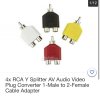
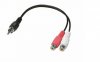
Ditto on markd51's suggestion since it is an easy solution if you don’t want the MX136 to manage the subs. The below photos will allow you to split the signal and available on Ebay:

FDF832A0-AE68-4B22-B81A-35B01A37D3FA.jpeg 3A322077-DDC2-467D-8F5D-3C475C0A5CB3.jpeg 596BA56B-2E46-4534-B9D3-40E0FEB122E5.jpeg
 
Last edited:
Ditto on markd51's suggestion since it is an easy solution if you don’t want the MX136 to manage the subs. The below photos will allow you to split the signal and available on Ebay:

View attachment 2133515 View attachment 2133516 View attachment 2133517

I was once using such in the second image you have posted. They were Monster Cable Brand, and used them with my McIntosh MX-130 as I wasn't so much liking the Sub Out, and thought the Sub did sound better and as well more powerful a with use of a simple Splitter.
 
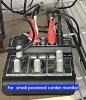
Yepper.......... I prefer the "All Brass" type in the 2nd photo. Here is a photo of a my garage setup with a MA6100. I like the spatial sound when the Phase 180 button is engaged. I needed to add a small center channel (as well as sub) so I double stacked piggy backed the splitters. Now I have signals going to a Sub and to a Center powered monitor via a mixer with equalizer. Lots going on but it works.

IMG_4277.JPG IMG_4278.JPG
 
Back
Top Bottom