• The move to the new server is done. There are some software and database maintenance updates in process. This has us passing the hat around to help out. We appreciate any donations. Seriously, even a dollar helps. The payment page may be found here - https://www.audiokarma.org/support.html

Help please. Sansui AU 719 kill left channel

Mauricio719

New Member
Good evening, the left channel of my Sansui 719 died, it does not emit any sound through the speaker or through the left headphones, I can get stereo sound from the tape jacks to the computer; disassemble and check the fuses, all marked correctly; also check the rectifier (without disassembling) and frame well; when I try to check the transistors (without disassembling) apparently they all behave the same, I didn't find any anomalies there.

This was due to an accident I had connecting a second turntable, the speakers were getting a lot of noise from the phono input so I turned the volume down to check for ground, when I thought it was ok I turned the volume up to about 80%, in At that moment I think that a cable making a bad contact generated a noise that put the amplifier in protection mode, I turned it off and on but the left channel was gone.

I have been following you for more than 15 years, I have supported myself in learning about audio and in this case to make the first revisions, there are still many things that I do not understand about electronics but at least I want to review it as far as I can.

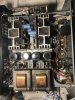
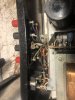
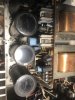
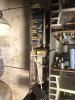
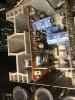
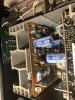
look for burns or filters with bad appearance but I did not find, I share some photos.

Thank you
 

Attachments

  • IMG_0615.JPEG
    IMG_0615.JPEG
    64.3 KB · Views: 37
  • IMG_0616.JPEG
    IMG_0616.JPEG
    48.2 KB · Views: 35
  • IMG_0628.JPEG
    IMG_0628.JPEG
    166.7 KB · Views: 36
  • IMG_0629.JPEG
    IMG_0629.JPEG
    105.1 KB · Views: 36
  • IMG_0630.JPEG
    IMG_0630.JPEG
    125.2 KB · Views: 33
  • IMG_0632.JPEG
    IMG_0632.JPEG
    114.3 KB · Views: 35
  • IMG_0633.JPEG
    IMG_0633.JPEG
    144 KB · Views: 35
  • IMG_0634.JPEG
    IMG_0634.JPEG
    146.1 KB · Views: 34
  • IMG_0635.JPEG
    IMG_0635.JPEG
    115 KB · Views: 35
  • IMG_0637.JPEG
    IMG_0637.JPEG
    172.6 KB · Views: 37
Register to hide this ad
This needs detailed troubleshooting with a digital multimeter, don't know your skill level in doing basic transistor tests, measuring power supply voltages and following signal path. Without these skills it will be quite difficult to find the problem. If you are not experienced, you can start with youtube videos, or reading some older threads about troubleshooting the 719. There is no way for us to tell you what is wrong by looking at these pictures.
 
First: does the amplifier come out of protection?
What you could try to narrow it down is switch the small signal connectors to your driver board. ( The small connectors on top of the photo of the bottom of the amplifier).
This would give left to right / right to left switch which could help decide if the problem is in the pre amp section or driver board/ outputs.
If this is conclusive ( if the dead channel moves from light to left it is in the left channel pre amp boards, if not in the driverboard/ output) you should start with checking the corresponding power supply.
 
This needs detailed troubleshooting with a digital multimeter, don't know your skill level in doing basic transistor tests, measuring power supply voltages and following signal path. Without these skills it will be quite difficult to find the problem. If you are not experienced, you can start with youtube videos, or reading some older threads about troubleshooting the 719. There is no way for us to tell you what is wrong by looking at these pictures.

CrSENS I am a systems technician, I know very little about electronics, I know how to solder, I have a multimeter and I know how to follow instructions, I checked the rectifier based on a thread here, but don't take it off the board; the transistors measured the same (the multimeter didn't whistle) but I didn't download them from the board either, you can recommend me a video and a thread suitable for newbies, I've searched but haven't found anything I can do beyond the two tests you mention.
 
First: does the amplifier come out of protection?
What you could try to narrow it down is switch the small signal connectors to your driver board. ( The small connectors on top of the photo of the bottom of the amplifier).
This would give left to right / right to left switch which could help decide if the problem is in the pre amp section or driver board/ outputs.
If this is conclusive ( if the dead channel moves from light to left it is in the left channel pre amp boards, if not in the driverboard/ output) you should start with checking the corresponding power supply.

GrisPato The amplifier is no longer in protection mode, only the right channel is heard, could you tell me what the photo of the controller board is
And then how could I check the power supply.
 
Screenshot_20220902-213836_Chrome.jpg

The circled connectors are the ones I was talking about. You can swap them and it will tell you more about where the problem is.
You can download the service manual front HiFi engine to find out where to measure the powersupply.
 
./ Check fuses
./ Download and study the service manual
./ read this (several times) http://conradhoffman.com/troubleshoottut.htm
./ Google how to use a DMM.
./ To test the power supply you need to attach the negative lead to the chassis and probe the red, blue, yellow, gray wire, on the big filter capacitors and follow them to the amp boards.
./
Photos:
AK server compress them and use an ancient resolution and the light is terrible, but I can't see anything burned
 
Last edited:
Check fuse 1 and 3. If one is blown, you may have a shorted output or two on the left channel.

Rob
 
View attachment 2654415

The circled connectors are the ones I was talking about. You can swap them and it will tell you more about where the problem is.
You can download the service manual front HiFi engine to find out where to measure the powersupply.

GrisPato, I reversed the wires as you suggested, the channel is still down, I noticed that I could also reverse the big black capacitors, I had the same result.
 
./ Check fuses
./ Download and study the service manual
./ read this (several times) http://conradhoffman.com/troubleshoottut.htm
./ Google how to use a DMM.
./ To test the power supply you need to attach the negative lead to the chassis and probe the red, blue, yellow, gray wire, on the big filter capacitors and follow them to the amp boards.
./
Photos:
AK server compress them and use an ancient resolution and the light is terrible, but I can't see anything burned

Hippocrates, trying to make the measurements of the power source, I was able to verify that if there is communication from all these cables to the plates that have the transistors connected, I was able to determine which is the right and left channel, the cables that come out of the large black capacitors I inverted them with the same result (it only sounds on the right channel). Does this mean the source is ok?

The page you suggested is very good, thank you.
 
Update, I was able to get sound from the left side (now the right is without sound) by reversing the cables I pointed out in the photo, left to right and right to left. Apparently the black brown braided cable is the good one, something I noticed is that if I disconnect the orange - white braid and the black - brown is on the left side, the left speaker stops giving sound, but if the black brown is on the right he will keep ringing even if the white orange is off.

What should I look at in this case?
 

Attachments

  • inverted.jpg
    inverted.jpg
    117.5 KB · Views: 14
That connections are for ground and signal from outputs to relais. So when you change them from left driver board to right driverboard you can not have change of output channel at speaker terminals.
But is looks like you have one driver board/ outputs not working.
( Although it is not ruled out you don't have problems on the tone board and or its powersupply).
 
Update, I was able to get sound from the left side (now the right is without sound) by reversing the cables I pointed out in the photo, left to right and right to left. Apparently the black brown braided cable is the good one, something I noticed is that if I disconnect the orange - white braid and the black - brown is on the left side, the left speaker stops giving sound, but if the black brown is on the right he will keep ringing even if the white orange is off.

What should I look at in this case?

This is what previous message revers to.
 
To be honest with you, I don't think you will be able to learn on this one...
My advice to you is to find a tech that at least fix your unit. Which BTW would be a good candidate for reconditioning.
You can learn on this one. I did.
But it will need some proper preparation. At least the little list Hipocrates gave before.
But I have to admit, if you can not find the powersupply, voltages and there related physical location/ pins. . .
I would almost ask : did you try?
Understand, you are only going to learn this by trying, not by someone telling you every step.
Just poking around without first and on the way learning is not going to bring results. Unless you are really lucky and you bump into the problem accidentally.
 
Fair enough.

OP.
Before attempt to fix this.

Google this.
1. Safety when dealing with electronics.
2. What are diodes, transistors, resistors and capacitors.
3. What is DC?
4. What is AC?
5. How to measure resistance and voltages(AC/DC) with a digital multimeter.
6. How to test a Diode.
7. How to test a transistor with a DMM
8.Schematic symbols.

With that covered you will be able to recognize components and make measurements, to post some info in order to grispato (who knows this unit) assist you.
 
That connections are for ground and signal from outputs to relais. So when you change them from left driver board to right driverboard you can not have change of output channel at speaker terminals.
But is looks like you have one driver board/ outputs not working.
( Although it is not ruled out you don't have problems on the tone board and or its powersupply).

Ok, I'll study this more.
 
Back
Top Bottom