• The move to the new server is done. There are some software and database maintenance updates in process. This has us passing the hat around to help out. We appreciate any donations. Seriously, even a dollar helps. The payment page may be found here - https://www.audiokarma.org/support.html

Help With Mac 1700

mobilestudio

New Member
I just got a Mac 1700 and am having some issues. It worked fine when I purchased it, but now that it's with me I'm having trouble getting it to output anything.

The tuner isn't picking up anything at all (even static) and each input seems to be playing anything but the input that its being given: For example: The aux input will play nothing at all if I plug something into it but I will faintly hear whatever I plugged into the aux input if I toggle over to the phono or tape input. Everything worked correctly yesterday when I tested it before purchase, I'm not sure what went wrong since? Any insight?
 
Register to hide this ad
The faint audio on other inputs is just bleed through from the AUX input. Don’t be concerned about that. May need a tech to look it over. But first confirm all switches are in the correct locations. I.e Speaker switch, Tape Monitor is off or on Source.

I haven’t used one in a few years unfortunately. You could try to ask the seller if something you might be overlooking. Did you have an antenna hooked to the FM Tuner? Aux should work regardless.

Has the unit been serviced recently? Lots of 50yr old components inside and something may have decided to fail. Try exercising all the switches and knobs with power off and retest. Sometimes the contacts are oxidized and not passing audio.
 
Thanks for the tips so far!

A few more diagnostic notes and then some insight toward what may have happened.

It makes sense that the faint audio is bleed. Also, there is no antenna connected to the back, but I don't even get static when it is set to the tuner. Phono 1 works, but I don't have a record player without a preamp to test with at the moment so records come in hyper-distorted. A somewhat good sign though because the speakers work on that setting and the records play, they just sound like garbage. None of the other settings work though, unfortunately. They had worked when I picked the receiver up, too.

Story wise: I listened to it at the sellers house and the tuner, aux, and phono jacks all worked fine. The thing that has changed since was that I took it to a shop where I purchased a case and at this point some of the front switches were stuck in position. I asked them to see if they could fix them and they did, so now they move again. My concern is that this "fix" may have acually interfered with the circuit and created a permanent tape monitor bypass or something. I'll be contacting the shop again tomorrow morning to discuss with them.

At this point I would like to see what happened to the switches. Does anyone have any tips for how to get the faceplate off? Also any suggestions for what to look for underneath would be welcome as well. I hope the repair shop is open to looking at it, but I'm not sure they will.
 
That’s a little concerning if was working before going to that shop.

Were you able to test it and was functioning before leaving the shop.

Am I correct that all they were tasked to do was put a wood case on it? And then some controls were stuck?
 
A lot of this was bad communication on my end. The shop does a some restoration work, so I thought they would be on top of things. I asked if they could "look at" the switches because some were stuck (these were the tape out and mute...so I wonder if an earlier owner had jammed them deliberately), and they agreed to give a quick look for free along with the purchase. They did fix the switches, but I didn't test on the way out like I should have because I was grateful they did it for free. Fortunately I live nearby so it shouldn't be too much work to get in touch with them again. Lesson learned!

If anyone does have any thoughts about what may have happened electronically though, they would be very much appreciated.
 
Set it up and work the switches they "unstuck" with music playing. Either of those switches not making proper contact internal to the switch could cause these kind of symptoms.

Shelly_D
 
Good news! An incremental step forward. The tuner is now coming through after working the switches. The aux input is still giving me a little guff though. Any insight there?
 
When I go to the aux channel the speaker pops and then I don't hear anything. It's fine if I switch back to tuner, but nothing is coming out of aux.
 
Okay--so this thing is temperamental. After the success of getting the tuner to work, the whole thing isn't letting anything through anymore. Phono, aux, tuner, you name it--nothing is coming out anymore unfortunately.

I did manage to get the bottom open and crack the front a bit. By my eye the electronics look good, but I'm not an expert. Just not seeing any components that look roasted or anything.

I took pictures of things and can take some more so that greater minds than my own can review. I'm not really sure how to clean up the switches because it seems like they connect directly into some components. If anyone with some experience has some suggestions for what to poke around with in down here in order to troubleshoot, I'm all ears.

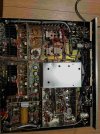
Full bottom of the chassis.
.Bottom.jpg

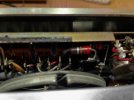
Inputs
Inputs.jpg


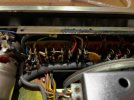
Right half of the switches (sorry about the lighting)
Switches 2.jpg

Left half of the switches
Switches 1.jpg
 
It sounds like it needs a serious cleaning of all of the Switches and Potentiometers as there may be built up oxidation on the contacts. That might be a first step.

As you may know this unit has a tube based Tuner section and the Preamp, Phono and Amplifier are all solid state circuits. So they have to be treated accordingly. Tube sections need to be managed a little differently and with caution because they utilize hi DC voltage that can be dangerous if you are not careful. If you don’t have the experience may not be a good idea to do anything yourself inside with the power on.

Might want to discuss the situation with the shop you bought it from. What were the terms of sale? Sis they offer any warranty?
Get a quote to have them service it properly. Doesn’t sound like they did much other then turn it on and see if it was working.
 
It was essentially a Craigslist find, so the guy I got it from didn't offer a warranty. He has been communicative in troubleshooting though. And we really did test everything before handing it over. It wasn't an electrical test, but it sounded good by my ear and had no trouble toggling between inputs. That trouble really only came up after the rogue shop I got the wood case from "fixed" the switches. That said, if it it oxidation, it probably would have been a matter of time until I encountered this anyway.

I'm going to grab some D5 today and see if I can clean these contacts up. Will report back!!!
 
It was essentially a Craigslist find, so the guy I got it from didn't offer a warranty. He has been communicative in troubleshooting though. And we really did test everything before handing it over. It wasn't an electrical test, but it sounded good by my ear and had no trouble toggling between inputs. That trouble really only came up after the rogue shop I got the wood case from "fixed" the switches. That said, if it it oxidation, it probably would have been a matter of time until I encountered this anyway.

I'm going to grab some D5 today and see if I can clean these contacts up. Will report back!!!
Lets slow down a bit...

First - we need more details. Have you contacted the SHOP that worked on the unit? This is who you really need to talk to. The seller sold it to you - then you had the shop do work on it. The seller should be off the hook at this point.

Second - describe what you are feeding through aux, tape, phono, etc. What is the source? CD, phone? What speaker outputs are you connected to? Pics of your speaker connections, input connections, and the switch positions on the front would be helpful. Have you tried listening through headphones?

Third - there is high voltage due to the tubes in the FM section. The reality is that you poking and prodding puts your safety at risk, as well as poses a risk of further damage to the unit.

Lastly - if you're going to clean the switches, use Faderlube and not D5. I don't know that this is necessarily a switch or control issue. You sound relatively new to the hobby (forgive me if I am incorrect), but we need to be sure we have the basics covered and that this isn't a situation of user error.
 
Of course!

1) Yes, I have contacted the shop that worked on it. They are not responsive. Nor was this repair invoiced. So I'm basically out of luck with them. There are some language issues there as well and so I just don't think that that avenue will bear fruit. I would really like to know what they did as well.

2) Great question! I have fed a few things through the inputs. These include a record player with and without preamp through phono (record player without preamp makes no sound, record player with made a very distorted sound...but I haven't tested this in a few days), Through tape and aux I've tried both the record player with the preamp as well as my computer via a 1/8" to RCA jack no sound through any of these (although as I've noted earlier, sometimes you can hear it faintly on the other inputs where apparently there is crosstalk.

Presently I'm using the main speaker right channel to test, but I have also tried headphones. The headphones work when the speaker works, which is rare but has been consistent with the brief hour the tuner worked yesterday and when getting a distorted signal through the preempted record player in the phono channel.

3) I'm not poking and prodding willy nilly, I'm aiming to clean the contacts on the switches. The machine is unplugged when I do this and I don't intend to poke any further than that. I am aware of the dangers here.

4) I've got faderlube as well, so thanks for the tip! I'll use that. I'm new to working on machines like this but have a lot of experience hard wiring things like patch bays from when I was younger. I'm aware of many of the basic precautions one should take but still learning about some of the more detailed steps for working with a unit like this. I've tried to systematically determine the step that this issue is coming from so far. If I'm missing anything that you think may be user error, please let me know, but I've owned one of these 10 years ago and was able to easily operate and wire it without error. As I've mentioned several times here, I was also able to hear this one working fine as I systematically checked all of the inputs with the original seller.
 
Presently I'm using the main speaker right channel to test, but I have also tried headphones. The headphones work when the speaker works, which is rare but has been consistent with the brief hour the tuner worked yesterday and when getting a distorted signal through the preempted record player in the phono channel.
Thanks...

It is common to have volume mistracking issues (L/R) via the combo volume/power control. If you are only using one speaker output, you may not have it loud enough to get past any mistracking in the volume control for the right channel. Just a thought...

I recommend you get an adapter for your phone and pipe music through the AUX input. Stop messing around with phono for now. It sounds like you're not 100% on how that works. Also, you need to use BOTH speaker outputs. Right now we're only getting half the picture.

I also want to see a pic of the front and back to make sure everything is connected correctly. This is VERY important if you want us to help you figure this out.

Not to bust your balls...but I'm not convinced this isn't operator error.
 
Sorry, I've tested this with many things connected. My first tests when I set it up were in stereo with both speakers connected. It was just easier to test in the corner of the room with one speak running out at mono. But in order to be thorough, I just plugged in both speakers and did a test--same results. No sound.

I've attached an image of the front and back to this to help. I'm not sure what you're hoping see here, but here you go.

I do understand how phono works. Obviously if you add a pre-amped record player to phono it will be overdriven and sound awful/not work well. I included this information because I thought it would be helpful to folks helping to troubleshoot. At the very least a record player without a preamp should work fine in the phono channel. I'm not sure how much simpler it gets than that. Record player --> preamp --> amplifier --> speakers. The Mac is both preamp + amp. I get it.

Testing the aux channel with a signal yields nothing.

I wish that this was as simple as user error, but I don't think it is.

A few small things I noticed while tinkering with this this morning: 1) When I left it on for 10 minutes, the cage in the back got VERY hot. It turned itself off automatically a moment later. Maybe this is related to the issue? After letting things cool, it will turn on again. It seems that this happens every time I try to leave it on for a period of time.

The other thing I noticed was that the wires behind the muting switch are absent. Where every other switch has wires connected on the back, this one is missing one. It may just be normal in the circuit, but of all the switches this one is almost too loose, so I wanted to relate.

Finally, I should note that when I do power it on/switch the speaker on/off the speakers pop. I've heard that this is because the plug is not grounded, but I thought I should note that too.

Behind the capacitor you can see the nubs missing a wire.
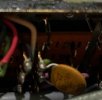
missing wire.jpg

Front powered on. Usually I test on all the channels (depending on what I've plugged into the back). I use mono when testing with one speaker, stereo when testing with two. Filter out, tape mon out, muting out, main speaker ON, and remote speaker off (Though I have tested with on, too).
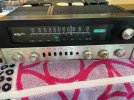
front.jpg
Back when inputting aux into a stereo speaker set.
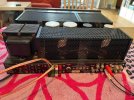
back --stereo.jpg
 
Back
Top Bottom