• The move to the new server is done. There are some software and database maintenance updates in process. This has us passing the hat around to help out. We appreciate any donations. Seriously, even a dollar helps. The payment page may be found here - https://www.audiokarma.org/support.html

How can the same down load sound so different?

What effect do you think the power supply has on the digital output of a purely digital device?
The difference between you and I is that of experience. It is truly difficult to imagine what you’ve never been exposed to.

What effect? Are you kidding me?

You really should drop the textbooks and experience reality. Only then will you understand.
 
I just observe the considerable audible differences I hear across multiple systems

The difference between you and I is that of experience. It is truly difficult to imagine what you’ve never been exposed to...

I'll try to describe it in the sort of subjective terms you might be familiar with.

The tertiary problems, such as power-supply induced jitter on the DAC clock will result in comments such as "it feels less emotional, with a less airy feel to the mid-range imaging".

Secondary problems, such as lossy compression will be "muddy, confused top end, with no detail".

Primary problems, like random data corruption will be "DEAR LORD, MY EARS; MAKE IT STOP!"...
 
This will be no help in this thread but:

You really should drop the textbooks and experience reality. Only then will you understand.

My everyday with the EE’s I work with. I am going to steal it, “it worked durning modeling”. They design something, ask us to work and/or install the prototype or proof of concept and get bent when we tell them it probably will not work right in the environment it is being installed.

And I am not saying this statement in this thread is correct, just that I am stealing it :banana:
 
My everyday with the EE’s I work with. I am going to steal it, “it worked durning modeling”. They design something, ask us to work and/or install the prototype or proof of concept and get bent when we tell them it probably will not work right in the environment it is being installed.
I work in a department full of EEs, computer scientists and mathematicians -- after a prior career as a software developer -- so I'm quite used to taking a theoretically-sound design into the field only to watch it fall over spectacularly. Of course, there's always a good reason -- usually some missed-but-obvious-in-retrospect factor somewhere -- but it always turns out to fit within the theory because the laws of physics (and thus electronics, acoustics, etc.) cannot be broken.

Debate sometimes ensues when we're asked to believe that one's hearing ability can trump the laws of physics. Of course, it's quite possible that there's some missed-but-obvious-in-retrospect factor at work and the laws of physics haven't been broken at all.

However, it's just as likely that the fallibility of human hearing is being demonstrated. Unfortunately, some folks seem reluctant to consider that as a possibility.

I'm not saying that's necessarily the case in this thread, by the way.
 
The difference between you and I is that of experience. It is truly difficult to imagine what you’ve never been exposed to...
I'll take your word about experience with the spectacularly poor ("corrupted data streams"). Must be quite storied indeed. Sorry to hear that. :)

My journey with external power supplies began when I bought my first Squeezebox Touch in 2012 to replace a GamuT CD-1. The latter used separate linear supplies for the audio and transport sections using toroidal trannies:

gamut2.jpg


As a far less expensive product, however, the Touch came with a crappy switcher:

switcher.jpg

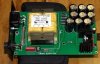
It didn't take long to understand better solutions existed. I first purchased a Welborne Labs linear using a nice R-core tranny and considerable filtration. Pic is board outside of supplied aluminum case.

ps1.jpg

I later purchased another Touch this time using a Teradak linear with similar construction.

It was then I began to notice the differences detailed in posts 49 and 57. Naturally, the power supply of the Audio Research DAC8 it fed did not resort to the use of a SMPS! It begins with an EMI filter at the IEC socket and like the GamuT, utilizes separate supplies for audio and control sections. Naturally, it also uses an R-core transformer with significant filtering.

When I replaced the Touch in the main system with a Sonore microRendu, it needed a 7V power supply. Based upon their list of recommended supplies, I purchased a HDPlex linear having variable output voltage capability to match the requirement exactly. That unit worked quite nicely for quite a while, but read of a new product also designed by John Swenson who also is behind the microRendu called the Uptone LPS-1. It is an ultracapacitor based unit that alternates between two banks: one for galvanically isolated output while the other gets charged. That improved transparency further. Final tweak also suggested by Swenson was replacing the generic DC cable with a much lower inductance Canare starquad based cable. I found it improved dynamic tracking especially at the PPP end of the scale. The HDPlex now feeds the Motorola cable modem and Cisco router.

For the garage, I replaced that Touch with a RPi based unit. For it, I use 12000 mAh cell phone charger with starquad DC cord that gives me a couple of days worth of playback time between charges.

Which kind do you prefer?
 
Last edited:
My everyday with the EE’s I work with. I am going to steal it, “it worked durning modeling”. They design something, ask us to work and/or install the prototype or proof of concept and get bent when we tell them it probably will not work right in the environment it is being installed.
Good engineering always begins with proven concepts and conservative design. It should not, however, end there. Then you go to alpha and beta testing to independently validate the results!

Some companies like Audio Research have an individual audition every component they produce before shipping to customer. This after multiple internal levels of QA conducted during the manufacturing process.
 
Must be quite storied indeed. Sorry to hear that.

That's what you expect to happen when you're developing something; things rarely go to plan. Sometimes, getting to the bottom of the problem is a battle. I once spent a month debugging a motion JPEG video system, that corrupted the entire frame, and stopped further decoding, which turned out to be a fault in the MJEG chip we were using, which was sensitive to the assertion of a control signal in a window of two clock cycles in each video frame (which, at 27MHz clock, is one in 540k cycles). We reported the bug to the manufacturer, and they simulated it, and confirmed our diagnosis. We implemented a workaround to stop the signal being asserted in the sensitive spot...

Which kind do you prefer?

Switching supply where appropriate (for the digits), and low-dropout, low noise, linear PSU where appropriate (for the analogue). Multiple linear supplies where necessary in the analogue, for instance, the DAC clock will have its own supply. But this has to be part of a well-designed power supply and system design, with appropriate isolation between the various stages of the processing (e.g. network interface, digital rendering engine, DAC digital interface, DAC clock, DAC analogue output, analogue filtering & amplification). I really don't care too much about the first two. I start to take care with the DAC digital interface onwards. That applies whether I'm designing analogue audio, video or RF circuits.

I don't expect the first pass of my designs (from schematic to layout) to be right first time, and it's usual to spend considerable time tracking down where the stages are managing to find ways to interact, especially so in the RF domain. The modelling tools are improving all the time though, due mostly to raw computing power. But the basic principles of circuit design and PCB layout haven't changed too much.

Retrofitting expensive power supplies to existing equipment leaves you at the mercy of the original system design; if they haven't got their partitioning and isolation right in the first place, adding a nice supply to the input won't help too much. Your RPi, for instance, has switching supplies on it, to generate the supplies for the processor core and IO. I haven't looked at the RPi system architecture in any detail, so I'm not sure how their power generation and distribution works around the board and the expansion connector. I'd look to concentrate any power supply improvements to any DAC 'hat' being used, but, if it's an I2S DAC, there's scope for improvement in cleaning up the I2S power supply on the RPi (as above: the DAC digital interface), if you can isolate that (unlikely, I think, since it's done as GPIO). It may be possible to identify the GPIO bank on the processor that is used to drive the I2S interface, and isolate that from other IO, and apply a dedicated, low noise, linear supply, or at least add some suitable filtering. Again, I haven't looked in detail at the RPi processor, or how the IO is arranged and powered.

Ultimately, though, the I2S signals are driven by a clock within the RPi, and if the clock has jitter on it, that will couple straight to the I2S signals, and, if these are used directly to drive a DAC without some reclocking, the jitter will couple direct to the DAC output. IIRC, one of the HifiBerry DACs gets over this by supplying the I2S clock to the RPi, rather than the RPi supplying it; that will eliminate the RPi clock jitter. I assume HifiBerry have done a decent job on the clock generation so that the clock jitter is lower than using the native RPi clock...

There's a useful-looking discussion on the RPi's I2S interface here, including some interesting phase noise (jitter) plots:

https://hifiduino.wordpress.com/2014/11/13/raspberry-pi-b-digital-audio/

I probably need to go and read that carefully...
 
Can we please get back to the original query with the specific devices or continue the endless theory vs application debate? I've been doing some reading up on AppleTV and it is a stand alone streamer and has it's own physical remote. So it is doing all the playback processing. AppleTV also has "mirroring" capability (aka "casting") for devices that have AirPlay which isn't an app, but baked into the OS. To further complicate matters the Apple "Remote" app allows Apple devices to control AppleTV over WiFi. So one can stream music files stored in his iCloud account or stream "rented" AppleMusic with AppleTV. If one is using the Apple "Remote" app to control AppleTV nothing changes except the device in your hand controlling AppleTV is a phone. This is consistent with AppleTV's FLAC and WAV compatibility since it as it's own tvOS and is self-contained. Since the OP states he is using AirPlay he is mirroring (casting) from his devices and those devices are doing the processing using iTunes and then transmitting them via WiFi to the AppleTV. Since iTunes content only comes in one flavor he is indeed getting different results from the same 256 Kbs AAC file using his 4 different "players". Apple computers tend towards very good and clean audio quality whether using the internal DACs or bypassing them. I have had 2 iMacs and 2 MacBook Pros and have never heard any system noise coming through analog, optical or USB running iTunes or Audirvana in "Hog" mode. There's a good reason for their near defacto standard status in pro audio applications.
Then there's the iPhoneX which is highly rated as an audio player. Due to capacity issues I've never considered using a phone as a DAP, but a with 1/2TB storage for my ALAC library and digital audio output on the Lightning connector I'm warming to the idea to replace my pair of aging iPod classics. So why does the iPhoneX fall short and finish dead last for the OP? The late model 27" iMac and the iPhoneX have 802.11ac simultaneous dual band transceivers so they should be 1st and 2nd place, not 1st and 4th place. Can there be that much degradation over WiFi? What if the OP's router isn't 802.11ac dual band? Could the iPhone degrade the output when backing down to an older WiFi standard? Some here say no, but then what could be causing this very perplexing result?
 
Can we please get back to the original query with the specific devices

It's a bit hard without the OP answering the questions/experimenting as we have asked...

I don't have an AppleTV or iPhone, and don't use iCloud, so I'll have to leave it to others to experiment; Dave has said he might be able to get hold of an AppleTV to experiment with. Hopefully, others can contribute findings.

My suggestion is still to ensure that the same file (preferably at least Red Book quality) is being used in all cases, by copying the file from one master source to all the other devices, using a local file transfer mechanism, and checking file sizes after copying. Then at least we know we're not trying to compare Apples and oranges...
 
Well! This is the biggest can or worms I have ever opened. Thanks for all the replays. I guess it's no different that no two phono cartridges sounding the same. back in the 70's and 60's there were some pretty bad MM cartridges compared to Moving coils, and vice versa. MC back then couldn't track worth a dam. The results are much better today after 40 years. Let's hope the same future is ahead for digital. For your info I use the little hardwire $9.00 adapter to drive my Sennheisers directly by the 10X.
 
Can there be that much degradation over WiFi? What if the OP's router isn't 802.11ac dual band? Could the iPhone degrade the output when backing down to an older WiFi standard? Some here say no, but then what could be causing this very perplexing result?
It isn't clear whether Apple TV is receiving the audio data stream from the controlling MacBook/Mac/iPhone -- and if it is, whether the source file is the same on all the devices -- or is being instructed to obtain the audio data stream from iCloud/iTunes directly, or -- perhaps depending on which device is the controller -- both.

In any case, the audio quality may be affected by network degradation (which could be due to both environmental issues and device differences) and/or source file/stream differences.

More information about the OP's system -- per @cpt_paranoia's questions -- and/or experimentation is needed.

With the latter in mind, today I wasn't able to find out if an Apple TV was still knocking around at work. I'll try again tomorrow.
 
Use an Allo DigiOne digital board

That appears to be using a number of the techniques I mentioned: multiple LDOs, filtering, reclocking to convert the I2S into a clean SPDIF. I'd probably still prefer the DAC to be the clock master, though, either by driving the clock into the RPi I2S, or using a destination-clocked ('asynchronous') USB interface. Either of these should give lower jitter.

I'm not convinced by the need for a low noise output buffer, since the SPDIF signal is a large swing, high-speed digital signal that will inject broadband digital noise into the DAC. A little bit of white noise on top of that isn't going to matter. [edit: the output driver needs a clean supply to help the jitter; any noise added to the output signal will contribute to the uncertainty about the position of the clock transition point. That's also why the active edges need to be very fast; the faster the edge, the faster it passes through the clock transition point, and the less sensitive the input is to noise on the input.]
 
Last edited:
It isn't clear whether Apple TV is receiving the audio data stream from the controlling MacBook/Mac/iPhone -- and if it is, whether the source file is the same on all the devices -- or is being instructed to obtain the audio data stream from iCloud/iTunes directly, or -- perhaps depending on which device is the controller -- both.

In any case, the audio quality may be affected by network degradation (which could be due to both environmental issues and device differences) and/or source file/stream differences.

More information about the OP's system -- per @cpt_paranoia's questions -- and/or experimentation is needed.

With the latter in mind, today I wasn't able to find out if an Apple TV was still knocking around at work. I'll try again tomorrow.

It is clear because he is using AirPlay to push the iTunes playback content to the ApplyTV. It's surely the same file. He would have to have multiple Apple ID's and iTunes accounts for each device and buy the song file 4 times. And even so theres only been 2 flavors ever available from iTunes 128 and 256. He would not have been able to inadvertently buy an old no longer available 128 AAC file with his brand new iPhoneX. I think we can take him at his word that it's the same file. He'd really have to work at it otherwise.
If AppleTV was pulling the content and processing it then he'd have to be using the Apple Remote app. AirPlay doesn't control or play anything, it's just the interface to the WiFi pipe. Hopefully you can find the AppleTV to play with. What devices do you have on hand to use as potential players?
 
Last edited:
It is clear because he is using AirPlay to push the iTunes playback content to the ApplyTV. If AppleTV was pulling the content and processing it then he'd have to be using the Apple Remote app. AirPlay doesn't control or play anything, it's just the interface to the the WiFi pipe.
Yes, but the OP hasn't identified what he was using to play the content from his MacBook/Mac/iPhone through the Apple TV, has he?

I.e., it's not clear whether the content is being "cast" and retrieved by the Apple TV, or streamed from the controlling device's local storage to the Apple TV.

Nor has he confirmed, per @cpt_paranoia's questions, that the file transferred to the various devices is identical on all of them.
Hopefully you can find the AppleTV to play with. What devices do you have on hand to use as potential players?
2017 MacBook Pro (2.9 ghz i7, macOS 10.14); mid-2012 Mac Pro (2 x 2.66 ghz 6-core Xeon, macOS 10.13.6); iPad 2 (iOS 9, as I recall, or whatever was the last update available for the iPad 2).
 
I.e., it's not clear whether the content is being "cast" and retrieved by the Apple TV, or streamed from the controlling device's local storage to the Apple TV.
While it might not be clear... That is not how AirPlay works. Airplay has Senders and Recievers. The content is push to and played out from the Apple TV. MACS and phone are senders.
 
While it might not be clear... That is not how AirPlay works. Airplay has Senders and Recievers. The content is push to and played out from the Apple TV. MACS and phone are senders.
The terms that Apple uses are certainly sender and receiver, but depending on the content being played, typical "casting" systems don't necessarily send audio (or video) data from the sender to the receiver.

Instead, if the playable content is on an accessible server (e.g., someserver.com), the sender (aka controller or remote) will only send a message to the receiver like "play rtsp://someserver.com/song_203498349.mp4", which instructs the receiver to connect to the server to play the stream. The sender may instruct the receiver to pause, rewind, skip, or stop, but doesn't transmit the data stream from sender to receiver unless the content to be played is only available on the sender's local storage. In some cases, the ability to play content from the sender's local storage is only available through external applications.

That's how Google Chromecast works.

Are you sure Airplay / Apple TV doesn't do the same?

I've been trying to find documentation that definitively indicates one way or the other, but haven't found it yet.
 
Back
Top Bottom