• The move to the new server is done. There are some software and database maintenance updates in process. This has us passing the hat around to help out. We appreciate any donations. Seriously, even a dollar helps. The payment page may be found here - https://www.audiokarma.org/support.html

JBL L110 Midrange Help

Jay Bee L

New Member
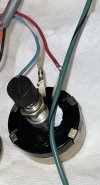
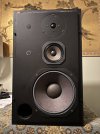
Hello! This is my first time posting on AudioKarma so forgive me if I make any mistakes. I recently acquired a pair of JBL L110's. They had been sitting in storage for quite a while and the previous owner said they were working before being stored. I got to work replacing the foam surrounds and used Deoxit on the L-Pads. I finally reassembled the speakers today and wired them up, then ran into a major issue.

While the low frequency and tweeters work, the midrange on both speakers does not work whatsoever. I sprayed more Deoxit and moved the knob a couple times for the midrange L-Pad which did nothing and also used a multimeter on the LE5-10 driver which showed a good reading of 5 ohms.

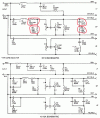
I did follow this guys advice from this post and jumped the two terminals on the L-Pad and still got no audio from the mid. So I'm suspecting possible corrosion or even a dead component in the crossover since both of these speakers have the same symptoms. At the moment I don't know where to start in regards to the crossover.

Have any other L110 owners out there run into a similar situation as mine? What would I need to do to get the midrange working again and what capacitors or resistors would I need to possibly replace on the crossover? Any sources to buy those capacitor / resistor parts from?
 

Attachments
  • L110.jpg
    L110.jpg
    120.7 KB · Views: 27
  • Cabinet1.jpg
    Cabinet1.jpg
    127.6 KB · Views: 23
  • Cabinet2.jpg
    Cabinet2.jpg
    137.4 KB · Views: 20
  • L110wiringcircled.gif
    L110wiringcircled.gif
    86.1 KB · Views: 24
  • possibleculpritsmaybe.jpg
    possibleculpritsmaybe.jpg
    130.4 KB · Views: 25
Last edited:
Register to hide this ad
Moving your post to The Lansing Legacy forum may get you more responses. There are some really knowledgeable JBL folks over there.
 
Sometimes it takes more than one application of DeOxit to get stubbornly corroded L-pads to work again. I've had to take them apart and sand/ scrape the contacts, to make them have reliable connections.

The way to tell, is to jump pins 2 and 3 on the L-pad. If the mid driver starts working, the L-pad is still your problem. And I suspect it is.

Regards,
Gordon.
 
Sometimes it takes more than one application of DeOxit to get stubbornly corroded L-pads to work again. I've had to take them apart and sand/ scrape the contacts, to make them have reliable connections.

The way to tell, is to jump pins 2 and 3 on the L-pad. If the mid driver starts working, the L-pad is still your problem. And I suspect it is.

Regards,
Gordon.
It's funny you mentioned jumping the pins, because I read this post and did exactly that. Still nothing from the mids though. So it definitely appears to be a crossover issue. But just to make sure before I move on, pins 2 and 3 are the blue and white wires correct?
 

Attachments

  • L-Pad.jpg
    L-Pad.jpg
    71 KB · Views: 7
It's funny you mentioned jumping the pins, because I read this post and did exactly that. Still nothing from the mids though. So it definitely appears to be a crossover issue. But just to make sure before I move on, pins 2 and 3 are the blue and white wires correct?

Yes, indeed. If that didn't make it work, and the tweeter has output when played directly, then there has to be a bad crossover capacitor or bad electrical connection, pretty much absolutely.

Regards,
Gordon.
 
I have the same problem with my L110 speaker. Can someone supply a link to a source for the capacitors? I tried Solen and the website says out of stock. The Solen caps say 400v and the ones on my crossover say 100V. Can 400v be used in place of the factory 100v?
My second question is: When I got the L110s they had 034 tweeters installed. I'm looking at the schematic for the N110 and it states there is no replacement for the 033 tweeter but the 034 is not safe for the L110 system, anyone know why that is? Thank you !
 
When I got the L110s they had 034 tweeters installed. I'm looking at the schematic for the N110 and it states there is no replacement for the 033 tweeter but the 034 is not safe for the L110 system, anyone know why that is? Thank you !

The 033 and 034 are actually very similar and should be compatible in terms of the actual driver.

The problem is the frame. The 033 has a strong metal frame. The 034 has a flimsy plastic frame. This is a problem if the tweeter is not inside it's own sealed chamber, because the air inside the cabinet is pressurized by the woofer during normal operation.

My L150 speakers use the same 033 tweeters as the L110. I found a pair of 034 tweeters for cheap so I got them to experiment with. The result was that the 034 tweeters sounded fantastic at low volumes but at higher volumes the entire plastic tweeter frame of the 034 would basically act like another passive radiator, vibrating horribly due to being pushed on by the pressure in the cabinet. This would apply if the 034 was used in the L110 also.

I've thought on and off about it over the years. I still keep the 034 tweeters as backups. If I had to use them, I think it would mainly be an issue of strengthening the plastic frame with metal or perhaps replacing it completely with a custom metal frame similar to the one found on the 033.
 
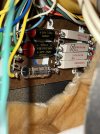
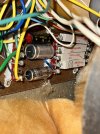
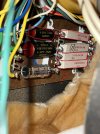
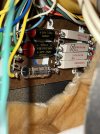
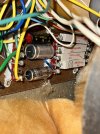
So I think I've pin pointed what the problem is. At some point in the speakers life the caps for the mid range and one cap for the woofer were replaced. It appears that the black and red capacitor replacements are electrolytic and not film from what I could find (Though if someone can confirm that the caps are indeed electrolytic that would help). That might explain the problem with no sound coming from the mids. Especially since these speakers were in storage since the 80's.

My plan now is to buy 4, Dayton 3uF Polypropylene caps (2 in each cabinet wired in parallel for a total of 6uF) and a Solen 36uF cap for the woofer since that's the only 36uf available.
 

Attachments

  • Cabinet1.jpg
    Cabinet1.jpg
    127.6 KB · Views: 14
  • Cabinet2.jpg
    Cabinet2.jpg
    137.4 KB · Views: 15
I have the same problem with my L110 speaker. Can someone supply a link to a source for the capacitors? I tried Solen and the website says out of stock. The Solen caps say 400v and the ones on my crossover say 100V. Can 400v be used in place of the factory 100v?
I'd recommend this site, Parts Express. It's already on the section for Polypropylene caps so all you have to do is filter out what you're looking for.

For the voltage rating it's perfectly fine if it’s 400v. What matters is that the capacitance remains the same or at least close to the original rating.
 
Last edited:
So I think I've pin pointed what the problem is. At some point in the speakers life the caps for the mid range and one cap for the woofer were replaced. It appears that the black and red capacitor replacements are electrolytic and not film from what I could find (Though if someone can confirm that the caps are indeed electrolytic that would help). That might explain the problem with no sound coming from the mids. Especially since these speakers were in storage since the 80's.

My plan now is to buy 4, Dayton 3uF Polypropylene caps (2 in each cabinet wired in parallel for a total of 6uF) and a Solen 36uF cap for the woofer since that's the only 36uf available.
Further proof that in most cases it's best not to monkey around with the original JBL caps unless you know that's where the problem lies. Never replace them just to "make them sound better", because they likely won't.
 
Further proof that in most cases it's best not to monkey around with the original JBL caps unless you know that's where the problem lies. Never replace them just to "make them sound better", because they likely won't.
This can't be stated enough.
 
So the new capacitors arrived today. I started with the cabinet which only had the 6 uF capacitor replaced. Soldered the new 3uF caps in parallel together and got it soldered to the crossover. Hooked it up to test the speaker and still nothing from the Mid.....

At this point I am very stumped at what is causing the issue. The only thing I can think of is a resistor possibly failing but I am not sure. I don't want to start taking out resistors at random so I would like to hear thoughts from other people. Any help would be appreciated.

So far I have checked these possible areas.

- Turned the L-Pad back and forth to see if the Mid would start working. (Nothing)
- Sprayed Deoxit into the L-Pad and turned it back and forth. (Nothing)
- Jumped pins 2 and 3 on the L-Pad to see if it was an issue with the L-Pad (In this case the Mid still didn't work when the pins were jumped)
- Tested the Mids with a multimeter to check if they were the issue. Both had normal readings.
- Replaced the red and black electrolytic 6uF cap with 2, 3uF polypropylene caps wired in parallel. (Still nothing)
- Also jumped pins 2 and 3 on the L-Pad again with the new caps just in case. (Still nothing)
 
Last edited:
So I think I've pin pointed what the problem is. At some point in the speakers life the caps for the mid range and one cap for the woofer were replaced. It appears that the black and red capacitor replacements are electrolytic and not film from what I could find (Though if someone can confirm that the caps are indeed electrolytic that would help). That might explain the problem with no sound coming from the mids. Especially since these speakers were in storage since the 80's.

My plan now is to buy 4, Dayton 3uF Polypropylene caps (2 in each cabinet wired in parallel for a total of 6uF) and a Solen 36uF cap for the woofer since that's the only 36uf available.
The material they are made of is not the problem and these all look fine.

When one jumps pins 2 and 3 on the Lpad, don't you also have to make sure that it is turned full up so that you are not grounding it out?

 
Last edited:
Check the leads for the midrange from the terminal block possible bad solder joint also check and resolder all points on the midrange circuit. Take a small toothbrush and clean all that oxidation off on the bottom of the terminal blocks before it gets worst
 
Back
Top Bottom