• Please note that Audiokarma will be offline briefly for updates early on Monday morning, September 28th.

Luxman A-373 - Powers on but no sound

002

Active Member
Hi all,

I have a Luxman A-373 with the symptom described in the thread title; powers on but no sound at all. I have ruled out what I presume to be the obvious things first - tested A and B speakers, tested various inputs.

There only seems to be one fuse in the entire amp which is on the power supply board - is that normal for amps of this era (~1995)? I've tested the voltage regulators on the power supply board (a 7805 and 7812) and they seem to be working. I can't find a schematic or service manual anywhere so I guess it will be tough to diagnose.

The main output transistors appear to be C3856 NPN and A1492 PNP. I've tested them in circuit and they seem to be OK so I am at bit of a loss. All the electrolytics in the unit are ELNA brand and seem very healthy.

Does this sound like a power supply problem? One thing I noticed is that there's a 3-wire cable that runs from the PS board to the board with the output transistors on it and the voltages on that wire are +12V, 0V, and -33V. I thought that the -33V seems a bit suspicious but I don't know if that's normal either.

Naturally I am happy to provide pictures or any other requested info. Thanks in advance!
 
Register to hide this ad
Try to narrow down the area of investigation. First identify the part where the defect is located. Go from the pre-out to another amplifier and check if there is a signal. From another amplifier, go from pre-out to main in on the A373. This way you can find out if the problem is in the power amp or the pre amp.
 
  • Like
Reactions: 002
Thanks very much Pieter - I did not even think of that troubleshooting step (I am a somewhat of a rookie with audio gear)
I'll give that a try tomorrow and report back my findings.
 
Another quick check without risk is to listen if the protection relay clicks in after some seconds. If it doesn't it is a significant narrow down of the problem area.
 
OK cool - that's good info too. There is definitely an audible click from the relay after 5 or so seconds of turning on the amp. There's also another relay which clicks when I press the 'Line Straight' button which I read is a feature that bypasses certain circuitry to increase fidelity on my model and other similar Luxman amplifiers.
 
Ok, if it clicks in, it is unlikely that the problem is in the power amp, because the circuitry checks on too high current or too high DC voltage on output. This is obviously not the case.
 
OK great - so then if I was to test the scenario of pre-out from another amp into A373 main in (by the way, which input exactly is 'main in'?), would you expect that I should hear sound?
I'm sorry if this is a stupid question but how does the A373 "know" or handle differently the signal from another amplifier's pre-out versus any other source (e.g. my smartphone is what I usually test with).
Thanks again for your advice so far!
 
Check the "Signal Processor" In and Out. They have to be bridged, otherwise there is no sound. Are there connectors over there?
You can use your Smartphone on "Signal Processor Out" to check the poweramp.
 
Question: What are you using for a source to test your amplifier? How is it connected?
Hi trinhsman - I generally just use my smartphone with a 3.5mm stereo to dual RCA cable as it is easy to hook up, but I have tape decks and a record player I could also test with if that would be worthwhile.
I hook the RCA cables up to the various 'Line In' inputs on the amp and then play my FLAC files from foobar2000 on my phone - it seems to work OK

Check the "Signal Processor" In and Out. They have to be bridged, otherwise there is no sound. Are there connectors over there?
You can use your Smartphone on "Signal Processor Out" to check the poweramp.
I'll look into this tomorrow and report back - bed time for now. Thanks!
 
Check the "Signal Processor" In and Out. They have to be bridged, otherwise there is no sound. Are there connectors over there?
You can use your Smartphone on "Signal Processor Out" to check the poweramp.

...I generally just use my smartphone with a 3.5mm stereo to dual RCA cable
I hook the RCA cables up to the various 'Line In' inputs on the amp

I'd stick with one such as the "CD/LD" input


Screen Shot 2022-02-10 at 8.24.26 AM.png
 
  • Like
Reactions: 002
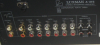
OK so there are no such jumper bars linking the 'In' and 'Out' jacks in the Signal Processor section like in the image Dswankey posted.
Can I just use a short set of RCA cables to bridge them for testing? I did try that anyways with my phone plugged into CD/LD IN and still no sound - I thought for sure that it would be the issue :(
 
In any case, you can use the cable to test it. In the end it is better to use the original jumpers, they pick up less noise because of their small size.
 
Hey guys,
So I tried with the phone in the Signal Processor In and Out jacks and no dice. Does this suggest that the issue might be in the power amp section?
 
.. I generally just use my smartphone with a 3.5mm stereo to dual RCA cable ...
I hook the RCA cables up to the various 'Line In' inputs on the amp and then play my FLAC files from foobar2000 on my phone - it seems to work OK

...there are no such jumper bars linking the 'In' and 'Out' jacks in the Signal Processor section

Curious, it was outputing sound previously without the jumpers? or were you talking about another amp?

Have you double checked that you have "CD" engaged on the front panel when you have the phone connected to the CD line in on the back?


Screen Shot 2022-02-11 at 4.30.27 PM.png
 
Curious, it was outputing sound previously without the jumpers? or were you talking about another amp?
Have you double checked that you have "CD" engaged on the front panel when you have the phone connected to the CD line in on the back?
View attachment 2482049

Sorry for the confusion - no this amp is a friend's; he asked me to have a look at for him. I was just describing how I normally test other amps that I've also looked at for the same guy (I know it probably sounds silly that I am lacking some fundamental knowledge but am repairing amps, but he has no other options. I normally repair and work on CRT televisions to be honest).

This A-373 came to me with the symptom described (no sound). Yup I have read that little problem table and ruled those things out. I had the corresponding button on the face of the amp selected (CD/LD) when I was testing the rear input for that. I also confirmed that my temporary RCA cable jumper bar solution was definitely linking the SP IN and OUT inputs by testing continuity on the pins inside the amp with the RCA cable in / out.

Oh I also tested with my little Marantz CP430 tape player to rule out my phone doing something silly. I tried the Tape 1 IN and Tape 2 IN and no joy :(
 
How about some pics of the insides, top and bottom. Have you checked for any fuses underneath?

Little more history: Ask your friend did it work and just stopped working? Did he get it this way?

You need a volt meter to see where voltage stops. Check power supply diodes.
 
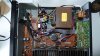
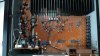
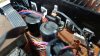
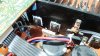
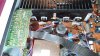
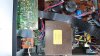
OK I took some photos just from the top for now as taking the unit apart doesn't seem trivial and it's very hot here - sitting in a shed with no air-conditioning is a struggle.
I can only attach 10 images so I'll make another post with the remainder. Hopefully I'm not breaking any rules by doing that.

Unfortunately my friend does not know the history of it other than it "turns on but no sound". He buys a lot of audio gear at garage sales and he's getting on a bit in age (and health) so he forgets easily.
I did see what I assume to be bridge rectifier diodes? There's two sets of them from what I could tell. One set on the vertically mounted power supply board next to the transformer and another set on the left side of the thin PCB that runs along the face of the unit. Is there anything special I need to check on these aside from a usual diode check?

DSC_1077.JPG DSC_1080.JPG DSC_1082.JPG DSC_1083.JPG DSC_1084.JPG DSC_1085.JPG DSC_1088.JPG DSC_1089.JPG DSC_1091.JPG DSC_1092.JPG
 
Back
Top Bottom