• The move to the new server is done. There are some software and database maintenance updates in process. This has us passing the hat around to help out. We appreciate any donations. Seriously, even a dollar helps. The payment page may be found here - https://www.audiokarma.org/support.html

Marantz 2215 HUM

Haha yes! They always ask if I'm building bombs, then when I say no, ask me if I can

And im actually 17, just wasn't sure if there was an minimum age on the site.
 
I read through your post and noticed you didn't mention anything about using a DBT (Dim Bulb tester). Since you are now starting to change components, it would be good to use a Dim Bulb Tester to ensure there isn't a problem when you power up. Just do a search in DIY on Dim Bulb tester or go to youtube if you need to figure out how to build one. It's cheap and quick and will save your unit from burning up.

You are getting really good advice and I'm just starting out myself. One thing I have not seen is having you bypass the main amp boards and ruling them out as an issue. To do this, go to the back of your unit and look for the Pre-OUT RCA plugs. There should be some short wires / or U shape wires jumping the Pre-Out to Main IN. Pull this out and connect RCA plugs from the pre-out of this unit to the Main inputs of another Amp.

If you don't have another amp, you can run a cross test. Take the Pre-out Right channel of your unit and cross it over to the Left Main In and do the same for the right side. Report back if the "Hum" moved.
 
I read through your post and noticed you didn't mention anything about using a DBT (Dim Bulb tester). Since you are now starting to change components, it would be good to use a Dim Bulb Tester to ensure there isn't a problem when you power up. Just do a search in DIY on Dim Bulb tester or go to youtube if you need to figure out how to build one. It's cheap and quick and will save your unit from burning up.

You are getting really good advice and I'm just starting out myself. One thing I have not seen is having you bypass the main amp boards and ruling them out as an issue. To do this, go to the back of your unit and look for the Pre-OUT RCA plugs. There should be some short wires / or U shape wires jumping the Pre-Out to Main IN. Pull this out and connect RCA plugs from the pre-out of this unit to the Main inputs of another Amp.

If you don't have another amp, you can run a cross test. Take the Pre-out Right channel of your unit and cross it over to the Left Main In and do the same for the right side. Report back if the "Hum" moved.

The Dim bulb tester is a good idea!

Unfortunately the 2215 doesn't have a pre-out.

The guy who "diagnosed" it for me said something along the lines of "shorting" the amplifier board and the hum was gone. So it had to be something other then the main amp board.
 
The Dim bulb tester is a good idea!

Unfortunately the 2215 doesn't have a pre-out.

The guy who "diagnosed" it for me said something along the lines of "shorting" the amplifier board and the hum was gone. So it had to be something other then the main amp board.
Oh that's a bummer. I should have pulled your service manual before giving you that advice. I think you are on the right track to figure out the problem.
 
+1 on the DBT. If you change components, you should always power up on the DBT. If you have introduced a short somewhere - and sooner or later you will - the tungsten filament will stay bright past two or three seconds. That does two things: 1) It tells you there is a short and you need to shut down ASAP. 2) It limits the current draw from the short, which can prevent a domino effect of blown components in the area of the short. Of course, if there are no shorts, the bulb will go bright for a second or two as all of the caps charge up, and then it will go dim. Thus the name. $10 or so worth of parts from Home Depot and an hour of your time, and you will have a DBT.
 
+1 on the DBT. If you change components, you should always power up on the DBT. If you have introduced a short somewhere - and sooner or later you will - the tungsten filament will stay bright past two or three seconds. That does two things: 1) It tells you there is a short and you need to shut down ASAP. 2) It limits the current draw from the short, which can prevent a domino effect of blown components in the area of the short. Of course, if there are no shorts, the bulb will go bright for a second or two as all of the caps charge up, and then it will go dim. Thus the name. $10 or so worth of parts from Home Depot and an hour of your time, and you will have a DBT.

Yep! Built one yesterday. Will a 50W CFL be enough for this marantz? Tried it on my Denon receiver and the bulb flickered on and off as did the receiver. assuming the denon was drawing too much power ?
 
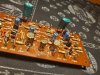
Recapped the Tone control board.... this one was tricky lol. Had to remove all the wires connecting to the board to be able to pull it out for easier access. Fingers crossed when I put it back in.
 

Attachments

  • 15997824834466034151743425169052.jpg
    15997824834466034151743425169052.jpg
    162.3 KB · Views: 93
Yep! Built one yesterday. Will a 50W CFL be enough for this marantz? Tried it on my Denon receiver and the bulb flickered on and off as did the receiver. assuming the denon was drawing too much power ?
As far as I know, only an incandescent bulb will give the needed protection. I don’t think CFL, LED or any other more modern type will work. The tungsten filament dissipates a lot of power as it gets hot, limiting the current flow, and protecting the unit. Other types don’t have that feature. I know incandescents are hard to find these days, but you can still get them at places like Amazon or 1000bulbs.com. Buy 5 or 10 while still available. I use 60W for lower power units and 100W for higher power units.
 
As far as I know, only an incandescent bulb will give the needed protection. I don’t think CFL, LED or any other more modern type will work. The tungsten filament dissipates a lot of power as it gets hot, limiting the current flow, and protecting the unit. Other types don’t have that feature. I know incandescents are hard to find these days, but you can still get them at places like Amazon or 1000bulbs.com. Buy 5 or 10 while still available. I use 60W for lower power units and 100W for higher power units.

Idk why I said CFL. Thats one of those spiral things! I ment incandescent, lol.
 
Well.... Finished the re-capping the tone control board (no smoke!), and still a hum...

Guess that means I just gotta crank it, and enjoy the music :).

Any more ideas? Buddy who diagnosed it didn't do a good job apparently, lol.
 

Attachments

  • 15998030619198357459130854364065.jpg
    15998030619198357459130854364065.jpg
    87.5 KB · Views: 10
For F*ck sakes.... was listening to music for about 20minutes, then boom, right channel stops working, and making popping noises :(.

Both speakers work when in Mono. Time to open it up again

Edit*** let it sit, turned it back on. Right channel works again. What a mess. Why did I get myself into this LOL. Time to go to bed.
 
Last edited:
For F*ck sakes.... was listening to music for about 20minutes, then boom, right channel stops working, and making popping noises :(.

Both speakers work when in Mono. Time to open it up again

Edit*** let it sit, turned it back on. Right channel works again. What a mess. Why did I get myself into this LOL. Time to go to bed.

Been there too. Sometimes you just have to step away. Good luck buddy.
 
Recapped the Tone control board.... this one was tricky lol. Had to remove all the wires connecting to the board to be able to pull it out for easier access. Fingers crossed when I put it back in.

index.php


The 2215 has (6) 2SC458 transistors on the P500 Tone board that can cause problems. Those other caps I circled, could cause a hum too:
3HIjrI3.jpg


If you want to replace those items, let me know, I'll post the Mouser links for them.

You also still have all your stock electrolytic on the P700 L&R board - and the blob diodes. Those blob diodes caused me a lot of problems in my 2215. Those little Elna caps with the arrows pointed to them, are usually suspect too.
tQvwEPl.jpg
 
Last edited:
For F*ck sakes.... was listening to music for about 20minutes, then boom, right channel stops working, and making popping noises :(.

Both speakers work when in Mono. Time to open it up again

Edit*** let it sit, turned it back on. Right channel works again. What a mess. Why did I get myself into this LOL. Time to go to bed.

This really seems like a bad capacitor situation.
I’ve found quite a few in Marantz gear where the legs have rotted. The units sort of work but not well. The rotten leg cap was located while re-capping.

If things work better or well in mono, I’d look to pre-amp or even power supply.
 
Back
Top Bottom