• The move to the new server is done. There are some software and database maintenance updates in process. This has us passing the hat around to help out. We appreciate any donations. Seriously, even a dollar helps. The payment page may be found here - https://www.audiokarma.org/support.html

Marantz 2225 left channel sucks when using phono - what gives?

Mat86

Active Member
Not sure how long it's been like this, but I've always felt these speakers didnt have good bass so I'd compensate with tone controls, but this weekend I decided to sit down and measure both with a sine sweep on an app and I was shocked when everything sounded fine. But, I was using my laptop and DAC to test it on the AUX input, not my usual turntable.

So I went back and put on a record and noticed immediately that one channel just sucks. Its tinny and has no bass, may as well be an old computer speaker. The other channel sounds great.

- Switching speakers makes no difference, its whichever Left is plugged in to
- I swapped the speaker cables around. The right channel output to speakers is always good, left channel sucks
- I also swapped the RCAs on the turntable, so its not the source. I also swapped the RCA phono inputs over, so it's not the jacks or cable either.
- I tried with both main and remote outputs
- Headphone output seemed consistent with the issue

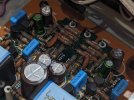
I should also mention that I recently recapped the phono board, but my suspicion of the channel imbalance goes back several months before tinkering. When I had the unit serviced a couple years ago, the tech didnt notice anything (but probably didnt check)

measurements (just played the beginning to Ai No Corrida to test bass response, not a full sweep). You can clearly see the red line on left fails to get very high below 100Hz (ignore yellow)

If it's not the cables, source, or speakers, and not the amplifier itself (since AUX works), what's going on here? Phono equalization broken?
 
Register to hide this ad
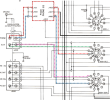
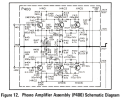
If you look at the schematic, the only difference between the Phono input and the Aux input is that Phono goes through the P400 board first before going to the selector switch. You can start by comparing L & R channel transistor voltages on the P400 board for differences.

1694926074619.png

1694926719154.png
Also, please note these errors in the SM error thread:
1694927281007.png
1694927338504.png
 
Check the phono board caps to make sure none are in wrong. Test the resistors in-circuit to see if any are very different channel-to-channel. Replace the phono board transistors with KSC1815s.
 
Check the phono board caps to make sure none are in wrong.
Specifically C407-11. Verify values of them and C417-9 and maybe also C415. Transistors are prolly OK. Frequency dependent failures almost never happen.
 
I have seen that exact defect when either C417, C418, C419, or C420 became leaky. They are the silver axial polystyrene capacitors that are in the feedback network. When one is leaky, that channel will have very little bass.
 
Last edited:
I have seen that exact defect when either C417, C418, C419, or C420 became leaky. They are the silver axial polystyrene capacitors that are in the feedback network. When one is leaky, that channel will have very little bass.

I see them. (There's also about 30 resistors on the board)

My multimeter doesn't have a capacitance mode - should I shotgun it and replace all 4?
 
Last edited:
Specifically C407-11. Verify values of them and C417-9 and maybe also C415. Transistors are prolly OK. Frequency dependent failures almost never happen.

407/408 are new and in correctly. Same with 411&412. 415/416 are mylars and were replaced previously.

409/410 are the ceramic disc caps, I didnt touch them yet

401/402 are the blue (tantalum?) ones, and were also replaced with bipolar nichis
 
409/410 are the ceramic disc caps, I didnt touch them yet
They only serve to destroy response at RF frequencies. I'd be very surprised if they cause issues. Did you check any DC values? You don't mention if you did but they are essential for proper operation of this circuit.
 
The issue with C417, C418, C419, and C420 is not that the capacitance is off value (so no capacitance meter needed), it is that one can develop DC leakage, which will kill the bass response on that channel. Just lift one lead, and measure the DC resistance with an ohm meter. If you see anything but open circuit (after a few seconds) the capacitor is leaky and causing the problem.
 
The issue with C417, C418, C419, and C420 is not that the capacitance is off value (so no capacitance meter needed), it is that one can develop DC leakage, which will kill the bass response on that channel. Just lift one lead, and measure the DC resistance with an ohm meter. If you see anything but open circuit (after a few seconds) the capacitor is leaky and causing the problem.

I'll give it a shot, I was weary to start de/re-soldering polystyrenes so ordered some replacements just in case.

That's with lowest ohm setting, one probe on the lifted lead, the other on ground? (or the other side of the cap?) (yeah i'm not good at this)

They only serve to destroy response at RF frequencies. I'd be very surprised if they cause issues. Did you check any DC values? You don't mention if you did but they are essential for proper operation of this circuit.
Sorry, DC values on which?
 
Use the highest resistance setting on your meter (megohms) to check for leakage. There should be NO conduction through the capacitors.
 
The issue with C417, C418, C419, and C420 is not that the capacitance is off value (so no capacitance meter needed), it is that one can develop DC leakage, which will kill the bass response on that channel. Just lift one lead, and measure the DC resistance with an ohm meter. If you see anything but open circuit (after a few seconds) the capacitor is leaky and causing the problem.

Wasn't sure on testing properly and accidentally removed one entirely so just shotgunned all 4 while to save time, and reflowed a few joints while in there (nothing looked bad tbh). Works now(!), I think, at least not audibly imbalanced - thanks

PXL_20231019_212714139-1 2.jpg
 
Back
Top Bottom