• The move to the new server is done. There are some software and database maintenance updates in process. This has us passing the hat around to help out. We appreciate any donations. Seriously, even a dollar helps. The payment page may be found here - https://www.audiokarma.org/support.html

Marantz 2240B Left Channel cuts out

So if I understand correctly, the Pre-Out jack itself is a switch? In other words, the presence of an RCA plug in the jack opens the switch breaking contact with Main Amp?

If that is the case, shouldn't plugging an RCA cable into only the Pre-Out (and not connecting the other end to Main In) on the left channel, cut sound on left channel?
 
Marantz used reed type contacts in the main-out, pre-in models that are not supposed to need jumpers. 40+ years later, the reed points don’t make good contact. Spray them all you like, won’t help much or long. There is no rubbing action to clean the contacts.

Put jumpers in. Even just an RCA cord will do.
Live happily ever after.
 
So if I understand correctly, the Pre-Out jack itself is a switch? In other words, the presence of an RCA plug in the jack opens the switch breaking contact with Main Amp?

If that is the case, shouldn't plugging an RCA cable into only the Pre-Out (and not connecting the other end to Main In) on the left channel, cut sound on left channel?

I think the main-in is switched.
Plugging in an RCA cuts the line to the pre-out and allows external injection of audio signal.

The pre-outs may not be switched.
That allows using the audio signal to another unit while still being able to use the original Marantz amps. Marantz had some smart features.

I don’t know if all jumper-less connected units have that trick. I discovered it on something once long ago.
 
Blhagstrom thank you for your responses.

Whenever I add a new post-- I discover that there were multiple replies to my prior posts that were not being shown a moment earlier. So unfortunately it looks like I completely disregarded your posts but I did not see them.

So I think I will work on cleaning the Main-In and Pre-Out jacks as best as I can, and then leave cleaning or replacing the relay as Plan B.
 
Blhagstrom thank you for your responses.

Whenever I add a new post-- I discover that there were multiple replies to my prior posts that were not being shown a moment earlier. So unfortunately it looks like I completely disregarded your posts but I did not see them.

So I think I will work on cleaning the Main-In and Pre-Out jacks as best as I can, and then leave cleaning or replacing the relay as Plan B.

To properly clean them you need to find the reed contact points and burnish them.

Just use jumpers.
 
Different Marantz models switch the pre/main jacks differently. Some switch the pre out, some switch the main in, some switch both the pre out and main in, and some have no switches and used jumpers.
 
blhagstrom, Yes I am going use jumpers for now. I will still probably have a go at cleaning the reed switch just for fun. But I plan to put the amp back together later today and bring it back upstairs to use it for a while with just the jumpers in. If that was the only issue this will have been be a pretty easy fix. I was actually hoping to have to do some more in-depth surgery on this amp and maybe solder in some new components. I am a pretty much a novice to electronics repair as you all can probably tell. The hardest part of this fix was carrying the amp up and down the stairs to the basement.

AE Bob. Thanks, and yes I am going to check the schematics for the 2240B to confirm where the switch is on this model

I am using a short stretch of RCA patch cable as a jumper but I would like to get the proper part (curved piece of bare metal wire) if they are attainable anywhere. Anyone have any tips as to where those could be found?
 
You can make your own jumpers with 8 AWG wire. It is the same diameter as the center of RCA plugs.
 
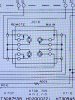
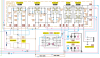
Still trying to figure out from the schematic which set of RCA jacks contains the switch. Even though this says "Remote" and "Main" I think these are the pre-out/main-in jacks. I think it is a misprint maybe?
image_123927839 (4).JPG
image_6487327.JPG
 
dankik, cool thank you. I did not know about these other sources for schematics. I am using the grainy one from Hifiengine. That hi-res one is so much easier to read and navigate. Sorry, what does SM stand for? That is the original factory schematic yes?

Confirming one of blhagstrom's post above, it is in fact the Main-In jacks that are switched. When I plug one end of an RCA cable into the Main-In's, the sound cuts out, and when I do the same to the Pre-Out's, there is no change to the sound.

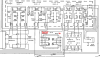
If I am reading the Hi-Res schematic correctly, then it is showing both the Main-In and Pre-Outs as being switched? And the original factory schematic is showing only the Pre-Out's as switched which would also be incorrect?

Please feel free to correct me if I am reading the symbols wrongly. I am guessing the simpler set of symbols on the right side (on the original/SM schematic) represent unswitched jacks, and the slightly busier set of symbols on the left, represent the switched jacks.
 
Just to update: I now have the amp back in place and will be testing. I am starting out with no jumpers in the Main-In Pre-Outs as I would still like to be sure of the source of the problem, and what might have fixed it. It is sounding great right now, and nothing wrong with either channel.

If the amp is in fact fixed, then what might have done it?

To review:

1. The relay was not replaced or even cleaned. It was tapped and manipulated a bit and the cover was taken off and put back on.
2. The Main-In and Pre-In Jacks were sprayed with CRC contact cleaner, and RCA plugged in and out repeatedly to try to help clean switched jacks.
3. The plastic backing plate on which Main-In/Pre-Out RCA jacks are held, was a bit loose, the screws holding it to the back of amp were tightened.
4. The headphones jack was replaced. This kind of confuses things, making it harder to determine the cause of the problem, and the remedy. But I had to do it while the amp was on the bench and opened up.
 
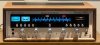
Now for no good reason, here is a picture of the amp in action:mtz on.JPG

DeadRock, I think we may have both bought wooden cases from the same guy--unless yours is the original.
 
Sorry, what does SM stand for? That is the original factory schematic yes?
SM = Service Manual, and yes that is the schematic included in the manual from Marantz. In some cases, it is a separate sheet from the rest of the manual.
If I am reading the Hi-Res schematic correctly, then it is showing both the Main-In and Pre-Outs as being switched? And the original factory schematic is showing only the Pre-Out's as switched which would also be incorrect?
The HiRes schematic apparently shows the PreOut as always being connected to Main In regardless of whether there is an RCA plug inserted into the PreOut or not.
The SM schematic shows that when a cable is plugged into PreOut, the signal is disconnected from the Main In and the Main In is left floating.
Confirming one of blhagstrom's post above, it is in fact the Main-In jacks that are switched. When I plug one end of an RCA cable into the Main-In's, the sound cuts out, and when I do the same to the Pre-Out's, there is no change to the sound.
This test seems to validate the Hi-Res schematic representation of the RCA jack configutation.
 
The amp has been in heavy use for the past two days, and it looks as though the problem is gone. I don't think it has operated this long without a problem since I acquired it. So I will tentatively say that we found the problem and fixed it.

So just to wrap up the thread:

Problem: Left channel drops out after about 5min or so of use
Probable cause: Main-In jack/switches were loose or dirty
Remedy: Cleaned with contact cleaner and tightened screws securing RCA jacks to back panel

Many thanks to all who contributed to this thread!
 
Back
Top Bottom