• The move to the new server is done. There are some software and database maintenance updates in process. This has us passing the hat around to help out. We appreciate any donations. Seriously, even a dollar helps. The payment page may be found here - https://www.audiokarma.org/support.html

Marantz 2325 with loud pop after 3 seconds right channel only

Kane4040

New Member
Hello all,

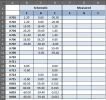
I am refurbishing a Marantz 2325 that has developed the above issue. I have 2 2325s so I have been able to confirm the issue is in P700 right by swapping between units. The pop occurs 3 seconds after the relay clicks. Because of the symptoms I suspected a transistor issue and nearly all the transistors have been replaced at this point except for H706/707. Below is a list of the transistor changes to date along with a picture. I additionally tried replacing the output transistors with On Semi 1193/1194 but same result.

Any thought from the experts would be much appreciated.

Heres my list of components I've replaced.
H701/702: 2SA722 > KSA992
H703: 2SA722 > KSA992
H704: 2SA720 > KSA1013
H705: 2SC1318 > KSC2383
H708: 2SC1669 > MJE15032
H709: 2SA839 > MJE15033
H710/713: 2SC945 > KSC945 (Crossed the collector and base legs to match the pinout of the original)
H711/712: 2SA733 > KSA733
H714/715: 2SC5960 > MJE2436
H718/H719: VD1122 > 1N4148

IMG_3789.jpeg
 
Register to hide this ad
Hi folks,
After replacing the fly-back diodes to J02 and J708 on one channel, it blew the 8 amp fuse. I undid that, place the old diode back. After turning the receiver on, it did nit blew the fuse but the relay did not come out of protection. I check the voltage, it had 110 volts on J809. I disconnected that channel, now it come on and the other channel plays normal.
The p800 board has all normal voltages.
Anyone want to take a jab as to why it has the crazy voltage?
 
Hi folks,
After replacing the fly-back diodes to J02 and J708 on one channel, it blew the 8 amp fuse. I undid that, place the old diode back. After turning the receiver on, it did nit blew the fuse but the relay did not come out of protection. I check the voltage, it had 110 volts on J809. I disconnected that channel, now it come on and the other channel plays normal.
The p800 board has all normal voltages.
Anyone want to take a jab as to why it has the crazy voltage?
If the audio phono plug isn't plugged into the amp module, the module loses a ground reference. There's a stab for ya!
 
So friends, my request for information was, which resister would bring to DC voltage at J809 back to normal milli volts and make the amp come out of protection. I can't see any visibly damaged parts.
Another question I have is why the relay makes 2-3 clicks, opening up several times before settling down and connecting the speakers. (?*?)
 
So friends, my request for information was, which resister would bring to DC voltage at J809 back to normal milli volts and make the amp come out of protection.
You can start by measuring and reporting the voltages of all of the P700 transistors on the bad channel so we can see where we are at.
1724343265191.png

Here is a reference to the back side of the board that might help identify the components,
Screenshot 2024-03-04 091317.jpg
 
Last edited:
Thanks! When I connected the bad amp to the power but I did not connect the RCA signal input, the relay click normal but the amp got hot really fast, too hot to touch within 2-3 minutes. I tried to start with H701-702, but I never got to measure the voltages. Should I replace the H701-702 transistors? I still have the old pair.
 
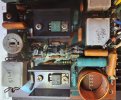
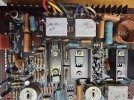
Hi guys! I followed @rBuckner's advice, put the RCA plug into J701 connected the power and within a few seconds the E leg of H711 turned white hot. I shut the power, replaced the H711 PNP transistor. I don't want to power up before find the reason for H711 to burn. Here are some pictures. No visible damage to any resistors. I am sure you have a clue of what needs to be replaced. Please - - -
 
here you go.
 

Attachments

  • KakaoTalk_20240829_181656495.jpg
    KakaoTalk_20240829_181656495.jpg
    154.2 KB · Views: 15
  • KakaoTalk_20240829_180546635.jpg
    KakaoTalk_20240829_180546635.jpg
    128.6 KB · Views: 14
  • KakaoTalk_20240829_180048812.jpg
    KakaoTalk_20240829_180048812.jpg
    125.1 KB · Views: 14
  • KakaoTalk_20240829_180033349.jpg
    KakaoTalk_20240829_180033349.jpg
    101.3 KB · Views: 15
Sorry to hear that. :( Can you please tell me which components on this board you have replaced and the part numbers of any transistors that you replaced.
Thanks.
 
Can you check this jumper wire (arrows). Is it bare wire or just your poor lighting in the photo (shadows)? If it is bare, make sure it is not touching the heatsink. Also, I can't see transistor H714, I assume it is there?

Also, what is the part no. for H711 & H710?

1724956265790.png
 
Last edited:
Sorry for the time delay. Korea time it is 9:40 AM.
Replaced the caps C706 and C707. H701-702 with PNP transistors A722 something, their test showed hFE 416 - 429; Ube 866mV - 867mV; Io 5.8mA - 5.8mA.
the jumper wire is not bare but nicely insulated, the legs of H714 are there, they barely show, it is located under the heat sink of H706-H707. The C713 is not seated in its place, instead, it's connected with a long insulated wire onto C722.
 
Check a couple of things:
  1. C706 = Check for solder bridge across leads
  2. C707 = (Can't see solder from your photo) Check for solder bridge
  3. H701/H702 = Make sure ECB orientation is correct and no cold solder joints (looks like you need some solder flux to get a smooth finish
1725031450214.png
 
I just noticed you point in question. A better angle may clear the concern you had about these connections. Thanks and I wish you a good day, I'd better get some shut eyes.
 
Two pictures showing the solder points better.
 

Attachments

  • KakaoTalk_20240831_011449425.jpg
    KakaoTalk_20240831_011449425.jpg
    158 KB · Views: 7
  • KakaoTalk_20240831_011449665.jpg
    KakaoTalk_20240831_011449665.jpg
    197 KB · Views: 7
Back
Top Bottom