• The move to the new server is done. There are some software and database maintenance updates in process. This has us passing the hat around to help out. We appreciate any donations. Seriously, even a dollar helps. The payment page may be found here - https://www.audiokarma.org/support.html

Marantz 4430 FM..... help!

jFF_Bulbo

Active Member
Hello AK'ers

I keep working on 4430, once it was repaired, i have no sound on FM right speakers.....

I've tested and checked all the wires on input selector, pin by pin on each wafer it was bad worked previously, soldering wires on wrong pins.....

What i´ve done:
I conect a wire from J313 TO J314 MPX board, and this way sound on right channel is working (so, a bad connection on input selector is already discarded, i think...

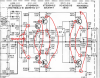
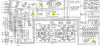
well... i think about check all this parts:

https://ibb.co/M90wG53

M90wG53


B2kIJBS

M90wG53

What do you think AK'ers????
any advise or experience about restore on FM channel???

regards
 
Last edited:
Register to hide this ad
Hello AK'ers

I keep working on 4430, once it was repaired, i have no sound on FM right speakers.....

I've tested and checked all the wires on input selector, pin by pin on each wafer it was bad worked previously, soldering wires on wrong pins.....

What i´ve done:
I conect a wire from J313 TO J314 MPX board, and this way sound on right channel is working (so, a bad connection on input selector is already discarded, i think...

well... i think about check all this parts:

https://ibb.co/M90wG53

M90wG53


B2kIJBS

M90wG53

What do you think AK'ers????
any advise or experience about restore on FM channel???

regards
Take a look for signal into and out of the L305 low pass filter block. Should have audio going into Pins 1 and 5, coming out of 2 and 4. I've had issues with this in Marantz units, usually the soldering or the trace on the PCB:

upload_2022-4-12_8-2-40.png
 
Take a look for signal into and out of the L305 low pass filter block. Should have audio going into Pins 1 and 5, coming out of 2 and 4. I've had issues with this in Marantz units, usually the soldering or the trace on the PCB:

View attachment 2537542
HELLO.
THANK YOU, I'LL DO AS FAR AS I CAN.
Should it be done with a oscilloscope? or just a VTM in diode mode is enought?
 
HELLO.
THANK YOU, I'LL DO AS FAR AS I CAN.
Should it be done with a oscilloscope? or just a VTM in diode mode is enought?
Signal trace with your scope. Radio static or a tuned station is sufficient for a signal source. Just look for absence or presence of whatever signal you use.
 
Hi. Since one channel (L) is working and the other (R) not working, you can measure the DC voltages at the same circuit point for each channel (L & R) and compare voltages with respect to ground (you can use your DMM for this -- maybe you don't have a scope). The circuit is the same for L & R. This should tell you if there is a DC voltage problem with the Right channel. Then we can trace it down to a bad transistor or other component.

upload_2022-4-12_16-48-5.png
 
Last edited:
Hi. Since one channel (L) is working and the other (R) not working, you can measure the DC voltages at the same circuit point for each channel (L & R) and compare voltages with respect to ground (you can use your DMM for this -- maybe you don't have a scope). The circuit is the same for L & R. This should tell you if there is a DC voltage problem with the Right channel. Then we can trace it down to a bad transistor or other component.

View attachment 2538081
Hello. Thank You!!!!!
A broken trace!!!
Right working well again!!!!
 
Signal trace with your scope. Radio static or a tuned station is sufficient for a signal source. Just look for absence or presence of whatever signal you use.
The culprit:
hKTEpIU.jpg

Repaired!!!!
Noe left and right working on FM!!!

Two details:
I hear the FM with low volumen... Overall good reception, but low volumen..

No STEREO light on...
 
No STEREO light on...
The signals for the Stereo Light (M952) go through the switches S005-3F, S006-1R, and S006-2R that you recently rewired (I think).
I would start by re-checking your switch wiring with the schematic, unless it is a problem with the MPX decoder.
Also make sure that the Mode switch is not on MONO.
I'm not sure about the FM low volume. If you have an oscilloscope you can see if you have a 19kHz and 38kHz signal?
upload_2022-4-13_11-26-53.png
 
Is it still low if you disable FM Muting?
welll. a little weird things happend with this unit....
FM GOOD QUALITY
AM POOR
From times to times, STEREO lights turn on on FM:
--sometimes it was turned on ALWAYS, even if there was no station tuned
--other times the light just no turn on, even if a good signal is capted and signal meter show a strong signal.

what is more?
on STEREO MODE, unit works well....
but on quadrial, i lost left frontal channel and right rear chanel......
 
but on quadrial, i lost left frontal channel and right rear chanel......
What is your signal source when you test the Quad?
Which 4-channel mode are you trying to use that causes the loss of LF and RR channels?
  1. Discrete (Need to have a discrete 4-channel source)
  2. Vari-matrix (What position do you have the Dimension Control positioned?)
  3. SQ-Decoder (Do you have an SQ Adapter installed?)
Regarding the poor AM reception - Is the antenna attenuator switch OUT (I think it only affects FM)? Also, make sure that you do not have any switching power supply "bricks", LED lighting, or fluorescent lights nearby, they will cause a lot of AM static and prevent good reception.

I had a problem with my 2252b AM reception on the bench (only static) and it was my magnifier ring lamp which uses LEDs causing static so bad I could not receive any stations. I unplugged it and AM was fine.
 
Last edited:
What is your signal source when you test the Quad?
Which 4-channel mode are you trying to use that causes the loss of LF and RR channels?
  1. Discrete (Need to have a discrete 4-channel source)
  2. Vari-matrix (What position do you have the Dimension Control positioned?)
  3. SQ-Decoder (Do you have an SQ Adapter installed?)
Regarding the poor AM reception - Is the antenna attenuator switch OUT (I think it only affects FM)? Also, make sure that you do not have any switching power supply "bricks", LED lighting, or fluorescent lights nearby, they will cause a lot of AM static and prevent good reception.

I had a problem with my 2252b AM reception on the bench (only static) and it was my magnifier ring lamp which uses LEDs causing static so bad I could not receive any stations. I unplugged it and AM was fine.

OOOOOOK
SOURCE: AUX FRONT. STEREO. with this source the unit bevahes like i describe

I´d think even with stereo signal front should work, and, if i connnect the same stereo source on AUX rear i´d think rear should sound L & R rear, but behaves like i describe.
 
SOURCE: AUX FRONT. STEREO. with this source the unit bevahes like i describe
Let's make sure that we are talking about the same configuration, please:
  • Selector Switch = AUX 1
  • Mode = 2 CH (Stereo)
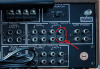
  • L & R Inputs connected to "FRONT INPUTS, AUX 1, L & R" and nothing connected to "REAR INPUTS, AUX 1, L & R".. correct?
  • Are you sure you have the L & R connected to the correct inputs?
  • It behaves like you have L Front connected to L Rear and R Front connected properly (and nothing connected to L Front and R Rear).
  • In Stereo, the F & R channels are summed so it makes no difference, but in 4-CH it does.
  • Then if you set the mode switch to "Discrete" you will only hear what you describe.
upload_2022-4-19_16-44-34.png

upload_2022-4-19_17-1-40.png
In 2 Channel mode:
upload_2022-4-19_16-53-33.png
but on quadrial, i lost left frontal channel and right rear chanel......
Which mode are you calling "quadrial"?
  1. Discrete
  2. Vari-matrix
  3. SQ Decoder?
Just some thoughts for you.
**** I'm assuming that you have 4 speakers connected to the amplifier. Here is a quick test you can do.
  • Put the MODE selector in DISCRETE,
  • Remove all cables from AUX inputs,
  • Plug-in one cable into each of the 4 AUX inputs and observe which speaker it comes out of (LR, RF, LR, RR).
  • You can repeat this in 2 CH mode.
 
Let's make sure that we are talking about the same configuration, please:
  • Selector Switch = AUX 1
  • Mode = 2 CH (Stereo)
  • L & R Inputs connected to "FRONT INPUTS, AUX 1, L & R" and nothing connected to "REAR INPUTS, AUX 1, L & R".. correct?
  • Are you sure you have the L & R connected to the correct inputs?
  • It behaves like you have L Front connected to L Rear and R Front connected properly (and nothing connected to L Front and R Rear).
  • In Stereo, the F & R channels are summed so it makes no difference, but in 4-CH it does.
  • Then if you set the mode switch to "Discrete" you will only hear what you describe.
View attachment 2543799

View attachment 2543818
In 2 Channel mode:
View attachment 2543814

Which mode are you calling "quadrial"?
  1. Discrete
  2. Vari-matrix
  3. SQ Decoder?
Just some thoughts for you.
**** I'm assuming that you have 4 speakers connected to the amplifier. Here is a quick test you can do.
  • Put the MODE selector in DISCRETE,
  • Remove all cables from AUX inputs,
  • Plug-in one cable into each of the 4 AUX inputs and observe which speaker it comes out of (LR, RF, LR, RR).
  • You can repeat this in 2 CH mode.
well...
actually 2 speakers only...
i'm monitoring rear channels with headphones. (headphone rear plug on front panel)
2 CHANNEL MODE IS OK.
ON QUADRIAL (ANY SELECTION OR DISCRETE or VARIMATRIX . SQ no sound because i have no none cartridge....
i think... on dicrete and vari matrix, if i plug a stero RCA cable on aux front ( L & R) the unit must decode the stereo signal and a 4 channel should be listened in main speakers (my set of two speakers) l 6 r front and the rear channel l & R should be heard on headphone.....

maybe i'm misunderstandig the funcion of this formidable machine.
 
2 CHANNEL MODE IS OK.
In 2 CH stereo, you should hear your AUX on the speakers (LF & RF) AND on your headphones plugged into the REAR PHONES jack on the front panel.
Is this correct?

In DISCRETE mode each channel is heard on the respective speaker. So if you don't have anything plugged into the AUX Rear L & R, you won't get any sound out of the rear speakers. Even when listening on your headphones plugged into the rear headphone jack.

In VARIMATRIX mode, the rear channels are synthesized from the LF & RF channels as described in the manual insert I provided earlier. If you have the Dimension Control set to maximum and the L & R channels are almost identical, then the sound out of the rear speakers is minimal.
 
Last edited:
Back
Top Bottom