• The move to the new server is done. There are some software and database maintenance updates in process. This has us passing the hat around to help out. We appreciate any donations. Seriously, even a dollar helps. The payment page may be found here - https://www.audiokarma.org/support.html

Marantz Model 1200 Left Channel Issue

I use the Peak Atlas DCA75 to spot bad transistors, and the Peak Atlas ESR70 to spot bad caps. Freeze Spray is good too for finding bad transistors, if you spray the bad component the sound can change, indicating a bad transistor, or cold joint. Use the Ohm setting on a DMM to test resistors to see if they're in spec.
 
If you switch your Tone Control knob, on the top far right, to Out, does the volume or distortion change at all?

When the unit was cold in this morning, the problem occured again. So, I switched Tone Control Knob many times. That made the problem go away. I thought I cleaned it well the other day, but I guess not enough.
 
Interesting, you have a similar problem to mine.

What switching the Tone Control to Out, does on mine, is by-pass the filtering on the 3300 Pre-amp output, so that only the power-amp or the 250's are delivering the sound. It would suggest to me, that you are also having a problem in the Pre-amp section on cold-start.

The other way to absolutely confirm you have a Pre-amp problem, would be to remove your Amp-In/Pre-Out jumpers in the back, and hook up an input that has its own volume control, like a phone, or iPad, with a 'Y' cable to the Amp-In section on the rear, and then when your 1200 is cold, see if going through Amp-In directly - eliminates that Left channel problem on cold-start. Make sure your input device has the volume turned down, if you do this step.

https://www.amazon.com/JSAUX-Shielded-Gold-Plated-Smartphones-Speakers/dp/B07D8M5DML
71%2Bh28xdAGL._AC_SL1500_.jpg


What's good about your problem is that it seems to be consistent, which makes the bad component easier to find, than an intermittent scenario.
 
It is interesting that we have a similar issue. I have to buy the cable, but I definitely try the method to identify the problem. Thank you for this suggestion. Which one is pre-amp board? X10 Amp?
 
The A3 X10 amplifier is where my shorted transistor is, but there is also the Tone board, that could be responsible for your problem. The sound signal passes first through the Balance pot, then through the Volume pot, and then into the X10 board, then the Tone board. My Left channel remains quieter than the Right, in any other Tone Control setting, than Out, mine never gets any better like yours does.

I would try the Freeze Spray in your situation, to see if making the Left 250 amp cold produces that problem you're experiencing.
 
I have a related question for you. I noticed the left output resistors are not original. I measured those resistors.
Top to Down
Current Gain
1 SMT B656 PNP 210 Hfe
2 SMT B656 PNP 29
3 Toshiba 2SD434 NPN 48
4 Toshiba 2SD424 NPN 83

SM shows Beta (Hfe) Range as follows,
Q802 30~49
Q803 50~69
Q804 70~99
Q805 100~120

Is this something I should do?

Also, If you found any faulty diodes or transistors on a board, how can you know the spec of those components? The parts list in SM only shows "Diode" or "Transistor PNP/NPN".
 
Last edited:
I have a related question for you. I noticed the left output resistors are not original. I measured those resistors.
Top to Down
Current Gain
1 SMT B656 PNP 210 Hfe
2 SMT B656 PNP 29
3 Toshiba 2SD434 NPN 48
4 Toshiba 2SD424 NPN 83

SM shows Beta (Hfe) Range as follows,
Q802 30~49
Q803 50~69
Q804 70~99
Q805 100~120

Is this something I should do?

Also, If you found any faulty diodes or transistors on a board, how can you know the spec of those components? The parts list in SM only shows "Diode" or "Transistor PNP/NPN".

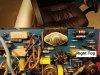
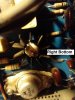
Nicely done! Does this mean your Right/B channel has all original Outputs? Can you get some pics of your Outputs, and if you can, also the pre-drivers, on the top and bottom of the 250 amp boards? I'm curious if you have the Motorola 2519/20's, or if yours has been serviced up to the Service Bulletins standard.

EDIT: To test a diode quickly in the board, I use Ohm/continuity setting on my DMM, and swap the red and black probes on either side of the banded cathode, it should only give a reading in one direction, as a diode's primary function is to conduct voltage in one direction, never in reverse.
 
Last edited:
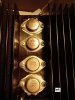
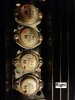
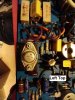
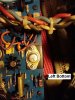
Just took some pics.
 

Attachments

  • IMG_20201206_191118490_MP.jpg
    IMG_20201206_191118490_MP.jpg
    106.2 KB · Views: 24
  • IMG_20201206_191305656_HDR.jpg
    IMG_20201206_191305656_HDR.jpg
    90.4 KB · Views: 24
  • IMG_20201206_192915964.jpg
    IMG_20201206_192915964.jpg
    120.5 KB · Views: 27
  • IMG_20201206_192923302.jpg
    IMG_20201206_192923302.jpg
    121.9 KB · Views: 26
  • IMG_20201206_201019352.jpg
    IMG_20201206_201019352.jpg
    145.7 KB · Views: 25
  • IMG_20201206_201032741.jpg
    IMG_20201206_201032741.jpg
    94.8 KB · Views: 25
It certainly does appear that all of your Outputs are stock on the Right channel, and both of your 250's.

The problem you're having would seem to me, to be related to the Left Outputs. Were you able to get some Freeze Spray and spray those Left Outputs?

Without the Freeze Spray, when your 1200 is cold, try bypassing the Pre-Out section, by removing the jumpers in the rear, and plugging a phone/iPad in the Amp-In with volume on low, this will tell you if you have a Pre amp or power amp problem.
 
It certainly does appear that all of your Outputs are stock on the Right channel, and both of your 250's.

The problem you're having would seem to me, to be related to the Left Outputs. Were you able to get some Freeze Spray and spray those Left Outputs?.

Last night I found out that the output transistors on the right are NPN(SJ2519), NPN, PNP(SJ2520), PNP (top to bottom), but PNP, PNP, NPN, NPN on the left.

Service Manual mentions
Q802(SJ2520) to be in same beta range as Q803(SJ2519)
Q804 to be in the same bata range as Q805
Pair Q802-Q803 to be matched to Pair Q804-Q805 within one bata range

None of the output transistors (right and left) on my unit are in the ranges SM shows.
 
Your Motorola 2520's, 2519's and 16/15's, all look like they have not been updated, in accordance with the Service Bulletins.

SB 250-2
kYFhVAx.jpg


pgou13d.jpg


My 1200 has the gain codes painted on them, as if this 1200 did have the Service Bulletin updates done to it:
pnVIiod.jpg


9FZ8hGv.jpg


There's also the issue of the quality of these stock Outputs though, and their gain matching procedure, might not be all that good:
https://audiokarma.org/forums/index...epair-restoration.933713/page-4#post-14223863

Here's an easy way to check your bias on those Outputs, that may tell you something:
https://audiokarma.org/forums/index...epair-restoration.933713/page-8#post-14326296
 
Last edited:
After I assembled the both power amp boards I tried to test the sound, but no sound came out. I didn't change anything, but I must have done something. The lamp turns on and I can hear the click of the relay too, but no sound. Then, when I switched Tone Control nob to "Out" position, I heard a big pop static sound from the relay.
 
Did you pull the jumpers in the back, and feed an input directly in to Amp-In? This will tell you if you have a power amp, or pre-amp problem.
 
I wonder about the whole 'Hfe matching' thing after reading this.

Tom
I rebuilt a 250M for a fellow up in Gig Harbor about seven years ago, with the SOA BS pretty much disabled. I took the outputs (MJ21195/96) out of the package, quick checked them with a meter, and installed them. It's still going strong. Same story with a 510M I rebuilt. Emitter degeneration resistors exist so that outputs don't have to be gain matched, and any amp that HAS to have gain matched outputs (BPJ) is a shitty design, IMCO.
 
Did you pull the jumpers in the back, and feed an input directly in to Amp-In? This will tell you if you have a power amp, or pre-amp problem.

I just tested it. "Pre Amp Out" is not working at all. And, the sound only comes out from the right channel in "Amp in" setting.
 
Glad to hear the Right channel is unaffected when going through Amp-In, thanks for checking that.

I'm not sure what has happened to the Pre-amp section, this may sound naive of me, but make sure to check that the middle switch in your 4 EQ sliders, is in the up position, if that middle switch is down (set to Tape In), you will get no Pre-amp sound.

EDIT: If you are plugged into the Amp-In section, your Pre-amp will not work, and the panel controls also do nothing, this is correct behavior.
 
Last edited:
I started to check X-10 board today. I tested from Q401 to Q406. Those are still attached to the board. I used DCA55 for the test. It showed Q403 and 406 are "shunt". Q401 and Q404 are NPN Transistor, but Q402 and Q405 are Series Diode Network. I am confused, because these should be all transistors according to SM.
 
Are you certain your pre-amp is completely dead? I would stay away from pulling transistors from any boards, until you're 100% certain.

I pulled all of my transistors off the board to check them, I got strange results in-board with a DCA75.

A Hakko FR-301 can quickly desolder a component without harming the board/traces, and it makes pulling and testing components much faster and easier.
 
Back
Top Bottom