• The move to the new server is done. There are some software and database maintenance updates in process. This has us passing the hat around to help out. We appreciate any donations. Seriously, even a dollar helps. The payment page may be found here - https://www.audiokarma.org/support.html

Marantz SD 9000 Compudeck Problem

Ryan Scruggs

New Member
Hi, all!

I have recently purchased a non-functioning Marantz SD 9000 Compudeck, with the knowledge that the optocouplers would have to be replaced. After following this tutorial exactly and purchasing the optocouplers, belts, and idler tires it mentions, I am still unable to play tapes.

Upon pressing PLAY, the tape heads move into place, but almost immediately retract. I assume that I made an error in replacing the optocouplers, but I cannot figure out where I went wrong. Additionally, when I press PLAY, the left tape spool does not spin, as the electric motor does not engage. This motor does work, because the machine will fast forward and rewind tapes beautifully.

Any help is appreciated, and I can supply photos if necessary!
 
Register to hide this ad
Hi! I have replaced both the idler tires and belts on the machine, and I am sure that the FF/REW motor is functioning properly. I'm just having issues with tape playback and with the machine not pulling the tape past the tape heads. I bought the optocouplers here, and I bought the belts and idler tires from this site.
 
First check idlers.

20pucxt.jpg

Hi! I have replaced both the idler tires and belts on the machine, and I am sure that the FF/REW motor is functioning properly. I'm just having issues with tape playback and with the machine not pulling the tape past the tape heads. I bought the optocouplers here, and I bought the belts and idler tires from this site.

Here's a video of the problem I'm having with my player:
 
Hi! I have replaced both the idler tires and belts on the machine, and I am sure that the FF/REW motor is functioning properly. I'm just having issues with tape playback and with the machine not pulling the tape past the tape heads. I bought the optocouplers here, and I bought the belts and idler tires from this site.

Here's a video of the problem I'm having with my player:
I figured out what the problem was: burnt out resistors on the PK21 board.

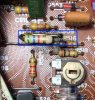
That being said, I am now having problems determining where the last resistor is supposed to be inserted into the PK21 board. The resistor in question is R516, shown here:
PK21 Photo.jpg

I have successfully replaced the other burnt out resistors shown in this picture, but I'm currently stuck on R516.

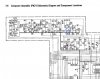
If this helps, here is a schematic with R516 encircled with a blue box:
PK21 Schematic.jpg


Thanks again!
 
Hello. I trying to fix my SD8000 Compudeck, did the Optocoupler replacement but when I switch it on only the Clock/Counter display blinks and when I load a tape the flywheel turns and nothing else happens. No Play/FF etc. How do I know if I have the right type of Couplers. Any thoughts??
Thanks.
 
@Morrocotudo

I bought the optocouplers for my machine here, but they required some modifications in order to fit into the machine properly. Following this tutorial gave me all of the information that I needed to replace the optocouplers successfully, so I would give it a look if you haven't already. Although this is my first time attempting to repair a machine of this caliber, I will say that replacing the optocouplers has proven to be the least of my problems with the machine (as I'm sure you've seen).

The flywheel spinning and the digital counter flashing is completely normal, so nothing to worry about there. I will say, however, that the problem you are having with the buttons on the front of the machine is quite odd. I would scrutinize the boards within the machine and see if there is/are any burnt out resistors or blown capacitors. If that's not the case, I would spring for some DeOxit spray and give the boards a good cleaning. Sometimes, the flux that is on the boards can conduct electricity and mess things up. I would especially give the control panel the most attention, seeing as that something is not performing correctly there.
 
@Morrocotudo

Also, I saw your question about the symptoms of bad optocouplers on the other post that I made.

The optocouplers simply tell the tape deck whether or not both reels on the tape are still spinning. Obviously, when you reach the end of a tape, the reels stop spinning, and the optocouplers tell the machine, thus eliciting a "STOP ALL" signal, effectively disengaging the tape heads and stopping the PLAY motor.

With that being said, I do not believe that your problem lies with your optocouplers, exclusively. Had everything else on your machine been working correctly (PLAY/RW/FF buttons), you would have expected for the tape to play for a couple seconds and then stop. That's because the defective optocouplers think the reels have stopped, thus sending the "STOP ALL" signal.

I hope this helps! Hopefully we can bounce ideas off of one another and be able to fix both of our machines! These things are beasts, but I think that once we get them fixed, the sound reproduction and recording potential will be second to none!

Additionally, I have extra optocouplers (the correct ones, if you're worried about purchasing the correct ones). I can send you a set of them that have already been modified to fit in the machine, if you want. Or I can send them to you unmodified and you can modify them according to the instructions on the aforementioned tutorial!
 
Thank You Ryan. I can't get the machine to even start the tape. The blinking occurs even when I switch it off, when I tried to set the clock, numbers 1,2,3,4 and 5 worked, the second row didn't. I was able to program the time but only using the first five digits, yet the blinking continue after I switched off. Thanks for the offer, since you already describe how the deck behaves with the bad couplers my next goal is to get the machine to start. I cleaned with DeoxIT D5 throughout couldn't' find any signs of burned component I wonder if maybe the eprom chip may be bad. This a deck I bought "As is" in eBay and always want it to have one, so I took the challenge a good working one is selling for $1500.00. My ex-brother-in law had one and I did a lot of taping with it and the recording quality was simply superb.
Thanks for your time.
-Luis
 
I hope that this discussion can be reactivated after five plus years. My SD9000 has been working beautifully since remedying a similar control panel problem 20 years ago. A week ago was the last time I played a taie and everything worked perfectly. Today, I noticed the clock was not lit up. I pressed the power switch and the power LED lit up but when I placed a cassette in the deck, none of the tape deck control buttons respond. Sure would appreciate it if anyone have an idea of what may be wrong?

Don
 
Hello and best of the festive season to all.
This must be a kick in the pants, to see your beloved deck acting up.
  • Have you popped the top?
  • Is the flywheel moving? Tape has to be in it.
  • Is there anything working on the display?
  • If you turn the right side take up reel your counter (tape out) should move but hard if displays dead.
I have the same issue with a SD8000. It just powers up....that's it. Changed opto couplers and while I was in there replaced the belts and three idler tires. Back in and now the flywheel is spinning and it tightens the tape by spinning the left reel backwards. Thats it. No solenoid action. Every function button is nonoperational, but they all have DC voltage. There is continuity from controls on front to plug P508. Solenoids test okay, so it's on to the solenoid drive voltage select circuit. Failing this, I am thinking it might be the dreaded Q701. I will let you know if I have any luck or have an epiphany.
Seconding the request for help or insights.
 
Hello and best of the festive season to all.
This must be a kick in the pants, to see your beloved deck acting up.
  • Have you popped the top?
  • Is the flywheel moving? Tape has to be in it.
  • Is there anything working on the display?
  • If you turn the right side take up reel your counter (tape out) should move but hard if displays dead.
I have the same issue with a SD8000. It just powers up....that's it. Changed opto couplers and while I was in there replaced the belts and three idler tires. Back in and now the flywheel is spinning and it tightens the tape by spinning the left reel backwards. Thats it. No solenoid action. Every function button is nonoperational, but they all have DC voltage. There is continuity from controls on front to plug P508. Solenoids test okay, so it's on to the solenoid drive voltage select circuit. Failing this, I am thinking it might be the dreaded Q701. I will let you know if I have any luck or have an epiphany.
Seconding the request for help or insights.
Any luck on this? I too have a 8000 with this issue. Only a key or two works on the right side keypad, and no transport controls at all. I haven’t tried recapping the PSU yet, but if Q701 is possibly dead, I’d rather not waste my time.
 
Hi Dan and Brandon 1250. Thanks for your comments.

I haven't opened it up at all. I don't have the expertise to go much beyond popping the lid and looking for something real obvious like a broken belt, swollen capacitors or burned resistors. There is a nice shop, Audio Unlimited, down in Maryland. I think I'll just have to bite the bullet and wait for their 6 week backup to wind down.

Thanks again for your responses.

Don
 
Any luck on this? I too have a 8000 with this issue. Only a key or two works on the right side keypad, and no transport controls at all. I haven’t tried recapping the PSU yet, but if Q701 is possibly dead, I’d rather not waste my time.
Hi all,
The control board for FF, Play, Rew etc can be checked by removing that small pcb with the control buttons and jumping the 2 poles below the black micro switches while the unit is connected and see if you get any response. Can also be checked by continuity test. I had to replace all of them with (2 poles, Length x Width x High: 6x6x9.5mm) tactile switches after this test. However, although all buttons are now responding, I still have the endemic 2 to 3 seconds play and stop.
I ' m somehow confused with the right position of the optocouplers and the positions of the 3 wires connected to it. They were disconnected during repair and now I cannot figure out which color goes where. Thanks for any help or picture of the small optocouplers boards ?
 
I don't know what to think about my bewildering good fortune with my SD9000. After several weeks of procrastination and before getting around to taking my beloved to the shop, one morning I noticed the clock was flashing, (as it had always done following a power outage). The unit is now, again, working perfectly. Could it be that whatever misfortune caused it to stop working in the first place somehow reoccurred as a good fortune? All I can did to be thankfully.

Don
 
They were disconnected during repair and now I cannot figure out which color goes where. Thanks for any help or picture of the small optocouplers boards ?
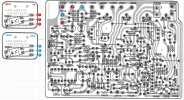
@noiseseeker9, I don't have a photo, but from looking at the SD8000 Service Manual, here is what I conclude. The two Optocoupler boards appear to have 3 pads (labeled 1,2,3). Based on the schematic (bleow), I have marked where each wire should be connected to. JM13 will have wires from both Optocouplers. Hope this helps.

1735512890432.png

1735512951232.png
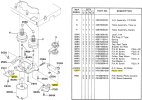
The Optocouplers mount as shown in this diagram.
1735514111297.png
https://www.vintagesilversmith.com/Marantz/SD9000/repair/sd9000_fix.html
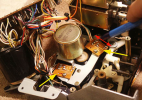
See his website for details of repair of the photo sensors and tips with lots of pictures.
1735514654445.png
Photo courtesy vintagesilversmith.com
 
Last edited:
@noiseseeker9, I don't have a photo, but from looking at the SD8000 Service Manual, here is what I conclude. The two Optocoupler boards appear to have 3 pads (labeled 1,2,3). Based on the schematic (bleow), I have marked where each wire should be connected to. JM13 will have wires from both Optocouplers. Hope this helps.

View attachment 3384543

View attachment 3384544
Wonderfull,Thanks a lot. I'll try it tomorow. This is the info I needed.
 
marantz sd9000
Thanks for all the help so far
Changed all Caps in PSU, in PK21, in motor governor's borad and checked all transistors, PK11 transfer signal properly when a signal source is applied to the imput connectors, optocouplers changed, all voltages ok from PSU, Capstan motor is excellent and turns while a tape cassette is in, pk21 preamp works fine, all program button commands are answering properly, all belts changed but plays, review and ff only for 2 seconds. I suspect a transistor is gone on pk21 board but which ones would be related to keeping the tape playing longer than those 2 seconds ? I also realize that the reel motor, which is in good shape, does not turn during the 2 second playback, Is that normal? No voltage on the 2 pins that sends power to the reelmotor at the same time, is that also normal?
 
Last edited:
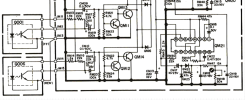
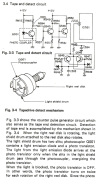
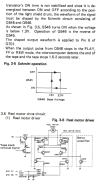
Transport stopping after 2 sec in PLAY, REW, FF may be because the end of tape detection circuit is not working. If you have an oscilloscope, you can look at Q601 pin 6 and you should see a series of pulses as the tape hub turns. If not, then you need to check the circuit. If you do not have an oscilloscope, you might be able to detect changing levels by attaching your DMM to measure the voltage at Q701 pin 6 while manually rotating either the feed or take up reel hub by hand. You should see the voltage to high then low.
1736274919131.png1736275042650.png
 
Transport stopping after 2 sec in PLAY, REW, FF may be because the end of tape detection circuit is not working. If you have an oscilloscope, you can look at Q601 pin 6 and you should see a series of pulses as the tape hub turns. If not, then you need to check the circuit. If you do not have an oscilloscope, you might be able to detect changing levels by attaching your DMM to measure the voltage at Q701 pin 6 while manually rotating either the feed or take up reel hub by hand. You should see the voltage to high then low.
View attachment 3392729View attachment 3392734
 
Back
Top Bottom