• The move to the new server is done. There are some software and database maintenance updates in process. This has us passing the hat around to help out. We appreciate any donations. Seriously, even a dollar helps. The payment page may be found here - https://www.audiokarma.org/support.html

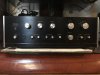
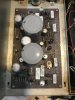
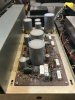
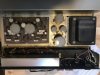
My first restore attempt: Sansui AU 555A

DatGtrPlaR

Amuse your Muse
This is my first post here, as I’ve been a lurker and learned a great deal from this community. So for that, I thank you! A own a QRX 7500A which has some intermittent distortion in the front 2 channels. That led me to acquire a Sansui 999, as a backup, which is wonderful, which I plan to do some mods…but… I was lucky to score a Sansui AU 555A to get my feet wet with audio restoration. I have all the tools, except for the oscillator, which I hope to get soon. It powers on, quite dusty inside. I was wondering what beginning steps I should take to tackle this endeavor. I’m posting a few pics for any thoughts/advice you may offer. Thanks in advance!!
Dat
 

Attachments

  • E5579664-1783-40C4-B714-F86641A23A28.jpeg
    E5579664-1783-40C4-B714-F86641A23A28.jpeg
    79.1 KB · Views: 36
  • D2C80092-5A11-4B20-9F83-12F686F00F26.jpeg
    D2C80092-5A11-4B20-9F83-12F686F00F26.jpeg
    108.2 KB · Views: 36
  • B4502CE6-C449-4797-A032-9A4A93ACFD05.jpeg
    B4502CE6-C449-4797-A032-9A4A93ACFD05.jpeg
    96.3 KB · Views: 36
  • DD54299F-B5CE-4FBD-ABB1-96FB766700BD.jpeg
    DD54299F-B5CE-4FBD-ABB1-96FB766700BD.jpeg
    105.7 KB · Views: 35
Register to hide this ad
.... I was wondering what beginning steps I should take to tackle this endeavor....

1) get the service manual
2) search AK for restore, or any, threads for AU-555A. Most models have their unique quirks, and with Sansui models much of this has been documented. I prefer google advanced search with audiokarma.org in the "site or domain" field. But AK resident search is not too bad, just search AU-555A in thread titles.
 
3) Listen to and get to know your amp before doing any work. Learn its sound and identify any operational issues before any parts are removed.
 
1) get the service manual
2) search AK for restore, or any, threads for AU-555A. Most models have their unique quirks, and with Sansui models much of this has been documented. I prefer google advanced search with audiokarma.org in the "site or domain" field. But AK resident search is not too bad, just search AU-555A in thread titles.

#1 already done
#2 Underway….

I’m guessing that I have to clean the inside boards first. Trying do do things right the first time.
 
IMO just getting rid of the majority of the dust is enough to get started. More thorough cleaning, if needed or wanted, is easier as old parts are removed. If this amp has any polystyrene caps be careful not to get any alcohol on them or expose them to solder iron heat (it may not have them, IDK).

4) take lots of pictures before removing any parts


Nice looking amp. I think that face plate will clean up nicely. Good luck with your project, it seems you are starting off the right way :thumbsup:
 
Last edited:
So far, I have output on both A and B speakers, but it is farting out very badly. I sound much better than that after some beans…My assumption is that the problem might be in one area…wow the puns…I am going to take some time studying how to clean these things. I was wondering if I should clean it up first without removing too much and plugging it in again with speakers to test audio, or to start doing a deep clean removing boards, and then some diagnostic testing with and audio generator and such… I am starting this out as a complete novice..I realize have to be patient during this time to go slow so I my learn quicker. Any advice is welcome…Thank you
Dat
 
The basics are to check for DC offset (DC voltage) across the speaker outputs: volume down, no loudness/filters/tone, no inputs connected, speaker outputs on of course. If DC offset is reasonable, (saying arbitrarily 70mv or less for a direct coupled amp, not sure if any voltage is appropriate for cap-coupled amp which I believe this amp is), then hook up a known-good input and speakers and test all functions, volume, balance, tone, etc. Test different inputs and speaker outputs. Note any issues like static or scratchy sounds and when that occurs, i.e. which knob turning causes those sounds. While doing this testing be aware of any unusual heat or odors.

It seems to me that you are placing too much importance on cleaning. Yes, cleaning can be super important if you're talking about contact areas where current flow takes place like inside switches and pots, fuses, speaker terminals, etc. But I wouldn't clean any pots/switches before initial testing. And as for dust or grime sitting on the board or on components, that shouldn't be causing any issues with sound.

Farting out badly? Forgive me...I may not be up on all of the latest technical terms :) What does that mean? It is making noise? Noise through speakers?? On both channels? Be specific.
 
The basics are to check for DC offset (DC voltage) across the speaker outputs: volume down, no loudness/filters/tone, no inputs connected, speaker outputs on of course. If DC offset is reasonable, (saying arbitrarily 70mv or less for a direct coupled amp, not sure if any voltage is appropriate for cap-coupled amp which I believe this amp is), then hook up a known-good input and speakers and test all functions, volume, balance, tone, etc. Test different inputs and speaker outputs. Note any issues like static or scratchy sounds and when that occurs, i.e. which knob turning causes those sounds. While doing this testing be aware of any unusual heat or odors.

It seems to me that you are placing too much importance on cleaning. Yes, cleaning can be super important if you're talking about contact areas where current flow takes place like inside switches and pots, fuses, speaker terminals, etc. But I wouldn't clean any pots/switches before initial testing. And as for dust or grime sitting on the board or on components, that shouldn't be causing any issues with sound.

Farting out badly? Forgive me...I may not be up on all of the latest technical terms :) What does that mean? It is making noise? Noise through speakers?? On both channels? Be specific.
I hooked it up with all 4 speakers A and B and there is short bursts of intermittent output (music) with distortion. It seems like it is the same throughout all 4 speaker outputs, volume works as a volume but the distortion bursts are the same and unaffected. Also unaffected by filter switches and tweaks of eq or stereo/mono switch, all have no effect on distortion. Inputs tested were the aux and tuner
 
I also saw the voltage selector plugs was set at 117v .. what’s up with that? Shouldn’t it be 110 in The United States? Could that have been my problem?
 
Nice video! Is that yours?

This is really a troubleshooting project, not a restore project. You have already been given the basic advice for getting started on a restore project, so based on the thread title and the first few posts, it is possible that there might not be a lot of additional posting. IMO viewership of this thread will be limited now, as some who might be able to help you with troubleshooting this particular issue will not be aware of the troubleshooting aspect that only appeared later in the thread.

The next thing is to try to determine if that distortion is in both channels or just one. Try this: first, put the MODE switch in Mono then turn the balance knob full left then right. You should probably hear the same thing in both channels. Then, put the MODE switch in Stereo and listen to full left then full right. Is the same distortion in both channels when the MODE switch is in Stereo as when it is in Mono?

I watched your video and yes, you did do this very quickly around 00:55 through 00:57. But you ran through that too quickly and you did not also compare MONO vs STEREO.

So here is my advice based on all that is currently known: start a new thread asking for troubleshooting help. Re-do your video focusing on the test that I described above, and don't rush through it. Allow time for viewers to hear what is happening for a few seconds with each change in the balance knob and MODE switch. Post the link to the revised video in your new thread. Others, more knowledgeable than myself, will guide you from that point.


After this distortion issue is resolved, then restore the amp. Either come back to this thread, or perhaps do a restore thread in the Sansui forum here.

good luck, nice Sansui...it will be a fine amp when it is fixed!
 
Last edited:
It is mine
I suppose this is a restoration project that is turning into a troubleshoot.. this is my first project into serious electronic repair and I figured I would do this one before doing some mods on my AU 999 and the troubleshooting the QRX 7500A.
With this one, I wanted to trouble shoot, get it running to specs, then do some of the Leestereo mods if been hearing about on here. I was thinking going in that order would give me some good knowledge. Hopefully!!!
I will post a new troubleshooting vid soon with your suggestions.. Thanks Roger2!
 
Nice video! Is that yours?

This is really a troubleshooting project, not a restore project. You have already been given the basic advice for getting started on a restore project, so based on the thread title and the first few posts, it is possible that there might not be a lot of additional posting. IMO viewership of this thread will be limited now, as some who might be able to help you with troubleshooting this particular issue will not be aware of the troubleshooting aspect that only appeared later in the thread.

The next thing is to try to determine if that distortion is in both channels or just one. Try this: first, put the MODE switch in Mono then turn the balance knob full left then right. You should probably hear the same thing in both channels. Then, put the MODE switch in Stereo and listen to full left then full right. Is the same distortion in both channels when the MODE switch is in Stereo as when it is in Mono?

I watched your video and yes, you did do this very quickly around 00:55 through 00:57. But you ran through that too quickly and you did not also compare MONO vs STEREO.

So here is my advice based on all that is currently known: start a new thread asking for troubleshooting help. Re-do your video focusing on the test that I described above, and don't rush through it. Allow time for viewers to hear what is happening for a few seconds with each change in the balance knob and MODE switch. Post the link to the revised video in your new thread. Others, more knowledgeable than myself, will guide you from that point.


After this distortion issue is resolved, then restore the amp. Either come back to this thread, or perhaps do a restore thread in the Sansui forum here.

good luck, nice Sansui...it will be a fine amp when it is fixed!
I created a new thread on your advice .. Thank you

https://audiokarma.org/forums/index.php?
threads/troubleshooting-the-555a.977164/
 
Great! I probably will stay out of that thread as some others here will be able to hone in on the source of the problem more quickly.

The new video is much better. But it is still not crystal clear to me what happens when going left channel then right channel in each of the MODE settings Mono and stereo. When you are in stereo mode you don't keep the balance knob full right long enough to hear the bass notes where the distortion is really prominent. It might be enough for other viewers of the video, I don't know.

The test I explained above....I guess I could have explained better :) The purpose of it is do determine whether the distortion is in both channels. If it is, it would tend to point to a power supply issue. But if the distortion is in one channel only, then it is more likely an amplifier or preamp section issue. When in Mono mode, you would expect to hear the distortion in both channels. So going full left then full right first in MONO mode is kind of the "control" portion of the test, setting a baseline. But when switching over to STEREO is where you can get the first clue as to the possible origin of the distortion. The balance knob should be turned full left....allow a few seconds for the distortion to be clearly heard, then full right for an equal amount of time. Anything other than full left or full right does not completely eliminate the other channel from the speaker outputs, so balance knob settings in any position other than full l or r is not giving the information that a troubleshooter is looking for.
 
Great! I probably will stay out of that thread as some others here will be able to hone in on the source of the problem more quickly.

The new video is much better. But it is still not crystal clear to me what happens when going left channel then right channel in each of the MODE settings Mono and stereo. When you are in stereo mode you don't keep the balance knob full right long enough to hear the bass notes where the distortion is really prominent. It might be enough for other viewers of the video, I don't know.

The test I explained above....I guess I could have explained better :) The purpose of it is do determine whether the distortion is in both channels. If it is, it would tend to point to a power supply issue. But if the distortion is in one channel only, then it is more likely an amplifier or preamp section issue. When in Mono mode, you would expect to hear the distortion in both channels. So going full left then full right first in MONO mode is kind of the "control" portion of the test, setting a baseline. But when switching over to STEREO is where you can get the first clue as to the possible origin of the distortion. The balance knob should be turned full left....allow a few seconds for the distortion to be clearly heard, then full right for an equal amount of time. Anything other than full left or full right does not completely eliminate the other channel from the speaker outputs, so balance knob settings in any position other than full l or r is not giving the information that a troubleshooter is looking for.

thanks again! It’s definitely in both channels I’ll but a new video now in the new thread..
 
Back
Top Bottom