• The move to the new server is done. There are some software and database maintenance updates in process. This has us passing the hat around to help out. We appreciate any donations. Seriously, even a dollar helps. The payment page may be found here - https://www.audiokarma.org/support.html
Yep, PITA. Expect you have both channels through headphones.
Basically you need to unsolder the switch pins, remove the switch, disassemble taking
great care not to damage the sliders, also take some pix at various stages so you know how to put it back together.

This one is from a Kenwood KA-7100, just a little dirty
upload_2020-9-18_19-8-42.png
 
Missing left channel through headphones "something else" is going on. Probably no need to remove/clean spkr selector switch.
Need some thinking time...
 
Maybe headphone socket is faulty, remote possibility.
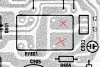
Check R951(470 ohms) is not open.
Probably bad solder connection on white wire on spkr switch board.
Post pic of solder side.
 
Maybe headphone socket is faulty, remote possibility.
Check R951(470 ohms) is not open.
Probably bad solder connection on white wire on spkr switch board.
Post pic of solder side.

Resistors are good, 470 on both. Solder connections looked good also, so doubt it. I desoldered the cables from the board though before I noticed your post about headphones and I have reflowed all connections on the board. Gonna test but doubt it will change anything.

Edit: nope, still the same. Most likely not switch/switch PCB. Headphone jack seems unlikely to me since it's the same in speaker output... double checking points with oscilloscope.
 
Last edited:
Post #37 shows signal at white wire, it's a little uneven though.
Probably quickest to probe with oscilloscope, possibly an intermittent
speaker relay contact, some suggest tapping the relay with something
non-conductive like a chop stick and note any change in audio(headphones)

Use oscilloscope to probe white wire as per post #37, also probe either
side of R951, expect signal.

There was a problem with NAD 3150's where the spkr relay was not getting enough
volts so the relay would drop out. At low voltage the mechanism can "twist"
slightly so one contact closes but the other remains open. Check R801(33)
and R807(680).

Need to sign off, others may chime in...
 
...some suggest tapping the relay with something
non-conductive like a chop stick and note any change in audio(headphones)
Tested tapping it while listening, nothing..

Use oscilloscope to probe white wire as per post #37, also probe either
side of R951, expect signal.
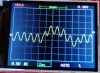
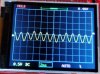
R951: R951-cr.jpg R951-2ms-cr.jpg
White cable again: White_Cable.jpg

Check R801(33) and R807(680).
R801 and R807 both ok.
R807 45V and 28V
R801 46V both sides...

Relay in action: https://imgur.com/Evm2oLb

Need to sign off, others may chime in...
Appreciate all the help for now! Yes, please. Don't be shy. :)
 
Last edited:
Yeah, I'm stumped, only thing I can think of is a path to GND that's killing the audio signal.
R951 signal is distorted. Check for headphone output with spkrs in the off position.
You could try lefting one leg or removing R951 and recheck for spkr output.
Could it be a double fault, faulty headphone socket and damaged left spkr?
Use oscilloscope at left spkr post
Try measuring the resistance from the white wire to GND/Chassis, no spkrs connected but Set A selected.
 
They do output when in off position. Any position for that matter, does that change anything?
Question is, do you get left channel output through headphones?
Does switching the spkr selector through it various positions change/improve left channel audio?
 
Question is, do you get left channel output through headphones?
Does switching the spkr selector through it various positions change/improve left channel audio?
Nope. Nada. Left channel has been completely dead throughout.
 
Needed to be clear, thx. Try the things in post #48
Allright, weirdest thing... getting signal from left with oscilloscope, but no sound...
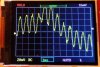
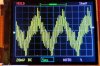
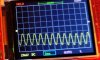
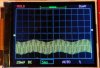
1khz signal, Output A, right and left:
Left:L1.jpg L2.jpg
Right:R1.jpg R2.jpg
 
Last edited:
taken at speaker posts? Would indicate damaged speaker? Change speaker wiring/connection at rear, ie, connect Left post
to right speaker...
 
taken at speaker posts? Would indicate damaged speaker? Change speaker wiring/connection at rear, ie, connect Left post
to right speaker...
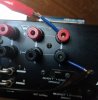
No, at speaker output at the back. Speakers are fine.
Like this: 1024-1365.jpg

Signal going to ground somewhere?

Measured white cable to ground at infinite.
 
Last edited:
Left channel audio does not look great, 1kHz on 50Hz however something should come out of the spkrs.
Suggest connect left speaker posts to right spkr (ie, damaged left spkr?)
 
Left channel audio does not look great, 1kHz on 50Hz however something should come out of the spkrs.
Suggest connect left speaker posts to right spkr (ie, damaged left spkr?)
Speakers are fine, works when connecting to right channel.
 
If you work your way from the speaker terminals inwards by measuring
resistance (DVM, amp turned off) you will end up at a switch or relay
(starting from the plus terminals). Where the minus terminals should end
up is pretty obvious. Both channels should be identical. Try all the
positions of the speaker selector. The A+B position should connect the
positive output terminal pairs A-left/B-left and A-right/B-right.
 
If you work your way from the speaker terminals inwards by measuring
resistance (DVM, amp turned off) you will end up at a switch or relay
(starting from the plus terminals). Where the minus terminals should end
up is pretty obvious. Both channels should be identical. Try all the
positions of the speaker selector. The A+B position should connect the
positive output terminal pairs A-left/B-left and A-right/B-right.

Allright, worked my way back from the speaker output to the relay. Both channels are getting full continuity...
Worth trying to bypass the relay?
 
Back
Top Bottom