• The move to the new server is done. There are some software and database maintenance updates in process. This has us passing the hat around to help out. We appreciate any donations. Seriously, even a dollar helps. The payment page may be found here - https://www.audiokarma.org/support.html

NAD 7140 faint Sound, volume and tone and balance do nothing

marcthisdate

Where’s the confounded bridge?
Hi folks... I recently came into procession of an NAD 7140. The receiver turns on, relay clicks, display lights up. Issue is that there is virtually no sound other than a very faint bit on the left side. By faint I mean barely audible.(lower than a whisper) I hear it on the left side only via the headphone jack and when speakers are connected. Sound is unaffected by volume, balance or tone control movement. Sound is coming from whatever the source switch is set to and I've verified by CD and AM radio.

I've visually inspected the boards and other internals and nothing looks like its out of place. Fuses look ok. There are no bulging caps or burn marks anywhere on the boards and actually its quite clean. Is there anything obvious I should be looking for? Has anyone seen this before?
 
Last edited:
Register to hide this ad
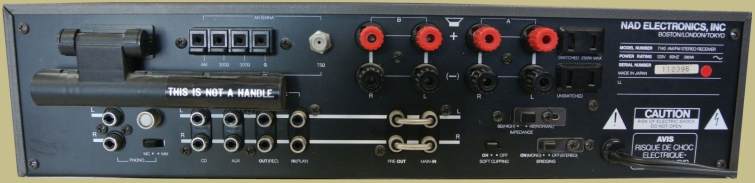
Check if your unit has the PRE-OUT MAIN-IN jumpers installed:

(pict linked from https://classicreceivers.com)
nad-7140-inputs.jpg


Also, check the TAPE-MONITOR switch is not enabled.
 
Does toggling the HIGH/Normal switch on the rear panel have any effect? How about the soft clipping switch?
 
Last edited:
Switches were tried, including that 8 and 4ohm switch and soft clipping. I’ll give the fuses a meter check, didn’t think to do that, thanks @avionic
I’m still trying to figure out if hearing the source faintly on just the left channel means anything or if it’s too vague a symptom.
 
The receiver turns on, relay clicks, display lights up.
Either the amplifiers have low or no rail voltage.ie (fuses or fusible resistors) Or the audio signal is not getting to the amplifier inputs (switching) ie. dirty switches or cracked solder connections.etc.
 
This unit does have a speaker protection relay. You may hear it click, but dirty contacts are not uncommon.
 
The 7140 also has a muting circuit before the pre-amp output sockets, so it's worth checking for signal before / after the Q603 / 653 FET's.
 
Is this doable without a scope? I’ve have a pretty good multimeter but no scope.

A scope makes life easier, but yes, it's basically possible:

The pre-out sockets are immediately after the muting FET's, so if you remove the pre-out / main-in links, you could connect the pre-outs to another amp, and check if the pre-amp sections have an output at all - if they do, then the muting FET's / circuit are not the issue.

Failing that, you could alternatively try with for example, a signal generator app on your phone, input via the AUX sockets, and your DMM set for mV AC - I'd expect to be able to put say a 50 - 100 mV audio signal (say 1kHz) into the AUX sockets, and find it again before, and after the muting FET's. Any audio source should work, but a steady fixed tone would be easier.
 
That's basically what I had in mind - Radioshack used to make a nice little 9V battery powered amp, with mic input socket, that was ideal for 'signal tracing' (Radioshack 2771008). I'm sure there's plenty of cheap alternatives on the usual sites.
 
Folks this is great stuff, thank you. Have a bit of work to do now and will get back on the initial troubleshooting results.
 
Finally able to do a bit of checking... I plugged an iPod into the main-in. With that done, I get decent sound out of the left channel only, verified out of the headphone jack. To eliminate the iPod cable etc I switched the wires around and verified sound only through the left.

In summary, pre-amp seems to be not working properly, only a faint source sound comes through on left. Right channel has nothing, no sound via preamp or main in.

Do I have a basket case or is it worth salvaging? I've done small board recaps but I'm starting to think this one might be over my head.
 
Have you popped the cover off of RY801 and cleaned the contacts? Then with the cover off, observe it in operation and be sure it is closing fully.
 
Back
Top Bottom