• The move to the new server is done. There are some software and database maintenance updates in process. This has us passing the hat around to help out. We appreciate any donations. Seriously, even a dollar helps. The payment page may be found here - https://www.audiokarma.org/support.html

Pioneer SX-424 right speaker barely working.

Renaud_

New Member
Hi everyone, hope you are all doing fine!

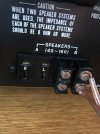
I have a Pioneer SX-424 and I have problems with the right speaker plugs. I've looked at a bunch of things, but still can't manage to make the right speakers work fine. I really think it's a cleaning problem, but at the same time I've cleaned everything twice, it looks like dust is somewhere blocking the connection because I could manage once to put the plug in a certain way so that it worked, but it's so sensible that if I move the wire a little than it moves the plug and the right speaker barely function again. Fuses are not a problem (I verified) and speakers aren't as well since when I plug them in the Left channel they are fully functioning. So I can only put both speakers in each « L » of the two systems (A / B). I contacted some repairing shops but they charge 90$ cad only for a diagnosis... At this point I may just want to change amplificator, but at the same time I really don't want to just throw it away, I'd love to keep it and understand how I can repair it...

Thanks again and really looking for some inputs here.

I can send you pictures of the inside if you want!

Renaud.
 
Register to hide this ad
Hi everyone, hope you are all doing fine!

I have a Pioneer SX-424 and I have problems with the right speaker plugs. I've looked at a bunch of things, but still can't manage to make the right speakers work fine. I really think it's a cleaning problem, but at the same time I've cleaned everything twice, it looks like dust is somewhere blocking the connection because I could manage once to put the plug in a certain way so that it worked, but it's so sensible that if I move the wire a little than it moves the plug and the right speaker barely function again. Fuses are not a problem (I verified) and speakers aren't as well since when I plug them in the Left channel they are fully functioning. So I can only put both speakers in each « L » of the two systems (A / B). I contacted some repairing shops but they charge 90$ cad only for a diagnosis... At this point I may just want to change amplificator, but at the same time I really don't want to just throw it away, I'd love to keep it and understand how I can repair it...

Thanks again and really looking for some inputs here.

I can send you pictures of the inside if you want!

Renaud.
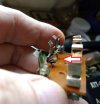
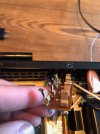
I had one come in for repair that had those symptoms. Turns out one of the contacts for the speaker plug had gotten pushed back where it was no longer making good contact.
You should be able to look into the speaker jack openings to see if all of the contacts are good.

IMG_20220422_085703752.jpg
 
Thanks a lot for your answer!

Unfortunately, it didn't work...

Renaud.

Well, you have the problem area narrowed down. You can check continuity between the inputs of the speaker jacks to the wires on the back.

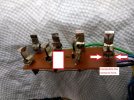
This pic is with the unit upside down. Black wire is ground, others are L & R outputs. You'll need to remove the bottom cover to gain access. be sure it's not plugged in. Don't want anyone to get zapped.

IMG_20220422_085413500.jpg
 
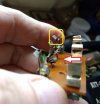
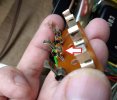
When you look into the speaker jacks from the back, all of the contacts in there should be tight together like the one circled in yellow. If they're spread apart they won't make good contact on the plug.

IMG_20220422_085703752.jpg
 
After checking to make sure all the PHYSICAL connections are tight, REFLOW all the solder connections on the speaker connection board. Trace the "A" RIGHT and "B" RIGHT leads back to the source and reflow those joints also.
 
Hi,

Thank you both for your answers. Never did reflow the solder connections but it doesn't seem so complex. I'll look forward to it this week and will let you all know if it worked.

Renaud.
 
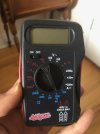
Hi to both of you! I'll test the connections later today, I just wanted to know how should I use my meter? And also, should I test the connectivity on the little pins where the speakers go or instead on the end of the wire itself?

I joined a picture of my meter tester so you could easily help me.

Thank you a lot to help me understand how my ampli works, I really appreciate.

Renaud.

image0.jpeg
When you look into the speaker jacks from the back, all of the contacts in there should be tight together like the one circled in yellow. If they're spread apart they won't make good contact on the plug.

View attachment 3081795
 
Your meter looks to be set to the 2000 ohm setting which is good because that is also the setting where it will beep when the continuity is good. Put one lead from the meter into the speaker jack on the back, then use the other one and check the internal wire from that jack. Then follow the wire back to where it connects and check there.
Larry's post #6 says to trace...etc.
Be sure your lead going into the speaker jack on the rear is touching the connection that grabs the speaker plug your speaker wires are connected to.
 
Hi again! I looked and the continuity is good everywhere... Still don't know where the problem comes from... Any other ideas?

Thanks,
Renaud
Your meter looks to be set to the 2000 ohm setting which is good because that is also the setting where it will beep when the continuity is good. Put one lead from the meter into the speaker jack on the back, then use the other one and check the internal wire from that jack. Then follow the wire back to where it connects and check there.
Larry's post #6 says to trace...etc.
Be sure your lead going into the speaker jack on the rear is touching the connection that grabs the speaker plug your speaker wires are connected to.
 
Take the three screws out of the back of the speaker jack and inspect the connections. See pic in post #4.
 
Take the three screws out of the back of the speaker jack and inspect the connections. See pic in post #4.
The problem is always on the R speaker of either A or B! All connections are good When I took the screws out of the back of the speaker jack!
 
Does the left speaker plug work good in the right side or does it do the same thing-dropping out?
 
Last edited:
If the continuity is good on the inputs to the back of the speaker jacks then when they're wiggled something isn't making a good connection if it drops out.

I would find it very odd to have both A & B right speaker jack wires to be a bad solder joint, but you said continuity was good.

Check the speaker plug. Is a wire strand shorting across to the other side? Is the wire good? Does the left speaker wire work good in the right side?

This one should an easy fix.
 
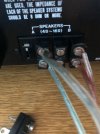
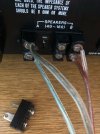
I'll send pictures (see below). So Continuity is good, I've cleaned everything many times with contact cleaner. So the problem is when I put the SAME speaker plug that I pluggeg in the L of either A or B, when plugged in the R of either A or B then the sound is there but it's all messy and really bad... I tried to upload a video so you could see how bad the sound is, but it didn't work.


image0.jpegimage1.jpegimage2.jpeg
 
I'll send pictures (see below). So Continuity is good, I've cleaned everything many times with contact cleaner. So the problem is when I put the SAME speaker plug that I pluggeg in the L of either A or B, when plugged in the R of either A or B then the sound is there but it's all messy and really bad... I tried to upload a video so you could see how bad the sound is, but it didn't work.
Thanks for the pics. As I look at the pics, especially the last one, the contacts look spread apart where the plug inserts. These should be tight together like the pic in post #4 circled in yellow.
That was what caused the problem with the one I worked on and I had to bend them back to where they were tight.

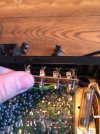
I found the easiest place to manipulate the contacts was down lower towards the base where they open apart a bit.. Here's a pic of the one I repaired, the crunched up on in post #4.

Also, I would never connect the wires like that to those plugs. Too easy to short them then you have bigger problems. Get some spade lugs to use on the ends of your wires.

IMG_20220422_090020204.jpg


Use a set of needle nose pliers to slightly bend the contacts in on both sides until they touch again.

IMG_20220422_085634254.jpg
 
Last edited:
Thanks for the pics. As I look at the pics, especially the last one, the contacts look spread apart where the plug inserts. These should be tight together like the pic in post #4 circled in yellow.
That was what caused the problem with the one I worked on and I had to bend them back to where they were tight.

I found the easiest place to manipulate the contacts was down lower towards the base where they open apart a bit.. Here's a pic of the one I repaired, the crunched up on in post #4.

Also, I would never connect the wires like that to those plugs. Too easy to short them then you have bigger problems. Get some spade lugs to use on the ends of your wires.

View attachment 3093274


Use a set of needle nose pliers to slightly bend the contacts in on both sides until they touch again.

View attachment 3093278
Thank you once again for your inputs, but nothing worked...

Thinking of taking it to a repair shop... I did try to fix everything that seemed to me as a possible problem, maybe I didn't do something good, but still, R speakers still going bad and messy...

I'll keep you posted on what the problem was if I ever find a way to repair it :)
 
Back
Top Bottom