• The move to the new server is done. There are some software and database maintenance updates in process. This has us passing the hat around to help out. We appreciate any donations. Seriously, even a dollar helps. The payment page may be found here - https://www.audiokarma.org/support.html

Recording analog audio on DVD recorder.

Lossless

Super Member
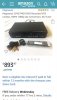
I have an old Magnavox DVD recorder/VCR + 100 blank dvds and am playing around with the idea of using it to record from an analog source. I’m not sure how the audio quality would be recorded at the VCR/DVD recorder’s highest quality which is 96kHz PCM format. A DVD could easily store 120 minutes of 24bit/96kHz digital audio in PCM format which is 4.5GB


The players analog to digital converter would probably greatly determine how a recorded audio DVD would sound from a. analog source. To my understanding, DVD audio quality is considerably better than 16bit/44.1 CD quality. This could be a very good way to record analog audio that is 24bit/96kHz Hi-Res. I’m sure I would have to edit in track separation, but being able to record analog Hi-Res audio would be worth the effort.

I looked online about this DVD/VCR recorder and the price for this old unit isn’t cheap so it may have some hidden potential as a HD analog music recorder. Any ideas, comments or experience with welcome.
1FBC8E2B-9726-41DA-9042-4C5B33254B3A.jpegD484CD95-28E3-4C89-AA7F-33EF0B4374F8.jpeg
EBF872CE-E3E1-4CB5-A994-2B85195A7EE7.jpeg
 
Last edited:
Register to hide this ad
How much cntrol do you have over the recording, manually?
Tracks to follow the music are nice. Can it be made to apply split points on the fly?
 
I've recorded quite a few tracks from LP and cassette onto a recordable CD player/recorder with nothing more than a line-in from the receiver to the CD recorder. Results were just fine to my ear. The player in question probably has more technology than my player/recorder so I'm sure you'll be just fine. Specs aside, your ears would be satisfied.
 
How much cntrol do you have over the recording, manually?
Tracks to follow the music are nice. Can it be made to apply split points on the fly?
I believe I can split tracks with chapter editing. I’m going to play around with it and see how easy or difficult it is to record and edit tracks. I’m still researching the Magnavox ZV427MG9 analog input and DAC quality. I’ll update this post with all the results.
 
I've recorded quite a few tracks from LP and cassette onto a recordable CD player/recorder with nothing more than a line-in from the receiver to the CD recorder. Results were just fine to my ear. The player in question probably has more technology than my player/recorder so I'm sure you'll be just fine. Specs aside, your ears would be satisfied.
That
I'm curios to see if it will start recording without a video signal.
I’ll have to input a random analog video signal from another source; Like another VCR.
 
Last edited:
I did quite a bit of transfers of early live DAT masters to the DVD audio band, in the mid-late 90's. The results were nice enough, but, I had no tracking, which sucked.
 
A consumer-grade recorder like that is going to have automatic recording level, which may affect the sound even with the Dynamic Range Control feature turned off. That may be the biggest impediment to it achieving CD-quality (or better) audio recording.
 
I’d want to make sure I was actually recording in 24/96.

I’ve had a couple of DVD recorders, and from what I recall they used Dolby Digital for audio, with no way to switch to PCM.
 
I’d want to make sure I was actually recording in 24/96.

I’ve had a couple of DVD recorders, and from what I recall they used Dolby Digital for audio, with no way to switch to PCM.
My thoughts exactly, I haven’t rushed to start this project because of that very issue. The menu has that option but I haven’t tried recording anything as of yet.If it records 16bit or hopefully 24bit is some I’m still researching.
2E5B058D-31A9-48D7-95DC-D3B8F2A3ED1D.jpeg
 
I have a Pioneer DVD recorder and a Marantz professional CD recorder and both do very well. I will admit the sound during playback sound much better using my Mcintosh and DVD and CD players feeding my MX 151. Between the two I think the audio from the Pioneer is less fatiguing than from the Marantz, but the Marantz in some instances captures the complexity of some type of music better than the Pioneer. It similar to the differences between a Shure V-15V MR, and Grace F9e and A Stanton 981 Hzl. Its what makes you happy.
 
vw: Maybe - or it simply relies on its comparatively high snr and dynamic range to still provide reasonable quality even with comparatively low level signals and is otherwise designed for a maximum input level of ca. 2 to 2.5 V.


lossless: Did you already try or check the manual, whether your recorder is designed to record audio only? Otherwise you might need to provide a random video signal in parallel. And the other thing, that you should probably consider, is, that DVD-Rs aren't exactly a very durable medium, even if kept under decent storage conditions.


Greetings from Munich!

Manfred / lini
 
vw: Maybe - or it simply relies on its comparatively high snr and dynamic range to still provide reasonable quality even with comparatively low level signals and is otherwise designed for a maximum input level of ca. 2 to 2.5 V.


lossless: Did you already try or check the manual, whether your recorder is designed to record audio only? Otherwise you might need to provide a random video signal in parallel. And the other thing, that you should probably consider, is, that DVD-Rs aren't exactly a very durable medium, even if kept under decent storage conditions.


Greetings from Munich!

Manfred / lini
A random video signal will be required to trick the player. I will record the video signal at the lowest setting; Giving audio priority.

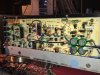
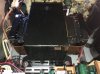
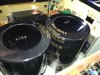
My project was delayed today from needlessly opening up my Fisher RS-Z1 to tighten volume pot.I only had to pull the volume knob to access the volume pot nut.:dunno:I did get some good nudies if anyone is interested.
A554933E-F378-4419-9A14-A91FF77A4BB7.jpeg
5C6F5A7B-AA2F-428D-9A9B-8D895B272BA8.jpeg 38ACD79C-084A-4CAB-9068-ADD15F74A4BE.jpeg 22CB8B55-5B03-42BB-A652-14ABC87AC1A6.jpeg 2A4FCEB3-2AA1-4AA8-BAE5-C46941034EDF.jpeg C620A8C1-9BDA-4C21-8FFA-A0CE15FDB62A.jpeg
 
Last edited:
Lossless: I'd suggest to use some kind of computer with video output to produce a blank, black screen - I guess that should both be easy to encode and compress to next to nothing.

Greetings from Munich!

Manfred / lini
 
Lossless: I'd suggest to use some kind of computer with video output to produce a blank, black screen - I guess that should both be easy to encode and compress to next to nothing.

Greetings from Munich!

Manfred / lini
Or take a video of the turntable while it’s playing during your rip.

I’ve got a Neil Young greatest hits DVD that does that.
Kinda cool, in a useless way, lol.
 
I have that same Magnavox but I've never tried to record audio only. Mine has been used mainly for copying VHS to DVD and it does a good job.

Splitting it up may not be too bad but you probably have to use track lengths as you can't scroll through the video to find the end of each cut. Editing titles would be very laborious using their interface.

I have used it to copy audio (real time while playing) from DVD to Audacity and VinylStudio - it works well with this.

Alan
 
I am wondering why no one has mentioned reaper as a recording software option. Why record to DVD when you can record to a laptop or PC? Maybe I am missing something.
 
Back
Top Bottom