• The move to the new server is done. There are some software and database maintenance updates in process. This has us passing the hat around to help out. We appreciate any donations. Seriously, even a dollar helps. The payment page may be found here - https://www.audiokarma.org/support.html

Restoring photos in Mc threads

Gregory

Soundco Kid
Several years ago Comcast/NBC (bye-bye to them) discontinued and shut down their customers' web spaces, which wiped out ALL photos and diagrams in every forum I posted in since ~2001. That includes audio, automotive, aviation, and constitution related forums.


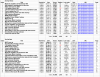
Step 1: Get index of threads

It took an hour or two to gather all Mc threads on updating Mc gear, and about the same to reformat the tables.
AK_thread_index_enh.png

The PNG above in 54.3 KB in size. We'll see what AK serves up. There's a thread on that topic as well:
https://audiokarma.org/forums/index.php?threads/uploaded-photos-come-out-blurry-distorted.908817/


Step 2: Subscribe and start uploading

Fortunately I saved 90% of the threads as HTML files on the C:\ drive. That will make the restore feasible.
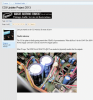
saved_AK_posts_256.png

All that's needed is to re-subscribe AK and get to work, but NOT if AK is going to resize/reduce and blur sharp images and photos. :no:


-Greg
 
Last edited:
Register to hide this ad
You wrote me, without sending me an example of your 'blurry' picture. You posted a thread, as referenced above, again, without providing an example of your blurry picture. The pictures in this thread are razor-sharp. I went into the admin control panel, browsed through a few dozen of your posted attachments, and found nothing resembling your description.

Please show me the pictures of which you are complaining.

BTW, here are a few recently-posted pictures of yours. This one is hotlinked to the AK database.

admin.php


This one, I saved, as I found it, renamed it, and uploaded it, here.

MC2505_multi-section_testpost.jpg

Here is the same picture, posted as a thumbnail. Clicking on it will enlarge it.

MC2505_multi-section_testpost.jpg

What am I missing? Nobody else has said anything about your pictures being unusable. Nor has anyone complained about their own pics being altered.

If anyone else finds there is a problem with these, please speak up.
 
I just went for a wander in a few of the threads from your spreadsheet, above. Many of your pictures were showing only the IMG tag, but no image.
If you are hotlinking photos from photobucket or imgur, they are blurring them. Not AK.

The photos you uploaded onto AK appear to be fine.
 
You wrote me, without sending me an example of your 'blurry' picture. You posted a thread, as referenced above, again, without providing an example of your blurry picture. The pictures in this thread are razor-sharp. I went into the admin control panel, browsed through a few dozen of your posted attachments, and found nothing resembling your description.

Please show me the pictures of which you are complaining. BTW, here are a few recently-posted pictures of yours.

Thanks for responding, first of all this is a constructive exercise and not a challenge or fight.

1. The sample pic you posted above are the 2505 can-caps. The original image is 900x600 pix JPG and 147kB, the one posted above is 800x533 pix JPG and 89kB. That's verified by downloading the above posted file and comparing properties in both Firefox browser and in the photo editor software to the original.

900x600 pix JPG and 147 KB
-vs-
800x533 pix JPG and 89 KB
All of my photos are edited and saved as lossless PNG or PSP for layered ones. The LAST step before posting is to export as JPG. Diagrams and charts stay in PNG because the image is lossless (razor sharp) and the file-size is very small compared to a JPG.


The worst thing that's happening is PNG files which are lossless (razor sharp) seem to become blurred when reduced in size, which will result in a REALLY big file-size. The razor-sharp PNG diagrams are mostly the problem.


2. With the AK_thread_index PNG I posted today (or yesterday), the original is 937x729 pix PNG and 55 KB, the one appearing on AK is 771x600 pix and a WHOPPING 417 KB which defeats the purpose of using a PNG.

937x729 pix PNG and 55 KB (6 colors)
-vs-
771x600 pix PNG and 417 KB (1060 colors) << and significant blurring​


I can email the two comparisons in this msg (already have email from the inquiry) and you can view the difference in your email client or whatever. They probably can't be compared too well using the board as a viewer.

Thanks,


-Greg
 
Last edited:
I just went for a wander in a few of the threads from your spreadsheet, above. Many of your pictures were showing only the IMG tag, but no image.
If you are hotlinking photos from photobucket or imgur, they are blurring them. Not AK.

The photos you uploaded onto AK appear to be fine.

See the first sentence of the TOP post in this thread. Comcast shut down their users' webspaces a few years ago and all my images were lost (not webspace backups or originals) removing ALL pics in every AK thread. I'm seeking to restore the images in those threads. I know from experience that pics uploaded to AK nearly always show up with reduced quality, or in audio speak, higher distortion.

I used Photobucket later on, and if you don't pay them, they won't serve-up photos linked in forums. I see now-a-days they or other similar sites will serve up a purposely BLURRED rendition as incentive for you to buy a subscription.

What I was asking in the initial inquiry was: what are the guidelines, max photo size in pixels before AK image routine starts reduces them? If there are limits, maybe uploading a smaller version of the pic would not get resized smaller.

Thanks,

-Greg
 
Last edited:
I can see every detail, including all the 1 pt gridlines in your spreadsheet.

Nonetheless, the AK limits on pictures are 1 Meg and 900 by 900.

Find me your 900x900 PNG, and then export as a 900x900 JPG, and post both, please. I'd really like to see the difference between the two, so that I know what you are talking about. I looked through your posted attachments, and didn't see any that seemed to me to be what you call 'badly blurred".
 
So, the photo of the circuit board, in post #2, is, in your opinion, "badly blurred", having "lots of distortion", so as to be basically unusable.

If I understand, this happens when you convert your PNG files to JPG, yes?

Since you are so unhappy with the results of file conversion, why do you do that? Why don't you just upload the PNG file, directly?
 
Had to step away from this topic yesterday/last night.. with replies that were stressful and not making a lot of sense.


I'm not sure what you're asking me to do?

Post a 900x900 PNG, then exported it to JPG and post that as comparison? That's what I do every day, and that's what gets uploaded to AK.

PNGs of photos are HUGE in filesize (KB), and the JPG will be almost as clear but with MUCH smaller filesize (KB), i.e. the reason for using JPG format.


Seems you're asking me to do a rigged test that will only show there's no problem while ignoring or misunderstanding the issues.


Are you asking for a 6-color PNG chart/diagram exported as JPG for comparison, or a 16 million color* PNG photo exported as JPG for comparison?

The former will look terrible, and the latter will look almost identical unless it's resized (which AK board does).


Nobody exports a 6-color PNG chart to JPG (16.7 million colors, lossy compression) unless they're nuts. What's more, if you resize a 6-color PNG chart in pixels, it will be ruined and blurry as hell, and no software can fix it. Also, if an image is resized in pixels, it will have to sharpened again to look right.


Files you requested

I have the two files you asked about, three versions of each (original, downloaded from AK, and snapshot of image in AK slideshow viewer) and will email them this morning with the image sizes in Pixel, and the file sizes in KB.

As already stated, AK is not a suitable viewer to compare images!


That being said, one of the WORST things MS did was bundle MS ClearType with IE updates. When I first saw (installed) that years ago it was a disaster, and then renamed it MS BlurType, a typical dialectic.

https://en.wikipedia.org/wiki/ClearType


To turn it off in Windows, go to Control Panel, DISPLAY, and uncheck box. Then press AUTO focus on your panel display.

MS_ClearType_in_Control_Panel_Display.png


MS_ClearType_Text_Tuner_checkbox.png


See those two PNGs? they already look blurry. :smoke:


*16 million color, is RGB (3 channels), 8 bits each, total 24 bits, 2^24 power is 16.7 million colors.
 
Last edited:
PNG is an accepted file type for AK's software. Why don't you send that to AK?

When we changed hosts, we increased server storage.

From my perspective, your argument seems circular. Exactly what is it you are asking for?
 
PNG is an accepted file type for AK's software. Why don't you send [those] to AK?

That would be antithetical to using a lossless PNG if the AK display engine is going alter them, plus the file sizes are WAY bigger than JPGs. PNG charts and diagrams get clobbered even worse, to the extent I'd probably not upload those types. Like in the recent 2100 and 2205 threads where I used CODE text blocks to post power and temperature numbers.

When we changed hosts, we increased server storage. From my perspective, your argument seems circular. Exactly what is it you are asking for?

After thinking about it, I'm asking for AK'er to be aware of the issue, for admins to think about improvements and not necessarily upgrade the board immediately. Right now I'm wondering if it's worth the effort to repopulate Mc threads with the most views where all the images are missing.

-Greg
 
I'm exercising the photo insert, full image tools as Ernie described, and it looks like the `original´ file is retained.

The problems described in this thread are apparently with the insert thumbnail feature. Why didn't someone speak up? :)

Comparison

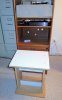
Here's the original photo of the 2205 slot in the rack on the left. It's a 59 kb JPG and 370x595 pix. On the right is the same photo downloaded from AK, re-uploaded, and inserted.

2205_service_stand.jpg 2205_service_stand_AK_saved.jpg

Both are 59 kb, 370x595 pix, and look identical.

I'll have to walk back some of the claims and statements in this thread.


-Greg

p.s. the new trim post are in the zip-lok bag on the lower shelf.

 
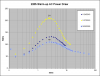
Lets compare the 2205 PNG chart. Below is the original image at 9 colors, 625x480 pix, and 7 kb.

Idle_power_draw_warm-up.png


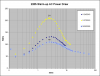
Now lets see the same file downloaded from AK, re-uploaded, and pasted as Full Image.

Idle_power_draw_warm-up_AK_download.png

These images appear to be identical, 625x480, 7 kb, and at 625 pix, they are shrunk by AK board but pop-out as sharp originals.

What's the guideline on file width that triggers the shrink-down/pop-out?


-Greg
 
Last edited:
Now try it with the AK thread index PNG which was the complaint in the OP.

It's 937x729 pix, 6 colors, and 54.3 KB.

AK_thread_index_enh.png

Ok, that's blurred, probably from being over 900 pix wide.


Here's the same image with the right column trimmed off – now 878 pix wide.

AK_thread_index_878x.png

Go ahead and click it – and that's sharp! Ok problem solved.


-Greg
 
So, posting within the 900x900 limit, and posting your PNG file directly, instead of converting to JPG and then posting, has resolved your problem?
 
So, posting within the 900x900 limit, and posting your PNG file directly, instead of converting to JPG and then posting, has resolved your problem?

Yes, 900 pix or less seems to work fine. Downloaded `posted pics´ from the thread are identical to the originals in pix and kb.

I may have to walk back some of the comments above. The blurred images sent to you were from inserting >900 pix charts as Thumbnails, and that might be a whole 'nother set of rules.

Would like to know the guidelines on how wide a pic causes it to shrink into a paragraph frame or whatever? Anyway, they pop back out as identical originals. That's been verified.

-Greg
 
So, posting within the 900x900 limit, and posting your PNG file directly, instead of converting to JPG and then posting, has resolved your problem?

Yes on posting PNG charts and diagrams directly. Photos are almost always exported to JPG then uploaded, and that works ok.


-Greg
 
Back
Top Bottom