• The move to the new server is done. There are some software and database maintenance updates in process. This has us passing the hat around to help out. We appreciate any donations. Seriously, even a dollar helps. The payment page may be found here - https://www.audiokarma.org/support.html

Rotel RA-12 Bricked!

Uk0kA

New Member
I'm really hoping to find help here.

I recently purchased a Rotel RA-12 secondhand. It was in great working condition then I decided to update the software. Because why not?... Well, it was more complicated than expected since I have an early model that has a usb connection on the back panel. The official software update instructions are meant for the v2 version.

I was in contact with the official reseller who sent me a set of instructions on how to update via the USB connection with Renesas Flash development toolkit. I was successful in updating the software according to the program... Final step was a power cycle... And now the Rotel won't turn on. I get a Led light but nothing else.... It seems to be bricked.

I have looked everywhere and can't find a way to hard reset the unit. Renesas FDT can't connect as I get a Failed boot error when trying anything. I can't reset to factory settings since the unit doesn't boot. I've tried leaving the unit unplugged for hours hoping it would somehow reset it. Nope

Is there some way to reset the chip? Or force the unit to go into Boot Mode? ... is there a magical internal button I can press that will make everything great again?

Any help would be greatly appreciated... else next week, it's off to the authorized repair shop which unfortunately doesn't have great reviews...
 
Register to hide this ad
You might want to try contacting Rotel for some technical support.

Or just for giggles, try doing a hard reboot by pushing and holding the power button for a few seconds. It's worth a try.
 
I'm trying to get a hold of Rotel. No luck so far. I also tried holding the power button for up to 15 seconds...nothing
 
I'm trying to get a hold of Rotel. No luck so far. I also tried holding the power button for up to 15 seconds...nothing
You probably already tried this and probably doesn't work without the unit being on, but.....

• FACTORY DEFAULT: This sets the unit back to the original state as when it left the factory. Press the right key on the front panel or the RIGHT arrow key on the remote control to select . The unit will ask for confirmation, press the RIGHT key again to confirm.

Have you tried turning it on with the remote?

When the power switch is in the ON position, the remote control ON and OFF buttons may be used to activate the RA-12/RA-11. In Standby mode the power LED remains lit, but the display is turned OFF.
 
You probably already tried this and probably doesn't work without the unit being on, but.....

• FACTORY DEFAULT: This sets the unit back to the original state as when it left the factory. Press the right key on the front panel or the RIGHT arrow key on the remote control to select . The unit will ask for confirmation, press the RIGHT key again to confirm.

Have you tried turning it on with the remote?

When the power switch is in the ON position, the remote control ON and OFF buttons may be used to activate the RA-12/RA-11. In Standby mode the power LED remains lit, but the display is turned OFF.
Unfortunately, neither the remote nor the menu can work while the unit has not booted. That's why I'm thinking there's probably a way to reset the unit internally somehow... a technician could not just rely on the unit being able to boot.
 
Something to check but may not be the problem.

Check the USB port itself on the Rotel for cold or broken solder joints. The USB only uses 2 out of 4 connections for communications.
 
You might see if there's a battery inside keeping volatile memory alive, or alternatively, a dead battery inside that needs replacing?

Not familiar with these, just guessing.
 
The authorized reseller got back to me today with great news! Rotel sent proper instructions and most importantly the right software update file for the RA-12 v01 which is different from the file available on Rotel's website. All is well and I'm grateful for Rotel's continued support even for older-ish units!
 
The authorized reseller got back to me today with great news! Rotel sent proper instructions and most importantly the right software update file for the RA-12 v01 which is different from the file available on Rotel's website. All is well and I'm grateful for Rotel's continued support even for older-ish units!
My curious mind would like to know what the solution was to the no-boot situation.
 
My curious mind would like to know what the solution was to the no-boot situation.

I had flashed the amp with the software available on Rotel's website. The documentation provided mentions that it's for the RA-12 v2 and required a RS232 Serial connector. I inquired about this before trying anything since I have the v.1 which has a USB connector and was assured it would be fine. I think that was the issue. I flashed with the wrong file basically.

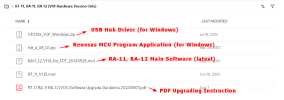
The reseller got back to me saying : "The main software V2.10 is not backward compatible, so Rotel sent me the link below for the re-write the MCU and get your unit up and running." The link provided included everything needed to "re-write the MCU". Notice (V01 Hardware Version Only) at the top.

1703862467798.png
The USB connection doesn't work out of the box. Windows needs the CP210x driver to emulate some sort of programming connection (not super familiar with that).
Then it's simply a matter of firing up the Renesas Flash Development Toolkit and following the instructions provided in the pdf. Pretty straighforward. FDT connects directly to the MCU and you upload the software image (.mot). In my case, the software asks what I wanted to do with some data that had been written int he wrong place from my initial flash I'm guessing. I selected to erase the data and FDT successfully re-wrote the MCU.

I still didn't have a lit screen at that point but simply power cycling got the unit back to life and updated to the latest main software for the V01
 
Thanks, glad it ended well for you. I had a HDTV bricked due to a firmware update and had to fight the company to get them to resolve it. Took a new component (can't recall what it was), but they supplied it at their expense and I installed it.
 
Hi, can you share or send to me a private message with the link to the last firmware for the ra-12 v01?
Thank you
Matteo
 
Yes, I think only the newest toolkit works on Windows 10 and 11. Glad to have helped a fellow ra-12 owner!
 
I'm really hoping to find help here.

I recently purchased a Rotel RA-12 secondhand. It was in great working condition then I decided to update the software. Because why not?... Well, it was more complicated than expected since I have an early model that has a usb connection on the back panel. The official software update instructions are meant for the v2 version.

I was in contact with the official reseller who sent me a set of instructions on how to update via the USB connection with Renesas Flash development toolkit. I was successful in updating the software according to the program... Final step was a power cycle... And now the Rotel won't turn on. I get a Led light but nothing else.... It seems to be bricked.

I have looked everywhere and can't find a way to hard reset the unit. Renesas FDT can't connect as I get a Failed boot error when trying anything. I can't reset to factory settings since the unit doesn't boot. I've tried leaving the unit unplugged for hours hoping it would somehow reset it. Nope

Is there some way to reset the chip? Or force the unit to go into Boot Mode? ... is there a magical internal button I can press that will make everything great again?

Any help would be greatly appreciated... else next week, it's off to the authorized repair shop which unfortunately doesn't have great reviews...

I'm really hoping to find some help here as well...

I had a similar experience (don’t ask why ). I accidentally installed firmware A12 instead of RA12, and now all I get is a LED light, but nothing else—it’s bricked. I’ve tried various solutions mentioned in this post, but it seems the RS232 isn’t responding and the connection isn’t working. Can anyone help?
thanks in advance
 
Back
Top Bottom