• The move to the new server is done. There are some software and database maintenance updates in process. This has us passing the hat around to help out. We appreciate any donations. Seriously, even a dollar helps. The payment page may be found here - https://www.audiokarma.org/support.html

Sansui 5000x No Right Channel

Dahjelle

New Member
We have a Sansui 5000x that was purchased in July 1971 while I was in Vietnam. It has been used almost daily since I returned home. The right channel no longer works and the volume control on the left is very sensitive - like all the power is going to the left channel. The same is true for speakers A, B, C and headphones. The right channel doesn't work when I press Reverse or Mono. It also doesn't work on AM, FM, Phono1, Tape1 or Aux input. Switching speakers still results in the right channel not working. All fuses are good. When the left speaker is disconnected, the right speaker works and vice-versa.

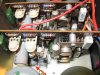
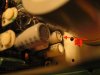
The serial number is 811070035 and it has the newer F6013 boards. The only physical thing I have noticed is the plastic covering on a capacitor labeled ELNA 6.3V 220 uf on one of the F6013 boards is a bit wrinkled on top. The red arrow in the attached pictures point to the capacitor.

If it only an inexpensive capacitor, it would hate to give up on this unit even though it looks like it might be a challenge to access. (I know given it's age, a complete rebuild would be ideal but I am not willing to spend that much money on the project.)

Can anyone help with a diagnosis without getting too technical? The only diagnostic equipment I have is a multimeter.

Thank you.
 

Attachments

  • IMG_3796.JPG
    IMG_3796.JPG
    62.7 KB · Views: 53
  • IMG_3797.JPG
    IMG_3797.JPG
    109.9 KB · Views: 52
Register to hide this ad
From your description, it looks like the right main amp board is at fault. It can be bad capacitors or transistors on the board and lastly, it may be output transistors on that side. You need to take out the right amp board and troubleshoot.
 
Welcome aboard Dahjelle
Speaker select switch may be dirty..
 
Last edited:
I think 5000X doesn't have any speaker fuse in the back (I may be wrong). Do you have any sticker near all input ports written R-XXXX (X is number) on it? If not then this unit is an earlier model and has problematic amp boards. If you have that sticker it means the board is updated.
 
This unit does have speaker fuses in the back. It's interesting that the Driver Amp boards in the schematic and in the Service Manual that came with the 5000X both list the Driver Amp boards as F-1040-1B but the installed cards are labeled F-6013. My understanding from other posts is that the F-6013 are the updated boards. I don't see any stickers. I purchased the unit new through PACEX and had it shipped directly home. It has never been in a shop. The only work that has been done on it was to replace four bulbs in 2003. Is a schematic and parts list for the F-6013 boards available?

Facing the front of the unit, is the Driver Amp for the right channel on the right side?

I hope to be able to see if I can see any problems with the speaker switch later today or tomorrow. How would you suggest cleaning the switch?

Thank you.
 
Thank you for the information on the F-6013 driver amp board. A picture of the back of our 5000X is attached. Hopefully it shows what you would like to see. I just rechecked both speaker fuses and they are both good. Is it significant that when I disconnected the left speaker, the right speaker worked?

Thank you.
 

Attachments

  • IMG_3798.JPG
    IMG_3798.JPG
    57.9 KB · Views: 36
Thank you for the information on the F-6013 driver amp board. A picture of the back of our 5000X is attached. Hopefully it shows what you would like to see. I just rechecked both speaker fuses and they are both good. Is it significant that when I disconnected the left speaker, the right speaker worked?

Thank you.
Disconnect the Pre-Main jumpers, connect your phone directly to the main-in. Connect your speakers to "Speaker C". Put speaker selector switch to C. Make the volume of your phone zero. Switch on the receiver. Next, play something on your phone and gradually increase the volume. See whether you are getting sound from both channels or not.
 
I tried the connecting a phone to main-in as you suggested. There is only sound to the left speaker. What does that tell us?

I also removed the bottom panel and inspected the speaker selection switch. It looks clean. I used an ohm meter to check resistance between the input to the switch and each of the speaker A & B connections. They were all the same and very low so it would seem the switch is O.K.

Thank you for your patience.
 
There is a level adjust screw on the top of the rear panel. Move it back and forth some, see if the dead channel comes on. Also hit all the front panel pushbuttons, tape monitor and filters.
 
I tried moving the level adjust screw (which was turned all the way clockwise). The right channel did not come on. I also hit all of the pushbuttons on the front panel several times with no sound from the right speaker.

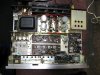
This may seem like a really dumb question, but in the attached picture do I have the left and right amp boards labeled correctly? Is it likely the capacitor in the picture on my original post is the problem?

It sounds like we have narrowed the problem down to the right amp board but if anyone else has any thoughts, please post them.
 

Attachments

  • IMG_3801_2.JPG
    IMG_3801_2.JPG
    133.6 KB · Views: 43
I think you are right.
Before taking the right amp board just check whether you have the continuity between the negative terminal of coupling capacitors on the right channel (C005 or C006, it is 2200uF, whichever is in the right channel) to the right speaker terminal and also check the continuity between the positive terminal of coupling capacitors to the collector of the output transistors (TR809 or TR810 whichever is in the right channel).
 
I checked the continuity as you suggested. It is a challenge to access some of the terminals and I am not sure which terminal is which but they all seem to be good. It also appears that the left and right amp are labeled correctly in the picture I sent.
 
You need to check first the output transistors and if they are okay take out the amp board and check all transistors first. Do you have a Dim Bulb Tester? If not buy or make one.
 
I could make a Dim Bulb Tester but I am starting to think I am getting in over my head. The probes on my multimeter aren't long enough to reach the output transistors. I extended one of them with a piece of wire to check continuity, but it looks like a transistor test will require that the unit to be turned on. Is that when the Dim Bulb Tester is used? I could easily do more damage than good while testing. Also, removing the amp board would require unsoldering a large ground connection and quite a few wires that would not be easy to access.

I am trying to decide if I should try to find an experienced technician to work on it or if we should sell it as is and just use the Denon AVR-1500 receiver a friend gave us when I mentioned we were having trouble with our Sansui. I am not convinced the Denon sounds quite a good as the Sansui 5000X but it might be just my imagination. It probably doesn't make any difference but we are driving a pair of Sansui SP-3500 speakers inside and a pair of inexpensive outside speakers on our deck.

I really appreciate your patience and understanding.
 
To test the output transistors with DMM you have to take them out from the heat sink.
This is a very nice receiver and IMO it is worth repairing. If you don't feel comfortable it is wise to take it to an experienced tech.
 
One thing you can check is the voltage to those driver boards. Ground the black lead of your multimeter, select the DC voltage at least 100volts setting. Check for the voltage at the top rear terminal of each board. Should be seeing right at 80 volts steady reading. And looking from the front the left amp board drives the right channel, etc. The later 5000X receivers did come with the F-6013 driver boards and the schematic and service manual are sometimes a mix of older and newer. Lots of changes in the 5000 series over the years.
 
Back
Top Bottom