• The move to the new server is done. There are some software and database maintenance updates in process. This has us passing the hat around to help out. We appreciate any donations. Seriously, even a dollar helps. The payment page may be found here - https://www.audiokarma.org/support.html

Sansui AU-9900 Left Channel Low Volume/Distortion With Tone Control On

Thorbr

AK Subscriber
Subscriber
Hello All,
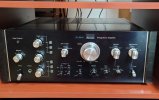
Picked up the attached recently. Overall in good condition, with original outputs and some caps replaced. Major issue is with the Tone control enabled,
the left channel volume is very low and barely audible at about 50%. Increasing the volume some more, introduces distortion. With Tone/Filter in defeat
mode, both channels work properly. Poked around in the archives and the only relevant thread that I could find, had to do with cleaning some transistor
leads, on the tone control board. Anyone else encountered this problem and/or is there another archive thread, that I may of missed. Thanks in advance.
 

Attachments
  • 20241025_125558_2.jpg
    20241025_125558_2.jpg
    83.9 KB · Views: 5
Last edited:
Register to hide this ad
Replace the 2sa798 with pair of ksa992 and recap the tone boards if you don’t think it’s dirty controls have already cleaned them
 
Quadmatrix82 - Thank you for the response. Will do that as a matter of course, along with caps when I have the board out.
What gives me some doubt and that there may be more, is that the Left channel cuts out completely and my concern is that
one of the pots is broken.
 
Hello All,
Picked up the attached recently. Overall in good condition, with original outputs and some caps replaced. Major issue is with the Tone control engaged,
the left channel cuts out completely, speakers and headphone. With Tone/Filter in defeat mode, both channels work properly. Poked around in the
archives and the only relevant thread that I could find, had to do with cleaning some transistor leads, on the tone control board. Anyone else encountered
this problem and/or is there another archive thread, that I may of missed. Thanks in advance.
The signal path through the AU-9900 passes through a lot of switch contacts, which after 50+ years almost definitely need cleaning.
While there could be a transistor failure causing your problem, I'd be cleaning and exercising ALL the switches first.
While most folks use DeOxit to clean contacts (and it's OK), I recommend this:


The techs at QRX Restore use and recommend Corrosion X, which is why I decided to use it.
I cleaned all my switches in the 9900 with it, and after two+ years they're still quiet and smooth.
Get some, it's great stuff.

Good luck...
 
The signal path through the AU-9900 passes through a lot of switch contacts, which after 50+ years almost definitely need cleaning.
While there could be a transistor failure causing your problem, I'd be cleaning and exercising ALL the switches first.
While most folks use DeOxit to clean contacts (and it's OK), I recommend this:


The techs at QRX Restore use and recommend Corrosion X, which is why I decided to use it.
I cleaned all my switches in the 9900 with it, and after two+ years they're still quiet and smooth.
Get some, it's great stuff.

Good luck...
This is the red can I assume? Thanks
 
Yes.
1729972018810.png
The sprayer on this size can can really blast the stuff out, so be careful.
The larger can (16oz) has the conventional sprayer (removeable straw), that's a bit easier to control.

Lots of household and shop use for this too.
 
I've had this exact issue on my AU-9900. Ended up being a dirty/bad contact on the board plug. Both tone control boards have the signal flow through pin connectors. If there is a bad physical contact on the pin that carries the signal, you'll loose the signal. Easy to test: with the amp on playing music wiggle the tone board connector a bit and see if the signal comes back. If so, just clean those pins and the mating female connector contacts.

Regarding transistors/caps on the tone boards. I did re-cap the tone boards. It's a major pain to get them in and out unless you fully remove the front plate that they are screwed in to. The 2SA798 transistors are said to be problematic. I did not have issues with those in my 9900. I did replace some of them, but I'd advise being very careful. the solder pads are small and very close together. The pads and traces around them are very delicate and prone to damage. Unless you are getting static or other transistor noise, I'd be tempted to leave them alone.
 
The signal path through the AU-9900 passes through a lot of switch contacts, which after 50+ years almost definitely need cleaning.
While there could be a transistor failure causing your problem, I'd be cleaning and exercising ALL the switches first.
While most folks use DeOxit to clean contacts (and it's OK), I recommend this:


The techs at QRX Restore use and recommend Corrosion X, which is why I decided to use it.
I cleaned all my switches in the 9900 with it, and after two+ years they're still quiet and smooth.
Get some, it's great stuff.

Good luck...
This is the red can I assume? Thanks
 
I've had this exact issue on my AU-9900. Ended up being a dirty/bad contact on the board plug. Both tone control boards have the signal flow through pin connectors. If there is a bad physical contact on the pin that carries the signal, you'll loose the signal. Easy to test: with the amp on playing music wiggle the tone board connector a bit and see if the signal comes back. If so, just clean those pins and the mating female connector contacts.

Regarding transistors/caps on the tone boards. I did re-cap the tone boards. It's a major pain to get them in and out unless you fully remove the front plate that they are screwed in to. The 2SA798 transistors are said to be problematic. I did not have issues with those in my 9900. I did replace some of them, but I'd advise being very careful. the solder pads are small and very close together. The pads and traces around them are very delicate and prone to damage. Unless you are getting static or other transistor noise, I'd be tempted to leave them alone.
Just so I am clear, for the board plugs, you are referring to boards F-2575 and F-2576, Tone Midrange and Tone Bass/Treble circuit boards respectively. Thanks
 
Just so I am clear, for the board plugs, you are referring to boards F-2575 and F-2576, Tone Midrange and Tone Bass/Treble circuit boards respectively. Thanks
Yes, those are the boards. I have a picture showing the connectors, I believe this is looking from the bottom of the amp. The two connectors are marked with yellow arrows.

IMG_2493 copy 2.jpeg

If the channel comes back when you wiggle either one of those, you've found your problem.
 
Well, I was going to leave this, until at least tomorrow, but I could not resist - lol. At this point, it does not appear to be the connectors. However, what I noticed is that,
with Filters/Tone enabled and balance set to Left Channel I get a faint signal at about 50% volume, then a bit louder and distorted the further I go. Will recheck again
in the morning, as I put a bit of Deoxit on the connectors. The original 2SA798s are still installed. Little monsters with 5 black legs. As per earlier comments, appears
these may need to be replaced, along with caps while I am in there.
 
Put some Deoxit on a Q-tip and wipe all sides of the pins. Spray a bit in the female connectors in each plug, then slide the plugs on and off each connector a few times to break up any oxidation on the female connectors. From what you describe, it may be that the L channel signal pin or female connector as a film of oxidation that needs to be cleaned/worked off. Not guaranteeing that is your issue, but its very easy to do the cleaning, which you should do anyway with each connector in the 9900.

I just discovered a weak/distorted R channel on my AU-777. Culprit? Dirty R channel fuse holder that cleared up when I moved the fuse in the holder. So, it got the Deoxit treatment along with putting more tension on the fuse clips. Problem solved.
 
Will do. Thanks
Put some Deoxit on a Q-tip and wipe all sides of the pins. Spray a bit in the female connectors in each plug, then slide the plugs on and off each connector a few times to break up any oxidation on the female connectors. From what you describe, it may be that the L channel signal pin or female connector as a film of oxidation that needs to be cleaned/worked off. Not guaranteeing that is your issue, but its very easy to do the cleaning, which you should do anyway with each connector in the 9900.

I just discovered a weak/distorted R channel on my AU-777. Culprit? Dirty R channel fuse holder that cleared up when I moved the fuse in the holder. So, it got the Deoxit treatment along with putting more tension on the fuse clips. Problem solved.
 
Will do. Thanks
Did some more cleaning and no luck. Not even a blip in terms of an increase in volume on the Left Channel. Replacing transistors will be the next step, but removing the Tone boards will not be a quick task.
 
If anyone has worked on the Tone boards, was there a need to replace the mylar and polystyrene caps? Because it is a bit of a chore to get at these boards, I am tempted to replace them, along with the electrolytic and transistors.
 
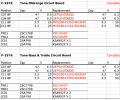
Check for cracked solder joints by pressing on components with a wooden or plastic stick while playing music. You can replace transistors, but your symptoms don't sound to me like a bad transistor - more likely a bad connection some where. When transistors go bad you get static/pops, etc. I have not run across a complete loss of signal from low power transistors going bad, but maybe others have. I've included an image below from my spreadsheet of the components I replaced on the tone boards. Parts in red are what I replaced. Those in black did not.

Screenshot 2024-10-28 at 5.38.09 AM.png
 
Check for cracked solder joints by pressing on components with a wooden or plastic stick while playing music. You can replace transistors, but your symptoms don't sound to me like a bad transistor - more likely a bad connection some where. When transistors go bad you get static/pops, etc. I have not run across a complete loss of signal from low power transistors going bad, but maybe others have. I've included an image below from my spreadsheet of the components I replaced on the tone boards. Parts in red are what I replaced. Those in black did not.

View attachment 3330867
Thank you for the detailed information. In regards to symptoms, the title of my thread may be a bit misleading. Picked up the unit last
week and at first was very reluctant to play at a higher than normal volume. Playing through headphones, I have since discovered that
with tone control enabled, I do get output on the Left at about 50% volume. Increasing the volume some more, brings noticeable distortion
on the Left channel. Not discounting your advice, among others but I am leaning towards the transistors as the culprits.
 
W
Thank you for the detailed information. In regards to symptoms, the title of my thread may be a bit misleading. Picked up the unit last
week and at first was very reluctant to play at a higher than normal volume. Playing through headphones, I have since discovered that
with tone control enabled, I do get output on the Left at about 50% volume. Increasing the volume some more, brings noticeable distortion
on the Left channel. Not discounting your advice, among others but I am leaning towards the transistors as the culprits.
Updated the thread title and content. Good to be a subscriber
 
Back
Top Bottom