rogic
New Member
Hi all,
This is my first time posting so hope I do this right. I have a Sony DTC-A7 DAT recorder which worked perfectly for a about year until the tape transport started giving me trouble. So I took the transport apart (several times), got that fixed so the tape was now wrapping around the head, and put it all back together just to have no audio.
So then I decided to replace all the capacitors in the RF amp and now was getting a distorted sound. I figured I had knocked the alignment off, so I adjusted the tape guides with a small screwdriver to see if I could get the tape back on track with the head, but it was still distorted. This was a tape that I know had sounded great before. So after fiddling with it for a couple days, I decided to record onto a new DAT tape and play it back, and it sounded great! So that tells me record and playback work perfectly, it's just that the tape alignment is just off from its original position.
I have about a dozen tapes I recorded over the past year and instead of re-recording them with the new alignment, is there a secret to getting the old alignment back? Especially without a scope? I turned the tape guides with a small screwdriver but was never able to get them aligned as before, although I feel I was close.
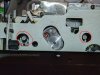
I've attached a file of the tape guides, circled in red, for reference.
Thanks!
This is my first time posting so hope I do this right. I have a Sony DTC-A7 DAT recorder which worked perfectly for a about year until the tape transport started giving me trouble. So I took the transport apart (several times), got that fixed so the tape was now wrapping around the head, and put it all back together just to have no audio.
So then I decided to replace all the capacitors in the RF amp and now was getting a distorted sound. I figured I had knocked the alignment off, so I adjusted the tape guides with a small screwdriver to see if I could get the tape back on track with the head, but it was still distorted. This was a tape that I know had sounded great before. So after fiddling with it for a couple days, I decided to record onto a new DAT tape and play it back, and it sounded great! So that tells me record and playback work perfectly, it's just that the tape alignment is just off from its original position.
I have about a dozen tapes I recorded over the past year and instead of re-recording them with the new alignment, is there a secret to getting the old alignment back? Especially without a scope? I turned the tape guides with a small screwdriver but was never able to get them aligned as before, although I feel I was close.
I've attached a file of the tape guides, circled in red, for reference.
Thanks!